Netgear Inc.
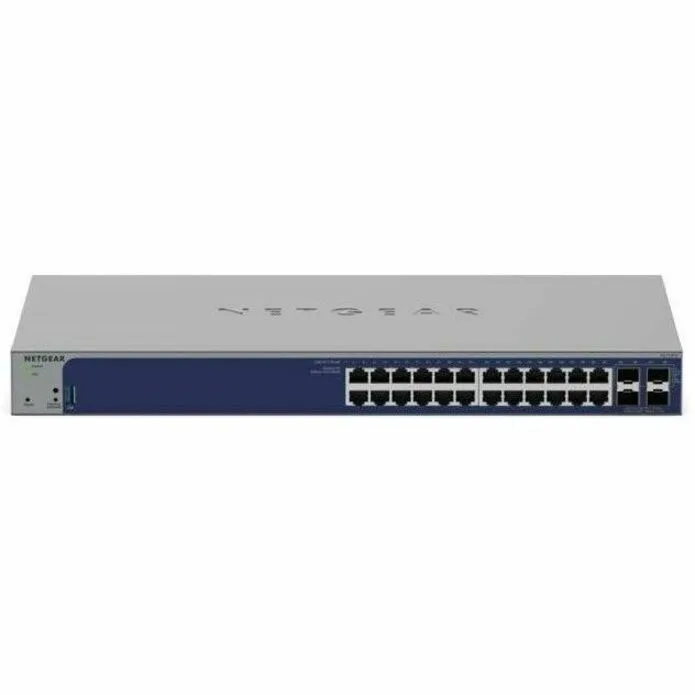
Netgear Inc. GS728TXUP-300NAS 24-port rackmount network switch
- Rackmount
- Smart
$567.99
0.00670068BTC
In stockWe take cryptocurrency — so the coins you hold can buy real hardware.Pay in crypto, spend it on real hardware. Free insured shipping worldwide over $399. Plain, unbranded boxes, sent from Germany.Free insured shipping over $399. Your rate is locked for 30 minutes once checkout opens.Rate locked 30 minutes. Every item sealed, serial-checked and covered by a 24-month warranty.Sealed, 24-month warranty.

Netgear Inc.
A 24-port Gigabit smart switch with four SFP uplinks, Layer 3 static routing and cloud management in a quiet rackmount chassis
Model GS728TX-300NAS
The Netgear GS728TX-300NAS is a rackmount 24-port Gigabit Ethernet switch with four dedicated SFP ports for fibre uplinks. It runs a Smart management layer that can be controlled through the Insight mobile app, cloud portal, web GUI or a lite CLI. Layer 3 static routing supports 32 IPv4 and 32 IPv6 routes for local inter-VLAN traffic. The unit draws a maximum of 26 W without PoE and operates at 26.80 dBA to 37.3 dBA at 25 °C ambient.
This switch fits organisations that want centralised configuration, monitoring and zero-touch provisioning across multiple sites without a full command-line environment. It supports IEEE 802.1Q VLANs, DHCP server and relay functions, plus ACLs for traffic control. Buyers who require Power over Ethernet for phones or cameras should look elsewhere, as this model provides no PoE ports. Environments needing 10 GbE copper ports or higher uplink density than four SFP slots will also need a different platform.
The four SFP ports are the only interfaces that can carry uplinks above 1 Gbps, so the choice of SFP transceivers determines whether the switch connects to 1 GbE or 10 GbE fibre backbones. All 24 RJ45 ports are limited to 10/100/1000 Mbps negotiation. If the network design demands more than four high-speed uplinks or copper 10 GbE connections, this chassis cannot meet that requirement.
| Brand | NETGEAR |
|---|---|
| Series | Smart w/optional Cloud |
| Model | GS728TXv3 |
| Part Number | GS728TX-300NAS |
| Format | Rackmount |
| Network Management Type | Smart |
| Primary Ports | 24 x RJ45 + 4 x SFP |
| Primary Port Speed | 10/100/1000Mbps |
| Management Feature | Cloud/Remote management Insight mobile app & Insight Cloud Portal management uPnP Discovery Lite Command-line Interface (CLI) Networking monitoring Data/performance logs Centralized network configuration/policies (network-centric management) Device auto-join and configure (zero-touch provisioning) Multi-site, multi-network single pane-of-glass view Multi-switch, multi-port concurrent configuration Network/global password (for all Insight Managed devices on a network) Password management Configurable management VLAN Admin access control via RADIUS and TACACS+ IPv6 management SNTP clie |
| Protocols | IEEE 802.3 Ethernet IEEE 802.3u 100BASE-T IEEE 802.3ab 1000BASE-T IEEE 802.3af PoE IEEE 802.3at PoE+ IEEE 802.3az Energy Efficient Ethernet (EEE) IEEE 802.3ad Trunking (LACP) IEEE 802.3z Gigabit Ethernet 1000BASE-SX/LX IEEE 802.3x Full-Duplex Flow Control IEEE 802.1Q VLAN Tagging IEEE 802.1AB LLDP with ANSI/TIA-1057 (LLDP-MED) IEEE 802.1p Class of Service IEEE 802.1D Spanning Tree (STP) IEEE 802.1s Multiple Spanning Tree (MSTP) IEEE 802.1w Rapid Spanning Tree (RSTP) IEEE 802.1x RADIUS Network Access Control |
| Security | IEEE 802.1x Guest VLAN RADIUS-based VLAN assignment via .1x MAC-based .1x RADIUS accounting Access Control Lists (ACLs): L2 / L3 / L4 IP-based ACLs (IPv4 and IPv6) MAC-based ACLs TCP/UDP-based ACLs MAC lockdown MAC lockdown by the number of MACs Control MAC # Dynamic learned entries: 16384 Control MAC # static entries: 256 IEEE 802.1x RADIUS port access authentication Port-based security by locked MAC addresses Dynamic ARP inspection Broadcast, unicast, multicast DoS protection DoS attacks prevention Network storm protection, DoS Broadcast, unicast, multicast DoS protection DoS attac |
| PoE | No |
| QoS | Port-based rate limiting: Ingress and egress Port-based QoS Support for IPv6 fields DiffServ QoS: Ingress IEEE 802.1p COS Destination MAC and IP IPv4 and v6 DSCP IPv4 and IPv6 ToS TCP/UDP-based Weighted Round Robin (WRR) Strict priority queue technology Auto-VoIP VLAN / Auto-Voice VLAN: Based on OUI bytes (default database and user-based OUIs) in the phone source MAC address Auto-VoIP: Based on protocols (SIP). Prioritzes traffic to a higher queue Voice VLAN: Based on either VLAN ID or 802.1p priority, packets are passed onto the connecting VoIP phone using LLDP-MED Auto-Video VLAN |
| Layer | 3 |
| Layer 2 Features | Services - VLANs IEEE 802.1Q VLAN tagging IP-based VLANs MAC-based VLANs Auto-VoIP VLAN / Auto-Voice VLAN: Based on OUI bytes (default database and user-based OUIs) in the phone source MAC address Auto-VoIP: Based on protocols (SIP). Prioritizes traffic to a higher queue Voice VLAN: Based on either VLAN ID or 802.1p priority, packets are passed onto the connecting VoIP phone using LLDP-MED Auto-Video VLAN Auto WiFi VLAN and Auto Camera VLAN: Based on inputed OUIs GARP with GVRP Private VLAN Services - Availability Broadcast, multicast, unknown unicast storm control IEEE 802.3ad - LAG |
| Layer 3 Features | Services - DHCP DHCP client DHCP snooping DHCP Server, DHCP IPv6 Server, DHCP Relay, DHCP IPv6 Relay Services - Routing IPv4 static routing: 32 IPv6 static routing: 32 VLAN routing Host ARP table (number of entries): 512 ARP ICMP Router Discovery Protocol (IRDP) Number of IP VLAN interfaces (routed VLANs): 15 |
| Max Power Consumption | Max power without PoE: 26 W |
| Dimensions | 440 x 257 x 43 mm (17.3 x 10.1 x 1.7 in) |
| Weight | 3.08kg (6.79 lb) |
| Shipping weight | 4.26 kg |
| Package size | 526 × 351 × 104 mm |
Other versions of this model
Same family, different memory, cooler or clock — compare before you commit.
The 24 RJ45 ports run at 10/100/1000 Mbps; the 4 SFP ports are 10G SFP+ for high-speed fiber uplinks.
It measures 440 x 257 x 43 mm (17.3 x 10.1 x 1.7 in) and weighs 3.08 kg; rackmount brackets are included for a standard rack.
Connect it to the network, adopt it through the Insight mobile app or Cloud Portal for zero-touch provisioning; the common slip is forgetting to set the management VLAN before applying policies.
Also in this aisle
Same shelf, same checkout — eight coins and a 30-minute rate lock.
What you pay in, and what you read prices in.
Sent from your wallet at checkout
Display only — the catalogue is priced in USD
No currency matches that.
Pick the language the site speaks to you in.
No language matches that.
New here?
Already have one?
There is no automatic reset: this shop sends no mail, so there is no one-time link to ask for. Leave the address on the account and it gets picked up by hand.
Request noted
Nothing is on its way to your inbox — this shop sends no mail at all. Someone picks these up by hand.
Remembered it?