


FLEANE
FLEANE USB 3.0 to HDMI adapter 1080p 60Hz USB-A MacBook Windows 10 11 macOS 10.15
Adds an HDMI display to a USB-A computer at 1080p 60 Hz, supporting Windows 10, 11 and macOS 10.15 with mirror or extend modes
- TypeHDMI Adapter
- Add a second display via USB 3.0 for 1080p 60Hz clarity
- Works on Windows 10 and 11 plus macOS 10.15 or newer
- Supports both mirror and extend modes for flexible workflows
- Driver installs automatically on first connection for plug-and-play use
- Aluminium housing and upgraded chip improve durability and signal stability
What the adapter does
This USB 3.0 to HDMI adapter connects a laptop or desktop with a USB-A port to an HDMI-equipped monitor, projector or HDTV. It supports both Windows and macOS, delivering up to 1080p resolution at 60 Hz for extended or mirrored desktop modes. The device is intended for users who need an extra display output without opening their computer. It is not suited for ChromeOS, Android or Linux systems, which are explicitly unsupported.
Thermals noise and power
The adapter draws power directly from the host USB port and has no fan, so it runs silently during normal use. An aluminium exterior helps dissipate the modest heat generated by the upgraded controller chip. When plugged into a USB 2.0 port the link falls back to 720p to keep signal quality stable, avoiding screen shake or latency that higher bandwidth would demand.
Build and daily use
An aluminium shell protects the internal circuitry and resists wear from frequent plugging and unplugging. A short captive cable ends in a standard USB-A 3.0 plug, while the opposite side presents a full-size HDMI socket for a regular video cable. First connection requires a one-time driver installation that appears as a drive letter in Windows; after that the adapter works plug-and-play on both Windows 7, 10, 11 and macOS 10.15 or later.
Highlights
- Add a second display via USB 3.0 for 1080p 60Hz clarity
- Works on Windows 10 and 11 plus macOS 10.15 or newer
- Supports both mirror and extend modes for flexible workflows
- Driver installs automatically on first connection for plug-and-play use
- Aluminium housing and upgraded chip improve durability and signal stability
Specifications
| Type | HDMI Adapter |
|---|
Questions about this item
How do I install the driver for the FLEANE USB 3.0 to HDMI adapter on Windows?
After plugging the adapter into a USB 3.0 port, open My Computer and locate the new drive letter created by the adapter. Run the driver installer from that virtual drive, then restart the system before connecting an HDMI display.
What ongoing maintenance does the FLEANE USB 3.0 to HDMI adapter require?
No scheduled maintenance is required. Keep the USB-A connector and HDMI port free of dust, and avoid bending the cable near the aluminium housing. If the driver becomes corrupted after a major OS update, reinstall it from the adapter's virtual drive.
At what resolution limit does the FLEANE USB 3.0 to HDMI adapter show instability first during sustained use?
When connected to a USB 2.0 port, the adapter is limited to 720p; pushing 1080p at 60 Hz over USB 2.0 causes screen shake and latency. Use a USB 3.0 port for stable 1080p 60 Hz operation.
New to this? Which coin should you pay with — what to check, what it costs to pay, and what is never asked for.
Also in this aisle
People compared these
Same shelf, same checkout — eight coins and a 30-minute rate lock.


STARTECH
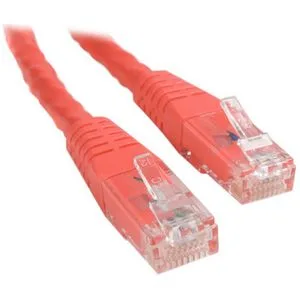
STARTECH C6PATCH1RD 1 ft Red Cat6 network ethernet cable
- others
- 1 ft
$5.99
0.00007225BTC
In stock