


DELL
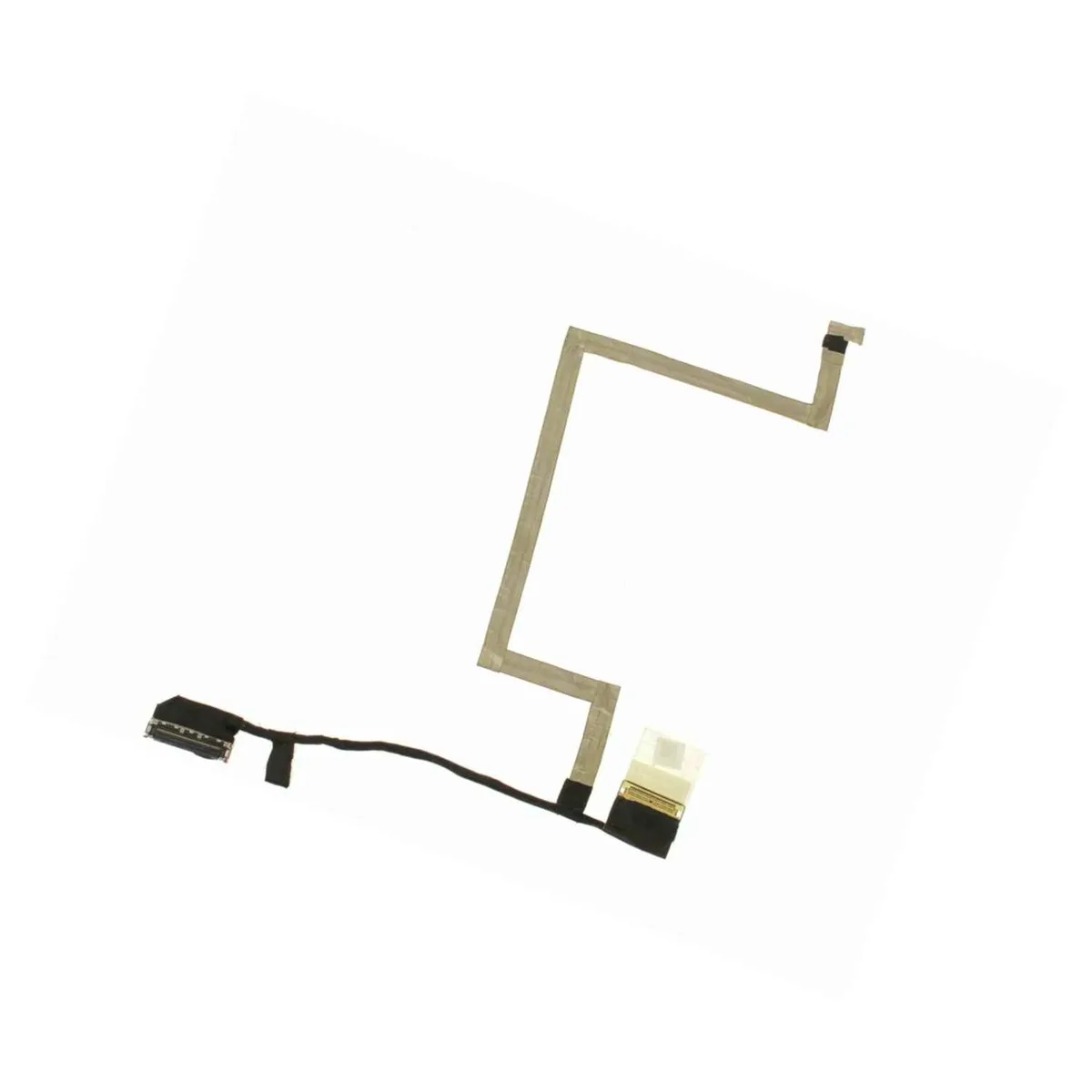
DELL Latitude 7290 12.5" LCD Video Cable C2P54 Non-Touchscreen
Replacement 12.5-inch LCD ribbon cable for Dell Latitude 7290 non-touchscreen models with standard HD camera
- Genuine Dell OEM replacement for Latitude 7290
- Designed for 12.5 inch non-touchscreen displays
- Compatible with standard HD web camera only
- Matches Dell part number C2P54 exactly
- New ribbon cable ensures reliable video connection
Genuine Dell Latitude 7290 LCD Video Cable
This genuine Dell OEM ribbon cable connects the 12.5 inch LCD panel to the motherboard on a Latitude 7290. It is built for non-touchscreen models equipped with the standard HD web camera and carries Dell part number C2P54.
Passive ribbon connection draws no extra power
The cable operates without active electronics so it adds zero thermal load and produces no noise. Installation simply restores the video signal path without affecting system power draw.
Sustained signal integrity under continuous use
As a passive component the cable maintains stable video transmission during extended sessions. It does not degrade or overheat because it carries only low-voltage display data. Buyers needing touchscreen or IR camera support should select a different part.
Highlights
- Genuine Dell OEM replacement for Latitude 7290
- Designed for 12.5 inch non-touchscreen displays
- Compatible with standard HD web camera only
- Matches Dell part number C2P54 exactly
- New ribbon cable ensures reliable video connection
Specifications
| Brand | Dell |
|---|
Questions about this item
How is the C2P54 ribbon cable routed through the Latitude 7290 hinge, and which step do people get wrong?
The flat ribbon threads through the left hinge channel and plugs into the motherboard EDP port and the LCD panel connector; the common mistake is folding the cable instead of following the factory bend radius, which cracks the traces.
What maintenance or replacement will the C2P54 cable need later?
The ribbon itself has no service interval; replacement is only required if the hinge area is stressed, the connector latch breaks, or the cable develops intermittent video artefacts.
What limit shows up first on the C2P54 cable under sustained hinge cycles?
Repeated opening and closing fatigues the copper traces at the hinge fold, causing flicker or total signal loss before the connectors wear out.
New to this? Which coin should you pay with — what to check, what it costs to pay, and what is never asked for.
Also in this aisle
People compared these
Same shelf, same checkout — eight coins and a 30-minute rate lock.


POINTZERO
POINTZERO PZ-360 .2mm Dual-action 9cc Airbrush
- Craft Accessories
- Silver
$20.99
0.00024391BTC
In stock
POINTZERO
POINTZERO PZ-260 Dual-action Airbrush .3mm Nozzle 7cc Gravity-feed
- Craft Accessories
- Silver
$13.99
0.00016257BTC
In stock
POINTZERO
POINTZERO PZ-408 Lightning Cable Silver .2mm
- Craft Accessories
- Silver
$19.99
0.00023229BTC
In stock