

PNY Technologies, Inc.
PNY Technologies, Inc. 699-2G133-0200-C00 NVIDIA A40 48GB GDDR6 ai accelerator card
$4,649.99
0.05385798BTC
In stockWe take cryptocurrency — so the coins you hold can buy real hardware.Pay in crypto, spend it on real hardware. Free insured shipping worldwide over $399. Plain, unbranded boxes, sent from Germany.Free insured shipping over $399. Your rate is locked for 30 minutes once checkout opens.Rate locked 30 minutes. Every item sealed, serial-checked and covered by a 24-month warranty.Sealed, 24-month warranty.

Vertiv
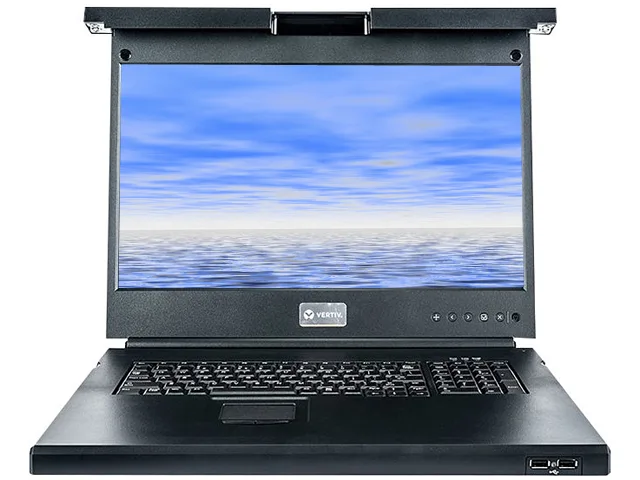
1U rackmount console with 18.5" widescreen LED monitor, full keyboard, touchpad and dual USB 2.0 pass-through ports
The Vertiv Avocent LRA185KMM-G01 is a 1U rackmount console that combines an 18.5 inch widescreen LED-backlit monitor with a full keyboard and touchpad. It provides direct, localised access to servers and network appliances for administrators who manage equipment inside the rack.
The unit fits a standard 19 inch rack and occupies only 1.75 inches of vertical space, leaving room for a KVM switch in the same tray. Front-facing interfaces include one VGA monitor port, one D-Sub computer port, two USB 2.0 pass-through ports and PS/2 keyboard and mouse connectors for broad server compatibility.
It replaces crash carts, standalone monitors and separate keyboards that consume floor space and add cable clutter. The jump is worthwhile when a data centre needs TAA-compliant hardware for government environments and wants a single tray that integrates with existing Avocent KVM switches for centralised, multi-server control.
| Brand | Avocent |
|---|---|
| Model | LRA185KMM-G01 |
| Type | D-Sub, USB, PS/2 |
| Computer Connections | 1 Port |
| Monitor Connections | 1 Port |
| Video Resolution | 1366 x 768 @60Hz Standard Resolution 1600 x 1200 @60Hz maximum 640 x 400 @60Hz minimum |
| Temperature | Operational: 0°C - 50°C Storage: -20°C - 70°C |
| Humidity | Operational: 5% - 80% Storage: 5% - 90% |
| Power Features | Maximum: 20 Watts Nominal: 17 Watts Standby: 0.5 Watts |
| USB Features | USB 2.0 compliant: Two pass through ports |
| Features | Global certifications and availability 18.5” Widescreen HD LED-backlit monitor Dual USB 2.0 pass-thru for faster data transmission Fully installed console occupies only 1U rack space Intuitive and user friendly on-screen display user interface Full 103 key keyboard with number pad and touch pad pointer Available in PS/2 or USB keyboard Keyboard available in 11 languages TAA compliant version available Power efficient during operation and standby Available 8 or 16 Port digital KVM switch bundle (AV3008 or AV3016) |
| Dimensions | 1.75" x 19.00" x 21.00" |
| Weight | 22.00 lbs. |
| Shipping weight | 15.42 kg |
| Package size | 762 × 591 × 229 mm |
The 18.5" widescreen LED panel supports up to 1600 x 1200 at 60 Hz over the VGA connection, with a standard mode of 1366 x 768 at 60 Hz and a minimum of 640 x 400 at 60 Hz.
The unit measures 1.75" high, 19.00" wide and 21.00" deep, so it fits a standard 19" rack and needs at least 21" of usable depth behind the front rails for the sliding tray.
Plug the supplied VGA cable and USB cable from the console's rear ports into the KVM switch's console ports, then connect the console's power adapter; the step often missed is linking the USB cable so the keyboard and touchpad actually communicate with the KVM.
New to this? Buying server hardware with crypto — what to check, what it costs to pay, and what is never asked for.
Also in this aisle
Same shelf, same checkout — eight coins and a 30-minute rate lock.
What you pay in, and what you read prices in.
Sent from your wallet at checkout
Display only — the catalogue is priced in USD
No currency matches that.
Pick the language the site speaks to you in.
No language matches that.
New here?
Already have one?
There is no automatic reset: this shop sends no mail, so there is no one-time link to ask for. Leave the address on the account and it gets picked up by hand.
Request noted
Nothing is on its way to your inbox — this shop sends no mail at all. Someone picks these up by hand.
Remembered it?


