
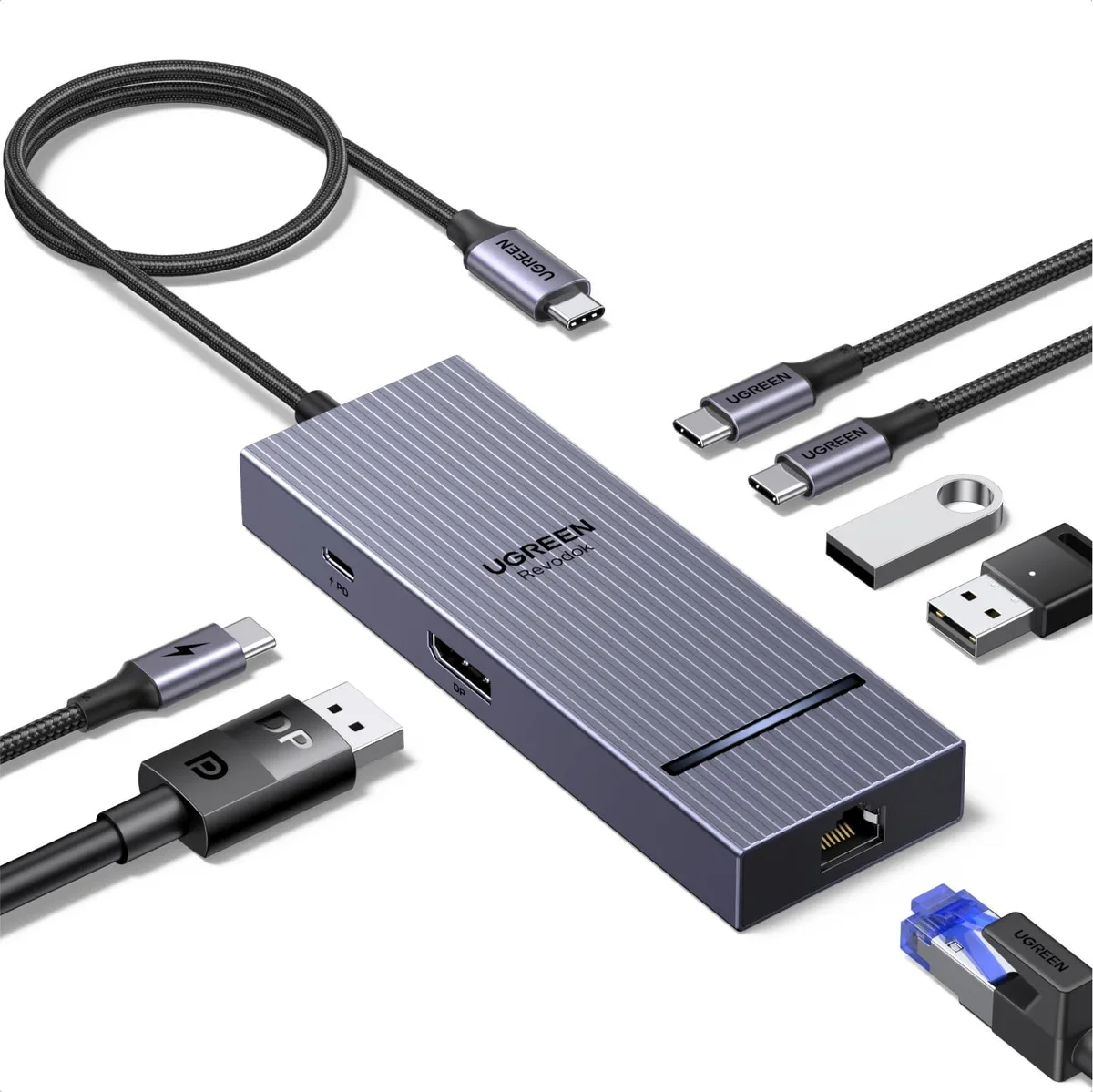


Ugreen 75774 Revodok Pro 7-in-1 USB-C Hub DisplayPort 4K 60Hz
Connects a USB-C laptop to a 4K 60 Hz DisplayPort monitor, gigabit Ethernet, two 10 Gbps USB-C ports, one 10 Gbps USB-A port, one USB 2.0 port and 100 W power delivery
- Max Devices Supported4, 7
- Ports1 x MINI Type-B Upstream, 7 x Type-A Downstream
- Video PortsFast Data Transfer
- Network Connectorusb_c
- Transfer Rate10 gigabits_per_second
- LEDsFast Data Transfer
- Connect two 10 Gbps USB-C ports and one 10 Gbps USB-A port for fast peripherals
- Extend or mirror a DisplayPort monitor at 4K 60 Hz for sharp visuals
- Add a 1 Gbps Ethernet port for stable wired networking
- Pass up to 100 W power delivery through the hub to keep the laptop charged
- Include a USB 2.0 Type-A port for legacy devices at 480 Mbps
Hub for DisplayPort workflows
The Ugreen 75774 Revodok Pro expands a single USB-C port into seven connections. It adds a DisplayPort 4K 60Hz output, gigabit Ethernet, two 10 Gbps USB-C ports, one 10 Gbps USB-A port, one USB 2.0 port and 100 W pass-through charging. The hub suits users who need a DisplayPort link and high-speed data on the same dock.
Thermals and power in daily use
The aluminium casing acts as a heatsink so the hub stays cool during sustained 10 Gbps transfers and 100 W charging. No fan is present, so operation is silent. The upstream USB-C connection supplies bus power for the hub itself while the PD port delivers up to 100 W to the host laptop.
Build, connectors and daily implications
The compact 13.5 cm by 5.5 cm by 1.5 cm enclosure weighs 76.8 grams and fits easily in a laptop bag. A short tethered USB-C cable with a Mini Type-B upstream plug connects to the host. The DisplayPort output requires a DP 1.4 monitor; HDMI displays need an active DP-to-HDMI adapter because the port does not support DP++. One USB-C data port is labelled 10 Gbps and does not carry video or charging.
Highlights
- Connect two 10 Gbps USB-C ports and one 10 Gbps USB-A port for fast peripherals
- Extend or mirror a DisplayPort monitor at 4K 60 Hz for sharp visuals
- Add a 1 Gbps Ethernet port for stable wired networking
- Pass up to 100 W power delivery through the hub to keep the laptop charged
- Include a USB 2.0 Type-A port for legacy devices at 480 Mbps
Specifications
| Brand | Ugreen |
|---|---|
| Series | 75774 UGREEN |
| Model | 75774 |
| Part Number | 75774 |
| Max Devices Supported | 4, 7 |
| Ports | 1 x MINI Type-B Upstream, 7 x Type-A Downstream |
| Video Ports | Fast Data Transfer |
| Network Connector | usb_c |
| Transfer Rate | 10 gigabits_per_second |
| LEDs | Fast Data Transfer |
| Dimensions | 13.5 cm x 5.5 cm x 1.5 cm |
| Weight | 76.8 grams |
| Temperature | Fast Data Transfer |
Questions about this item
How do I connect the 75774 hub to my laptop and what step do people often miss?
Plug the Mini Type-B upstream cable into a USB-C port that supports DisplayPort 1.4 Alt Mode and power delivery. People often miss that the host port must carry video and charging, not just data.
What will need replacement first on the 75774 hub under daily use?
The Mini Type-B upstream cable and the 100 W pass-through charger see the most connect-disconnect cycles and are the items most likely to need replacing.
What limit appears first when I run the 75774 hub at full load for a long period?
Sustained 10 Gbps transfers on both USB-C 3.2 Gen 2 ports plus 100 W pass-through charging will hit the hub’s thermal ceiling before any port reaches its rated bandwidth limit.
New to this? Which coin should you pay with — what to check, what it costs to pay, and what is never asked for.
Also in this aisle
People compared these
Same shelf, same checkout — eight coins and a 30-minute rate lock.



Black Box Corporation
Black Box Corporation CAT6 EZ-RJ45 Modular Plugs 100-Pack
$95.99
0.00114537BTC
In stock
