


Toshiba
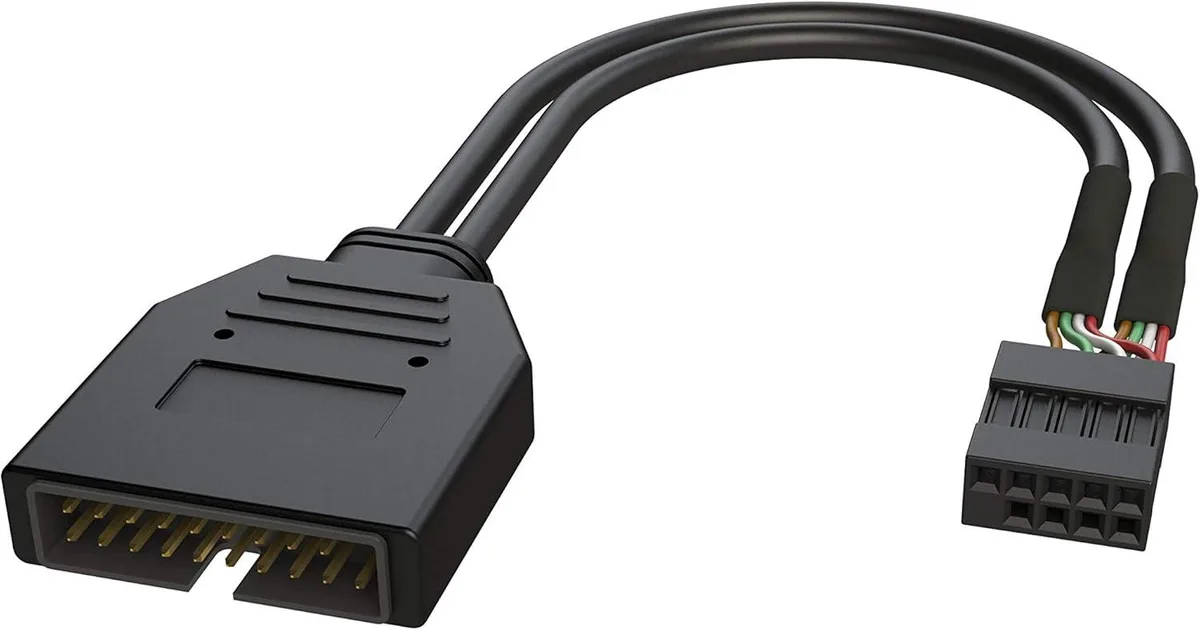
Toshiba USB 2.0 to 3.0/3.1 Upgrade Adapter Noise Reduction Shielded 26 cm
Converts a USB 2.0 motherboard header to USB 3.0 or 3.1 with a 26 cm shielded cable that reduces interference
- Changer TypeUSB Adapters
- Upgrade USB 2.0 headers to 3.0 or 3.1 speeds
- Shielded cable cuts EMI and RFI noise
- 26 cm length fits tight internal routing
- Connects 9-pin motherboard header to newer ports
- LINKUP 1-year warranty with online support
USB 2.0 Header Upgrade Adapter
This adapter converts an internal USB 2.0 nine-pin motherboard header into a USB 3.0 or 3.1 connection. It targets builders with older platforms who want faster front-panel ports without replacing the board. The 26 cm cable reaches most front-panel header locations. It is not for systems that already provide native USB 3.0 headers.
Shielded Cable with EMI Reduction
A shielded design reduces electromagnetic and radio-frequency interference near sensitive components. The 10 inch length keeps routing tidy inside compact chassis. The nine-pin plug fits standard USB 2.0 header pinouts. It is not for external port conversions or devices that require a longer internal cable run.
Legacy Header to Modern Front Panel
This part replaces a direct USB 2.0 front-panel link with a higher-speed interface for compatible cases. The upgrade is worthwhile when the case provides USB 3.0 ports but the motherboard lacks the matching header. It does not add bandwidth beyond the header’s native capability.
Highlights
- Upgrade USB 2.0 headers to 3.0 or 3.1 speeds
- Shielded cable cuts EMI and RFI noise
- 26 cm length fits tight internal routing
- Connects 9-pin motherboard header to newer ports
- LINKUP 1-year warranty with online support
Specifications
| Changer Type | USB Adapters |
|---|
Questions about this item
Does the USB 2.0 to USB 3.0/3.1 upgrade adapter support the USB 3.1 standard?
Yes, the adapter upgrades a USB 2.0 9-pin header to USB 3.0 or USB 3.1 connectivity.
What header space and cable clearance does the 26 cm adapter require?
The adapter fits a standard 9-pin USB 2.0 motherboard header and includes a 26 cm shielded cable for flexible routing inside the case.
How do I install the USB 2.0 to 3.0/3.1 adapter, and what is the common mistake?
Connect the 9-pin plug to the motherboard USB 2.0 header, attach the USB 3.0/3.1 port bracket, and secure it; the frequent error is reversing the header orientation.
New to this? Which coin should you pay with — what to check, what it costs to pay, and what is never asked for.
Also in this aisle
People compared these
Same shelf, same checkout — eight coins and a 30-minute rate lock.



Black Box Corporation
Black Box Corporation CAT6 EZ-RJ45 Modular Plugs 100-Pack
$95.99
0.00114708BTC
In stock
