

Innovation First, Inc.
Innovation First, Inc. 1UCMA-137 1U Cable Management Arm 19" 28.5"-33" computer accessory
- Product Type:Cable…
- Panel Width:19" Rac…
$72.99
0.00084983BTC
In stockWe take cryptocurrency — so the coins you hold can buy real hardware.Pay in crypto, spend it on real hardware. Free insured shipping worldwide over $399. Plain, unbranded boxes, sent from Germany.Free insured shipping over $399. Your rate is locked for 30 minutes once checkout opens.Rate locked 30 minutes. Every item sealed, serial-checked and covered by a 24-month warranty.Sealed, 24-month warranty.


Rocstorage, Inc
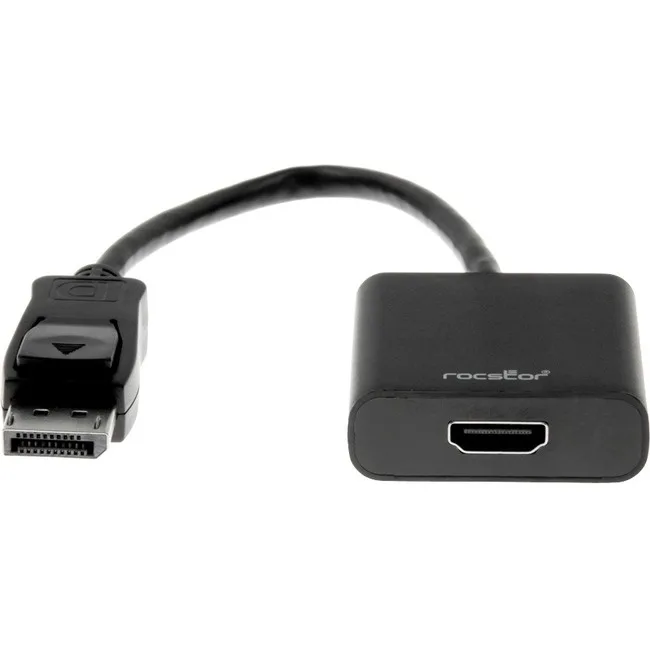
A DisplayPort to HDMI adapter supporting 1080p resolution up to 1920x1200 with 7.1 surround sound pass-through and 2.25 Gbps transfer rate
The Rocstor DisplayPort to HDMI adapter connects a DisplayPort source to an HDMI display. It supports a maximum video resolution of 1920x1200 at 1080p and digital 7.1 surround sound. The adapter complies with DisplayPort specifications version 1.1a and handles a transfer rate up to 2.25 Gbps. Audio pass through works when the video source is compatible with Intel Thunderbolt.
This adapter replaces a direct DisplayPort cable when the display only offers HDMI input. The jump is worth it when you need to connect a laptop or desktop to a monitor, HDTV, or projector that lacks DisplayPort. It is not for buyers who need resolutions above 1920x1200 or refresh rates beyond what DisplayPort 1.1a allows. It also does not suit setups that require an active converter for dual-mode signals.
The male DisplayPort plug fits the source and the female HDMI port accepts a standard HDMI cable. No external power is needed for operation. The adapter frees up the need for a dedicated DisplayPort display. Ensure the source device supports DisplayPort 1.1a output and the display accepts 1080p or 1920x1200 over HDMI. Cable length beyond the adapter follows normal HDMI limits.
| Brand | Rocstor |
|---|---|
| Type | Consumer Electronics |
| Shipping weight | 0.07 kg |
| Package size | 203 × 178 × 3 mm |
Yes, the adapter is compliant with DisplayPort 1.1a specifications and its male connector fits a standard DisplayPort output on a laptop or desktop.
Connect the DisplayPort male end to the source first, then attach an HDMI cable from the adapter's female port to the monitor; reversing the order often prevents signal detection.
The adapter supports a maximum video resolution of 1080p up to 1920x1200, so a higher-resolution monitor would require a different adapter.
New to this? Which coin should you pay with — what to check, what it costs to pay, and what is never asked for.
Also in this aisle
Same shelf, same checkout — eight coins and a 30-minute rate lock.
What you pay in, and what you read prices in.
Sent from your wallet at checkout
Display only — the catalogue is priced in USD
No currency matches that.
Pick the language the site speaks to you in.
No language matches that.
New here?
Already have one?
There is no automatic reset: this shop sends no mail, so there is no one-time link to ask for. Leave the address on the account and it gets picked up by hand.
Request noted
Nothing is on its way to your inbox — this shop sends no mail at all. Someone picks these up by hand.
Remembered it?


