


QGeeM
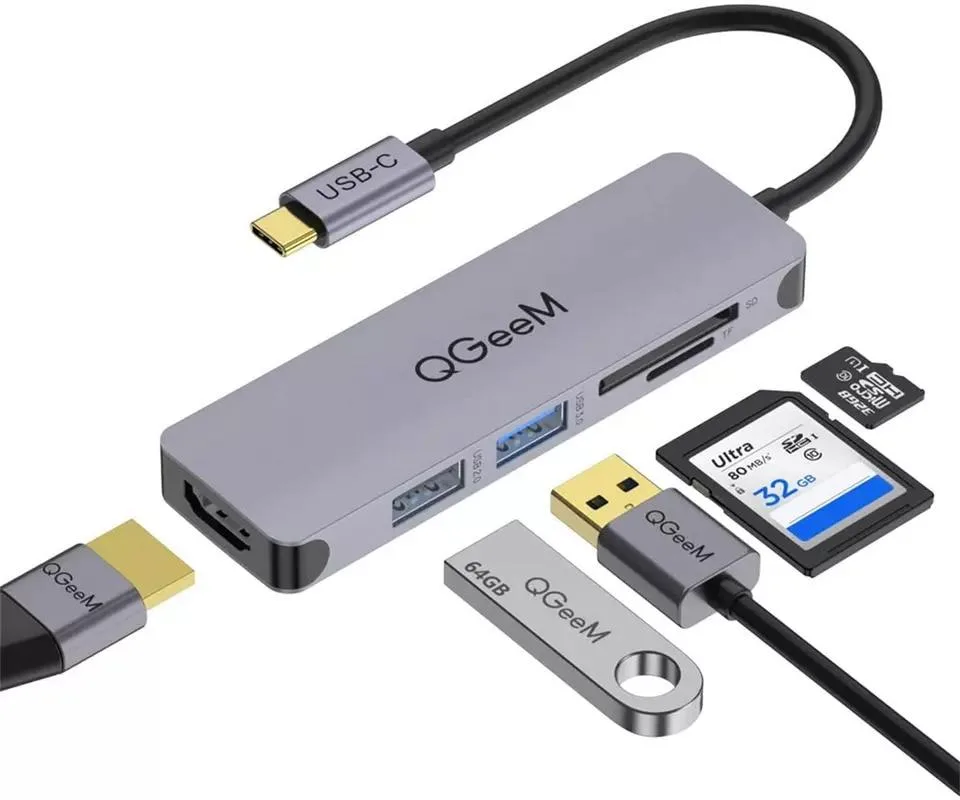
QGeeM QG-UH05-4 5-in-1 USB-C Hub Grey
Adds 4K HDMI, USB 3.0, USB 2.0 and dual card readers to a USB-C laptop
- ColorGrey
- Connect external displays in 4K @ 30 Hz via HDMI
- Transfer data at up to 5 Gbps with the USB 3.0 port
- Read SD and TF cards simultaneously at up to 104 MB/s
- Charge connected devices at 5 V 0.9 A through the USB 2.0 port
- Works with laptops that have USB-C 3.1 or DP Alt Mode
Portable 5-in-1 USB-C Hub
This compact hub adds HDMI video, USB 3.0, USB 2.0, SD and microSD slots to a single USB-C port. It suits mobile professionals who need to connect a display, peripherals and memory cards while travelling light. The grey finish matches modern laptops and the aluminium shell resists daily wear. Buyers who need Ethernet, additional USB-A ports or power delivery pass-through will not find those features here.
Aluminium build with fixed cable
The short integrated cable keeps the desk tidy and reduces strain on the laptop port. HDMI supports 4K at 30 Hz or 2K at 60 Hz for presentations and media playback. USB 3.0 runs at 5 Gbps for fast drives while USB 2.0 handles keyboards and mice at 480 Mbps. Both card readers operate simultaneously at up to 104 MB/s and accept cards up to 512 GB.
HDMI 4K 30 Hz output
The single HDMI port delivers 3840 x 2160 at 30 Hz and scales down to 1920 x 1200 or 1920 x 1080. This specification decides whether the hub matches your monitor’s refresh-rate requirement. The host must provide a USB-C port with DisplayPort Alternate Mode or Thunderbolt 3 for video to function. Without that host capability the HDMI port will remain inactive.
Highlights
- Connect external displays in 4K @ 30 Hz via HDMI
- Transfer data at up to 5 Gbps with the USB 3.0 port
- Read SD and TF cards simultaneously at up to 104 MB/s
- Charge connected devices at 5 V 0.9 A through the USB 2.0 port
- Works with laptops that have USB-C 3.1 or DP Alt Mode
Specifications
| Brand | QGeeM |
|---|---|
| Model | QG-UH05-4 |
| Color | Grey |
Questions about this item
What resolution does the HDMI port on the QGeeM QG-UH05-4 cap at in practice?
The HDMI port outputs 4K at 30 Hz, which is 3840 x 2160. For a 60 Hz refresh rate you must lower the definition to 2K.
What does the hub physically need to fit or mount?
It plugs straight into a USB-C port that supports USB 3.1 or DP Alt Mode; no extra cable, bracket or driver is required.
How is the QGeeM QG-UH05-4 installed, and what step do people get wrong?
Insert the hub into a compatible USB-C port and the operating system recognises it instantly; the common mistake is using a port that only carries power or USB 2.0 data, which disables video and the card readers.
New to this? Which coin should you pay with — what to check, what it costs to pay, and what is never asked for.
Also in this aisle
People compared these
Same shelf, same checkout — eight coins and a 30-minute rate lock.


