

Innovation First, Inc.
Innovation First, Inc. 1UCMA-137 1U Cable Management Arm 19" 28.5"-33" computer accessory
- Product Type:Cable…
- Panel Width:19" Rac…
$72.99
0.00086426BTC
In stockWe take cryptocurrency — so the coins you hold can buy real hardware.Pay in crypto, spend it on real hardware. Free insured shipping worldwide over $399. Plain, unbranded boxes, sent from Germany.Free insured shipping over $399. Your rate is locked for 30 minutes once checkout opens.Rate locked 30 minutes. Every item sealed, serial-checked and covered by a 24-month warranty.Sealed, 24-month warranty.


NZXT
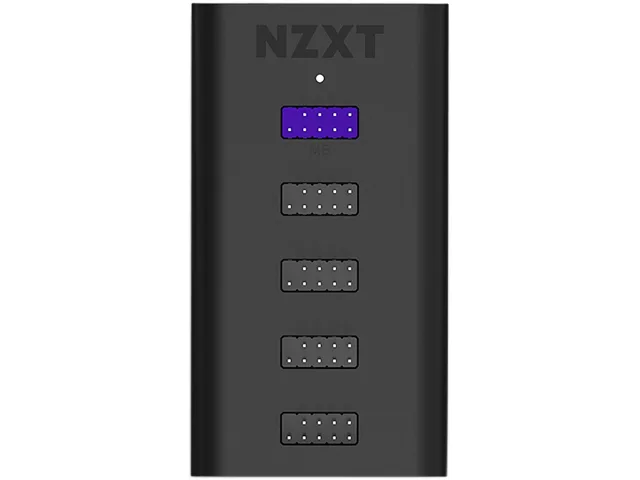
Adds four internal USB 2.0 ports via a motherboard header, powered by SATA and mounted magnetically or with 3M Dual Lock
This NZXT AC-IUSBH-M3 hub adds four USB 2.0 ports to a single motherboard header so builders can connect liquid coolers, fan controllers and lighting accessories without running out of headers. It draws power from a SATA connector for stable delivery and measures 41mm by 82mm by 14mm without pins, or 20mm with pins, allowing it to be tucked away in tight builds. Magnetic mounting and 3M Dual Lock tape make installation quick and tool-free. The black plastic and PCB construction keeps the unit lightweight and discreet inside any case.
This hub suits anyone whose motherboard lacks enough USB 2.0 headers for multiple internal devices such as AIO coolers or RGB controllers. It is not for users who require USB 3.0 or higher speeds because every port and the upstream connection are limited to USB 2.0. It also does not help if your power supply lacks a free SATA connector, since the hub needs that 5 V DC rail for reliable operation. Systems with no spare header at all cannot use this product because one header is required for the upstream link.
The deciding specification is the single USB 2.0 header that connects the hub to the motherboard; if your board has no free USB 2.0 header this hub cannot be installed. Four downstream USB 2.0 ports then become available for internal peripherals. Power is supplied through a standard SATA connector, so a spare SATA power lead is also necessary. No other interface or protocol is involved, and the hub does not convert or upgrade the signal to a newer USB standard.
| Brand | NZXT |
|---|---|
| Model | AC-IUSBH-M3 |
| Type | Internal USB Hub |
| Color | Black |
| Specifications | Dimensions: 41mm x 82mm x 20mm (with pins) / 41mm x 82mm x 14mm (without pins) Material(s): Plastic, PCB, Magnets Mounting: Magnets, 3M Dual Lock Connections: 1 x USB 2.0 Header, 1 x SATA Input Channel Voltage: 5V DC |
| Features | The Internal USB Hub (Gen 3) enables you to connect an additional 4 usb 2.0 devices and is designed to be tucked away and installed quickly with a magnetic body and 3M dual lock tapes. 4 internal USB 2.0 ports and 1 port for connection to motherboard. Works great with any PC and designed to be easily hidden away. SATA power connection provides a stable power source. User friendly installation with magnetic body and 3M dual lock tapes for mounting. |
| Shipping weight | 0.12 kg |
| Package size | 142 × 127 × 25 mm |
Yes, the four internal USB 2.0 ports accept any standard USB 2.0 device such as liquid coolers, fan controllers or lighting accessories.
Connect the SATA power cable, then check in your operating system or motherboard BIOS that each attached device appears on the USB 2.0 header.
The hub has a built-in SATA power connector and comes with 3M dual lock tape and a magnetic body for mounting; no extra cables or adhesives are required.
New to this? Which coin should you pay with — what to check, what it costs to pay, and what is never asked for.
Also in this aisle
Same shelf, same checkout — eight coins and a 30-minute rate lock.
What you pay in, and what you read prices in.
Sent from your wallet at checkout
Display only — the catalogue is priced in USD
No currency matches that.
Pick the language the site speaks to you in.
No language matches that.
New here?
Already have one?
There is no automatic reset: this shop sends no mail, so there is no one-time link to ask for. Leave the address on the account and it gets picked up by hand.
Request noted
Nothing is on its way to your inbox — this shop sends no mail at all. Someone picks these up by hand.
Remembered it?


