Battery Technology Inc.
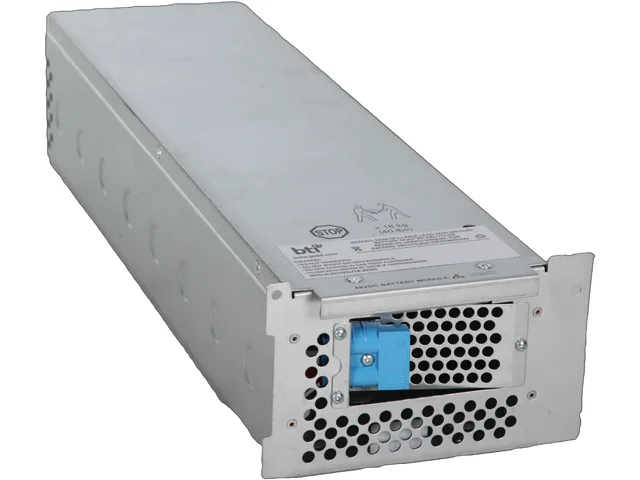
Battery Technology Inc. APCRBC105-SLA105 ups replacement battery
- Battery
- RBC105 APC REPLACEM…
$314.99
0.00381192BTC
In stockWe take cryptocurrency — so the coins you hold can buy real hardware.Pay in crypto, spend it on real hardware. Free insured shipping worldwide over $399. Plain, unbranded boxes, sent from Germany.Free insured shipping over $399. Your rate is locked for 30 minutes once checkout opens.Rate locked 30 minutes. Every item sealed, serial-checked and covered by a 24-month warranty.Sealed, 24-month warranty.

Nippon Labs
Connects a USB-C device with DP Alt Mode or Thunderbolt 3 to an HDMI display at up to 4K 30Hz
This USB 3.1 Type-C to HDMI adapter connects a computer or smartphone with DP Alt Mode or Thunderbolt 3 to an HDMI display, TV or projector. It supports resolutions up to 4K x 2K at 30 Hz and HDMI 1.4 with HDCP content protection. An HDMI cable is required for the connection. The white adapter features a reversible USB-C plug.
The adapter upgrades a USB-C port that lacks native HDMI output, enabling 4K 30 Hz video on monitors and projectors. The jump is worth it when the host device supports DP Alt Mode or Thunderbolt 3 but has no built-in HDMI connector. It does not add video capability to USB-C ports that carry only data or charging.
Verify the host specification before ordering; the adapter will not function with USB-C ports limited to data or power delivery. Ensure you have an HDMI cable for the display side. The product is not for users whose devices lack DP Alt Mode or Thunderbolt 3 video output.
| Brand | Nippon Labs |
|---|---|
| Model | 30UC-CHDMI |
| Type | USB-C to HDMI Adapters |
| Changer Type | USB to HDMI |
| Color | White |
| Specifications | Connect A: USB 3.1 Type-C Male Connect B: HDMI Female Type: USB Type-C to HDMI Adapter Adaptor Color: White Color Compatible Devices for USB 3.1 Type-C with DP Alt Mode or Thunderbolt 3 (not a full list) PC: MacBook 2015 and newer/ MacBook Pro 2016 and newer/ iMac 2017 and newer/ iMac Pro 2017 and newer MacBook Air 2018/ iPad Pro 2018 / New Mac Mini Dell XSP 15/13 ASUS T303ua/ ZenBook 3 Lenovo YOGA900/910/920 / Lenovo Thinkpad X1 Carbon 5th Chromebook Pixel 2 HP EliteBook Folio G1/ Spectre 13 X360 Huawei Matebook And more... Smartphones: Huawei Mate 10 Samsung Galaxy S8/S8+/S9 / Sams |
| Features | This USB Type-C to HDMI adapter allows you to connect a Type-C equipped computer or smartphone to a HD monitor, TV or projector with HDMI input. (An HDMI cable is required) USB-C connected devices must support DP Alt Mode or Thunderbolt 3 connector. USB Type-C features a smaller and reversible connector that makes it easier to plug in. HDMI resolution up to 4K x 2K @ 30Hz in DP 1.2 Altmode in SST mode. Support HDMI 1.4 and former versions. Support per lane data rates of 5.4Gbps (HBR2), 2.7Gbps (HBR) and 1.62Gbps (RBR). Support multiple color formats: RGB 6/8/10/12-bit per component ( |
| Shipping weight | 0.14 kg |
| Package size | 165 × 127 × 25 mm |
The adapter has a USB 3.1 Type-C male connector that plugs straight into the host port; you only need an HDMI cable between the adapter's HDMI female port and the display.
The host must support DisplayPort Alt Mode or Thunderbolt 3 over its USB-C port; a plain USB-C data-only port will not carry video.
Replace the HDMI cable only if you see signal drop-outs, flicker or physical damage; the adapter itself has no moving parts or wear items.
New to this? Which coin should you pay with — what to check, what it costs to pay, and what is never asked for.
Also in this aisle
Same shelf, same checkout — eight coins and a 30-minute rate lock.
What you pay in, and what you read prices in.
Sent from your wallet at checkout
Display only — the catalogue is priced in USD
No currency matches that.
Pick the language the site speaks to you in.
No language matches that.
New here?
Already have one?
There is no automatic reset: this shop sends no mail, so there is no one-time link to ask for. Leave the address on the account and it gets picked up by hand.
Request noted
Nothing is on its way to your inbox — this shop sends no mail at all. Someone picks these up by hand.
Remembered it?