

Innovation First, Inc.
Innovation First, Inc. 1UCMA-137 1U Cable Management Arm 19" 28.5"-33" computer accessory
- Product Type:Cable…
- Panel Width:19" Rac…
$72.99
0.00086848BTC
In stockWe take cryptocurrency — so the coins you hold can buy real hardware.Pay in crypto, spend it on real hardware. Free insured shipping worldwide over $399. Plain, unbranded boxes, sent from Germany.Free insured shipping over $399. Your rate is locked for 30 minutes once checkout opens.Rate locked 30 minutes. Every item sealed, serial-checked and covered by a 24-month warranty.Sealed, 24-month warranty.


Manw
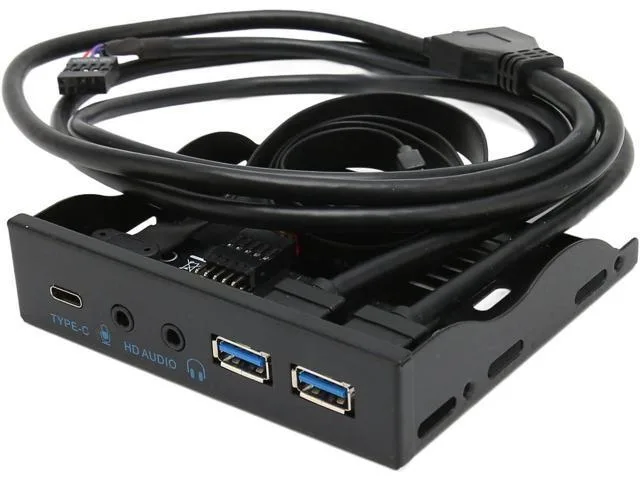
Adds a USB 3.2 Type-C port, two USB 3.0 ports, microphone input and speaker output to a 3.5-inch drive bay with an iron shell
This Manw hub installs in a 3.5in floppy drive bay and adds a USB 3.2 Type C port, two USB 3.0 ports, a microphone input and a speaker output. It connects to the motherboard via a USB 3.0 20Pin header, a USB 2.0 9Pin header and a TYPE E interface. The iron shell construction provides durability and the unit is plug and play on supported operating systems.
It suits PC builders who have an available 3.5in bay and a motherboard or adapter card that provides the required TYPE E, USB 3.0 20Pin and USB 2.0 9Pin connections. Builders whose chassis lack a 3.5in bay or whose motherboards do not expose the necessary headers should look at alternative solutions.
The iron shell acts as a sturdy housing that resists wear during repeated insertion and removal of cables. Under continuous data transfer across the Type C and USB 3.0 ports the metal chassis helps dissipate heat without active cooling. Plug and play operation means no driver management is required during extended sessions on Windows 7, 8, 10, 11 or Linux.
| Brand | Manw |
|---|
You need a motherboard or adapter card that provides a TYPE E connector, a USB 3.0 20-pin header and a USB 2.0 9-pin header, plus a free 3.5in drive bay for mounting.
Yes, the hub’s USB 3.0 and USB 2.0 headers are backward-compatible, so USB 2.0 devices function normally on the Type-C and two Type-A ports, and the 3.5mm jacks accept standard analogue headsets.
Plug a USB 3.2 Gen 2 device into the Type-C port, then check the connection speed in Device Manager or lsusb -t; it should show a 10Gbps link.
New to this? Which coin should you pay with — what to check, what it costs to pay, and what is never asked for.
Also in this aisle
Same shelf, same checkout — eight coins and a 30-minute rate lock.
What you pay in, and what you read prices in.
Sent from your wallet at checkout
Display only — the catalogue is priced in USD
No currency matches that.
Pick the language the site speaks to you in.
No language matches that.
New here?
Already have one?
There is no automatic reset: this shop sends no mail, so there is no one-time link to ask for. Leave the address on the account and it gets picked up by hand.
Request noted
Nothing is on its way to your inbox — this shop sends no mail at all. Someone picks these up by hand.
Remembered it?


