

Innovation First, Inc.
Innovation First, Inc. 1UCMA-137 1U Cable Management Arm 19" 28.5"-33" computer accessory
- Product Type:Cable…
- Panel Width:19" Rac…
$72.99
0.00084261BTC
In stockWe take cryptocurrency — so the coins you hold can buy real hardware.Pay in crypto, spend it on real hardware. Free insured shipping worldwide over $399. Plain, unbranded boxes, sent from Germany.Free insured shipping over $399. Your rate is locked for 30 minutes once checkout opens.Rate locked 30 minutes. Every item sealed, serial-checked and covered by a 24-month warranty.Sealed, 24-month warranty.
LORDWORLD
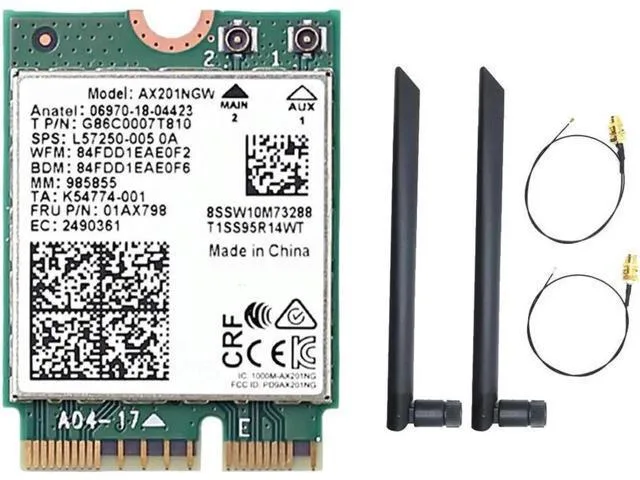
Adds Bluetooth 5.1 to a compatible M.2 CNVio2 slot with dual antennas for 2.4 GHz and 5 GHz bands
The LORDWORLD AX201NGW is an M.2 CNVio2 audio adapter that adds Bluetooth 5.1 connectivity to compatible Windows 10 systems. It installs into an M.2 slot with CNVio2 support and includes a dual-antenna design for wireless reception. This adapter is intended for builders who need integrated Bluetooth on a supported motherboard. It does not suit systems lacking a CNVio2-enabled M.2 slot or those requiring a USB-based solution.
The adapter operates within the power envelope of the host M.2 CNVio2 interface and adds no active cooling components. With no onboard fan the unit runs silently during typical Bluetooth 5.1 workloads. Heat output remains low and is dissipated passively through the PCB and motherboard. Power draw scales with wireless activity at 2.4 GHz and 5 GHz bands up to the 3000 Mbps link rate.
| Brand | LORDWORLD |
|---|
Insert the card into a compatible M.2 CNVio2 slot, secure it with the mounting screw, then attach both dual antennas before closing the case; skipping the antenna connection is the common mistake.
No scheduled maintenance is required; keep the antenna connectors tight and dust the contacts if signal drops, and replace the card only if Bluetooth 5.1 performance degrades permanently.
New to this? Which coin should you pay with — what to check, what it costs to pay, and what is never asked for.
Also in this aisle
Same shelf, same checkout — eight coins and a 30-minute rate lock.
What you pay in, and what you read prices in.
Sent from your wallet at checkout
Display only — the catalogue is priced in USD
No currency matches that.
Pick the language the site speaks to you in.
No language matches that.
New here?
Already have one?
There is no automatic reset: this shop sends no mail, so there is no one-time link to ask for. Leave the address on the account and it gets picked up by hand.
Request noted
Nothing is on its way to your inbox — this shop sends no mail at all. Someone picks these up by hand.
Remembered it?


