

Innovation First, Inc.
Innovation First, Inc. 1UCMA-137 1U Cable Management Arm 19" 28.5"-33" computer accessory
- Product Type:Cable…
- Panel Width:19" Rac…
$72.99
0.00087492BTC
In stockWe take cryptocurrency — so the coins you hold can buy real hardware.Pay in crypto, spend it on real hardware. Free insured shipping worldwide over $399. Plain, unbranded boxes, sent from Germany.Free insured shipping over $399. Your rate is locked for 30 minutes once checkout opens.Rate locked 30 minutes. Every item sealed, serial-checked and covered by a 24-month warranty.Sealed, 24-month warranty.


Cables To Go
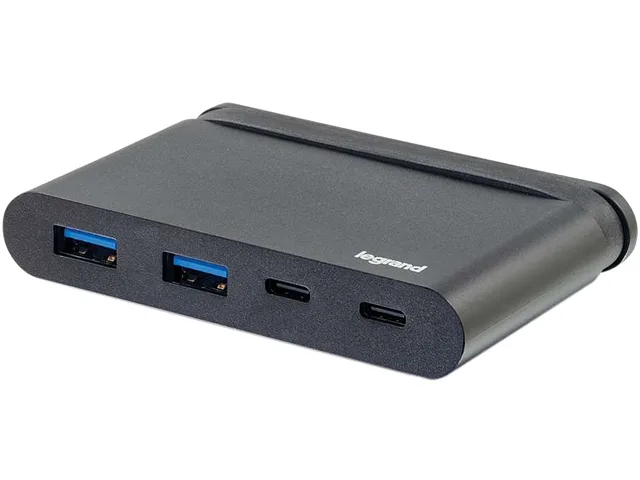
A compact hub adds two USB-A and two USB-C ports with 5Gbps data and 100W charging through a single USB-C connection
The Cables To Go 26914 adds two USB-A ports and two USB-C ports to a single USB-C connection on a laptop or tablet. It supports 5Gbps data transmission on every port and delivers up to 100W power delivery through one USB-C port for charging the host device. The 5-inch cable keeps the hub close to the port without strain.
Users with only one USB-C or Thunderbolt 3 port gain multiple connections for drives, displays and peripherals at once. The jump is worth it when a basic adapter cannot charge the laptop while transferring data or when more than one USB-A device is needed simultaneously. It does not suit buyers who need more storage or additional video outputs beyond what the host port provides.
The reversible USB-C connector inserts either way and works immediately with compatible hosts. The compact size of 0.61 by 3.54 by 2.36 inches and weight of 0.13 lbs make it easy to carry. What usually goes wrong is expecting 100W charging from a host port or charger that supplies less power, or connecting devices that draw more current than the hub can provide.
| Brand | C2G |
|---|---|
| Model | 26914 |
| Type | USB-C Hub with USB-A, USB-C and Power Delivery |
| Color | Black |
| Cable Length | 5 in. |
| Specifications | The USB-C Hub with USB-A, USB-C and Power Delivery expands USB capabilities by providing two USB-A ports and two USB-C ports for connecting peripherals to a single USB-C port. This hub connects to a USB-C or Thunderbolt 3 enabled laptop, tablet, or desktop computer and features USB-C power delivery, making it ideal for charging mobile devices or transferring data while in the office or on the road. Convenience Small, lightweight and portable, the hub is easily stored in a laptop case or pocket. With a transfer rate up to 5Gbps, it is fully USB 3.0 (USB 3.1 Gen 1) compliant, backwards |
| Connector A | 1 x USB-C Male |
| Connector B | 2 x USB 3.0 A Female 2 x USB-C Female |
| Features | Two USB-A ports supporting 5Gbps data transmission One USB-C port supporting 5Gbps data transmission One USB-C port supporting 5Gbps data downstream and a max 100W power delivery upstream for charging Compatible with 3.1 USB-C and Thunderbolt 3 ports Reversible, symmetrical USB-C connector Small form factor for portability |
| Dimensions | 0.61" x 3.54" x 2.36" |
| Weight | 0.13 lbs. |
| Shipping weight | 0.06 kg |
| Package size | 89 × 70 × 19 mm |
The hub measures 3.54 inches long, 2.36 inches wide and 0.61 inches high, so it fits in a laptop sleeve or a small pocket.
Plug the hub's USB-C male cable into the host, connect the charger to the upstream USB-C port, then attach devices to the two USB-A and the downstream USB-C ports.
Replace the hub if the upstream USB-C port no longer negotiates 100W charging, if data drops to below 5Gbps on any port, or if the 5 inch cable shows fraying.
New to this? Which coin should you pay with — what to check, what it costs to pay, and what is never asked for.
Also in this aisle
Same shelf, same checkout — eight coins and a 30-minute rate lock.
What you pay in, and what you read prices in.
Sent from your wallet at checkout
Display only — the catalogue is priced in USD
No currency matches that.
Pick the language the site speaks to you in.
No language matches that.
New here?
Already have one?
There is no automatic reset: this shop sends no mail, so there is no one-time link to ask for. Leave the address on the account and it gets picked up by hand.
Request noted
Nothing is on its way to your inbox — this shop sends no mail at all. Someone picks these up by hand.
Remembered it?


