


Blackmagic Design Pty. Ltd.
Blackmagic Design DaVinci Resolve Micro Color Panel video switch
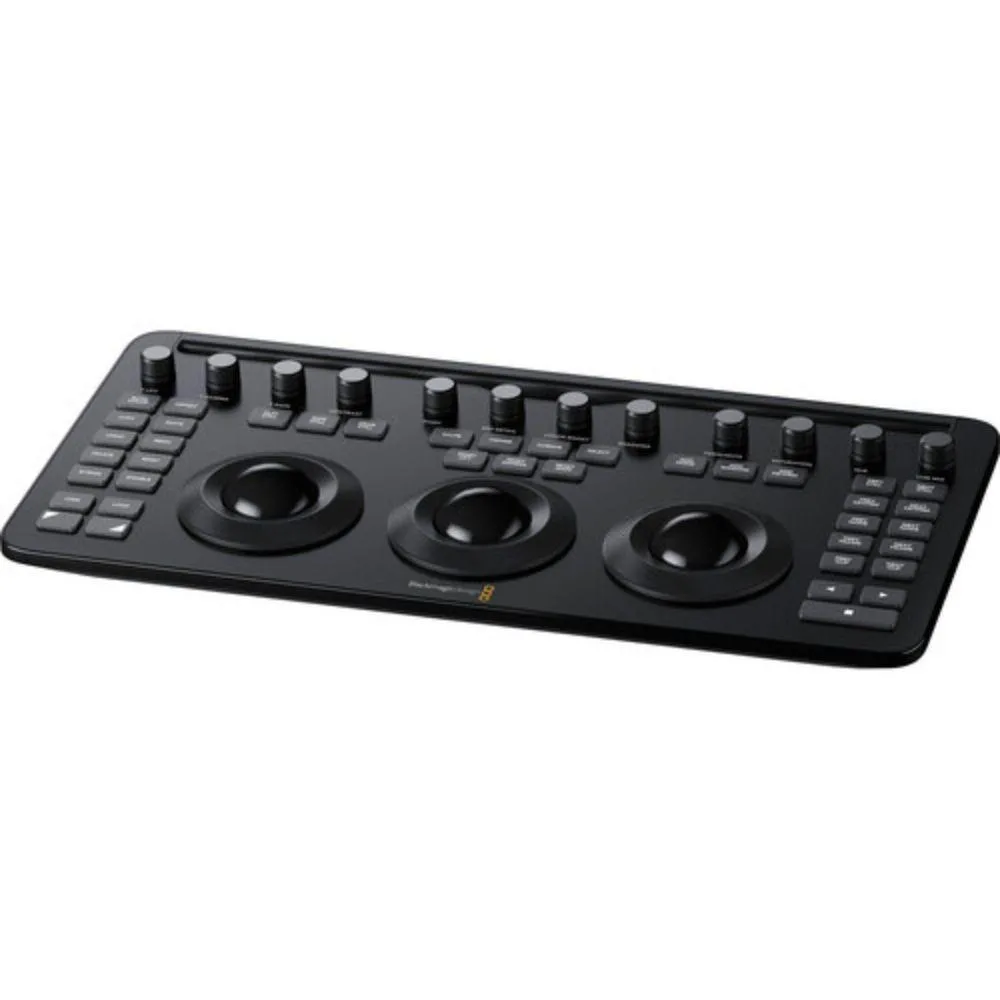
A compact grading surface with three trackballs, 12 precision knobs and dedicated transport keys that connects via Bluetooth or USB-C and includes an iPad Pro mounting slot
- Professional colour grading with three high-resolution trackballs
- Tactile control via 12 precision-machined knobs
- Fast navigation using dedicated transport keys
- Flexible connectivity through Bluetooth or USB-C
- Portable design with iPad Pro mounting slot and internal battery
Compact color panel for DaVinci Resolve
The Blackmagic Design DaVinci Resolve Micro Color Panel is a hardware control surface built for DaVinci Resolve software. It gives editors and colorists physical trackballs, knobs and transport keys instead of relying only on a keyboard and mouse. A dedicated slot holds an iPad Pro so the tablet can serve as the primary display. The unit suits post-production professionals who want tactile grading controls in a desktop form factor.
Thermals noise and power
The panel draws power over USB-C or runs from its internal battery, so it adds no fan noise or measurable heat to a workstation. Bluetooth and USB-C connectivity keep cable clutter low and allow wireless operation when the battery is charged. Power consumption stays minimal because the device has no active cooling or high-draw components. Typical grading sessions run silently whether the panel is tethered or untethered.
Mounting slot and battery change the workflow
The integrated iPad Pro mounting slot turns the tablet into a calibrated reference monitor positioned directly above the controls. The internal battery enables untethered grading for location work or quick client reviews without hunting for mains power. Twelve precision-machined knobs and three high-resolution trackballs map to lift, gamma, gain and contrast adjustments, matching the layout of larger panels so muscle memory transfers. Bluetooth pairing lets the same panel switch between iPad and desktop without re-cabling.
Highlights
- Professional colour grading with three high-resolution trackballs
- Tactile control via 12 precision-machined knobs
- Fast navigation using dedicated transport keys
- Flexible connectivity through Bluetooth or USB-C
- Portable design with iPad Pro mounting slot and internal battery
Specifications
No published specifications for this item yet.
Questions about this item
How do I pair the Micro Color Panel with my iPad Pro over Bluetooth?
Power on the panel, open Bluetooth settings on the iPad Pro, select the panel from the device list, then launch DaVinci Resolve to complete the link.
What part of the panel will need replacement after heavy daily use?
The internal battery will eventually lose capacity and require service or replacement.
How long can I grade on battery power before the panel shuts down?
The internal battery runs the panel for a typical grading session; plug in USB-C for continuous all-day work.
New to this? Which coin should you pay with — what to check, what it costs to pay, and what is never asked for.
Also in this aisle
People compared these
Same shelf, same checkout — eight coins and a 30-minute rate lock.


Transway's Marketplace
Transway's Marketplace CU0122 1.8 m USB 3.0 A Male to B Male printer cable
$15.99
0.00018464BTC
In stock
Transway's Marketplace
Transway's Marketplace CU0093 1.8 m USB 2.0 A Male to B Male Printer Cable, Crystal Blue
$8.99
0.00010381BTC
In stock
Transway's Marketplace
Transway's Marketplace 10 ft USB to Parallel Printer Adapter
$21.99
0.00025392BTC
In stock