

PNY Technologies, Inc.
PNY Technologies, Inc. 699-2G133-0200-C00 NVIDIA A40 48GB GDDR6 ai accelerator card
$4,649.99
0.05612879BTC
In stockWe take cryptocurrency — so the coins you hold can buy real hardware.Pay in crypto, spend it on real hardware. Free insured shipping worldwide over $399. Plain, unbranded boxes, sent from Germany.Free insured shipping over $399. Your rate is locked for 30 minutes once checkout opens.Rate locked 30 minutes. Every item sealed, serial-checked and covered by a 24-month warranty.Sealed, 24-month warranty.


BFKK
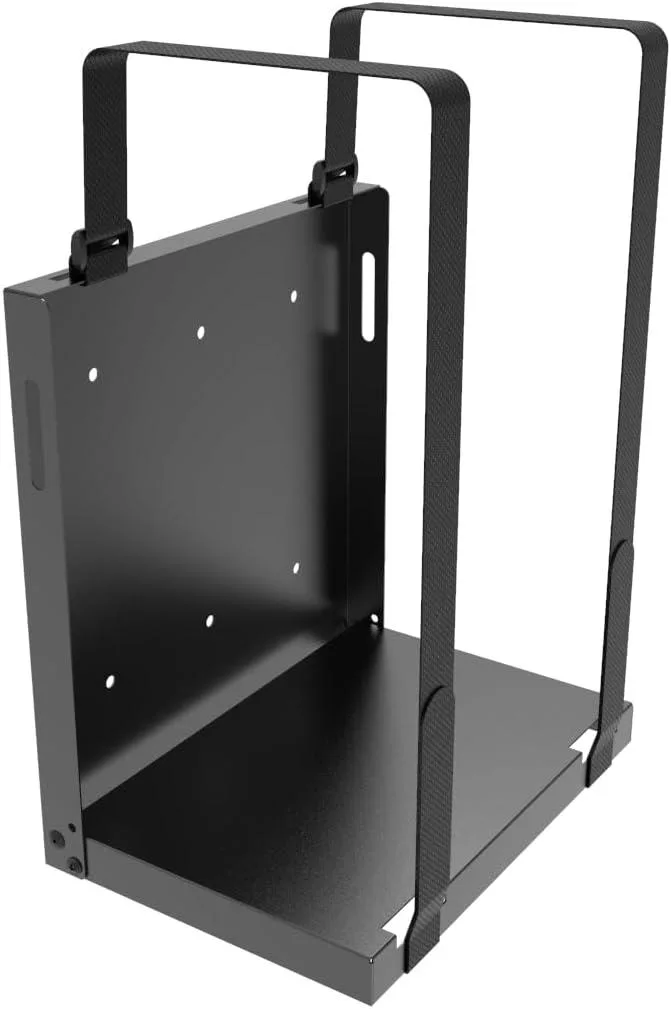
Adjustable steel bracket mounts CPUs, UPS units or towers up to 25 lbs using two 31" straps, freeing desk space with a compact 10.6" x 6.97" x 9.84" profile
This adjustable steel bracket attaches to a wall or desk side and holds a computer tower, UPS, or other electronic device up to 25 lbs. It fits hardware from brands such as HP, Dell, Acer, Apple, APC, Tripp Lite, CyberPower, Xbox, and Lenovo. The mount frees desk space and keeps equipment off the floor.
The open frame design allows unrestricted airflow around the mounted device so it runs at its normal temperature without added fan noise. The bracket itself has no moving parts and draws no power. Heat dissipation depends entirely on the installed equipment.
The unit is made of durable metal and ships almost fully assembled; only unfolding and screwing into drywall or wood studs is required. Two 31" adjustable straps secure devices within a usable space of 9.7" H x 5.9" W x 9.8" D. Included hardware covers standard mounting surfaces.
No published specifications for this item yet.
Unfold the pre-assembled bracket, locate wood studs or use the included drywall anchors, then drive the supplied screws through the four mounting holes before tightening the two 31-inch straps around the device.
The two 31-inch securing straps and the four mounting screws should be inspected periodically for wear or loosening, especially after moving the mounted device.
The 25 lb weight capacity is the primary limit; exceeding it risks bracket deformation or fastener failure under sustained load.
New to this? Buying server hardware with crypto — what to check, what it costs to pay, and what is never asked for.
Also in this aisle
Same shelf, same checkout — eight coins and a 30-minute rate lock.
What you pay in, and what you read prices in.
Sent from your wallet at checkout
Display only — the catalogue is priced in USD
No currency matches that.
Pick the language the site speaks to you in.
No language matches that.
New here?
Already have one?
There is no automatic reset: this shop sends no mail, so there is no one-time link to ask for. Leave the address on the account and it gets picked up by hand.
Request noted
Nothing is on its way to your inbox — this shop sends no mail at all. Someone picks these up by hand.
Remembered it?


