


Axiom
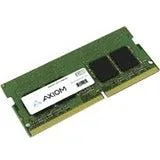
Axiom 16 GB DDR4-2666 SODIMM AX42666S19B-16G cpu accessory
A 16 GB DDR4-2666 SODIMM module that boosts laptop responsiveness and multitasking capacity while drawing 20 % less power than DDR3
- 16 GB SODIMM runs multiple applications smoothly
- DDR4-2666 / PC4-21300 delivers faster data rates
- Up to 30 % performance gain in single DIMM configurations
- 20 % less power consumed reduces cooling demands
- 100 % speed increase over DDR3 boosts responsiveness
Axiom 16 GB DDR4-2666 SODIMM
This Axiom SODIMM adds 16 GB of DDR4 memory running at 2666 MT/s. It targets laptops and compact desktops that use the PC4-21300 standard. The module is designed for users who need more capacity for multitasking and data-intensive programs.
Suits single-DIMM upgrades
Buyers who want more storage or a different memory type should look elsewhere. Systems limited to DDR3 slots cannot use this DDR4 module. The part addresses capacity and bandwidth needs for compatible platforms only.
Sustained throughput with lower voltage
DDR4 architecture delivers up to 30% better performance in single-DIMM configs and scales 65% faster in 3DPC workloads versus DDR3. A 20% power reduction cuts heat during prolonged sessions. Improved signal integrity supports stability under continuous load.
Highlights
- 16 GB SODIMM runs multiple applications smoothly
- DDR4-2666 / PC4-21300 delivers faster data rates
- Up to 30 % performance gain in single DIMM configurations
- 20 % less power consumed reduces cooling demands
- 100 % speed increase over DDR3 boosts responsiveness
Specifications
No published specifications for this item yet.
Questions about this item
Does my laptop need a DDR4 SODIMM slot to use this 16 GB module?
Yes, the module is a DDR4-2666 SODIMM and requires a compatible DDR4 SODIMM slot in the laptop or small-form-factor system.
Can this DDR4-2666 stick run alongside older DDR3 memory in the same machine?
No, DDR4 and DDR3 use different physical keys and signalling voltages, so they cannot be installed in the same slots or mixed in a single system.
How do I confirm the module is running at the rated 2666 MT/s after installation?
Check the memory speed reported in the system BIOS or a utility such as CPU-Z; it should show 2666 MT/s (PC4-21300) for the installed module.
New to this? Which coin should you pay with — what to check, what it costs to pay, and what is never asked for.
Also in this aisle
People compared these
Same shelf, same checkout — eight coins and a 30-minute rate lock.


