

Tilta Technology Co.,Ltd
Tilta Technology Co.,Ltd Mounting Bar for Boulder Camera Cart, Black
$114.99
0.00137874BTC
In stockWe take cryptocurrency — so the coins you hold can buy real hardware.Pay in crypto, spend it on real hardware. Free insured shipping worldwide over $399. Plain, unbranded boxes, sent from Germany.Free insured shipping over $399. Your rate is locked for 30 minutes once checkout opens.Rate locked 30 minutes. Every item sealed, serial-checked and covered by a 24-month warranty.Sealed, 24-month warranty.
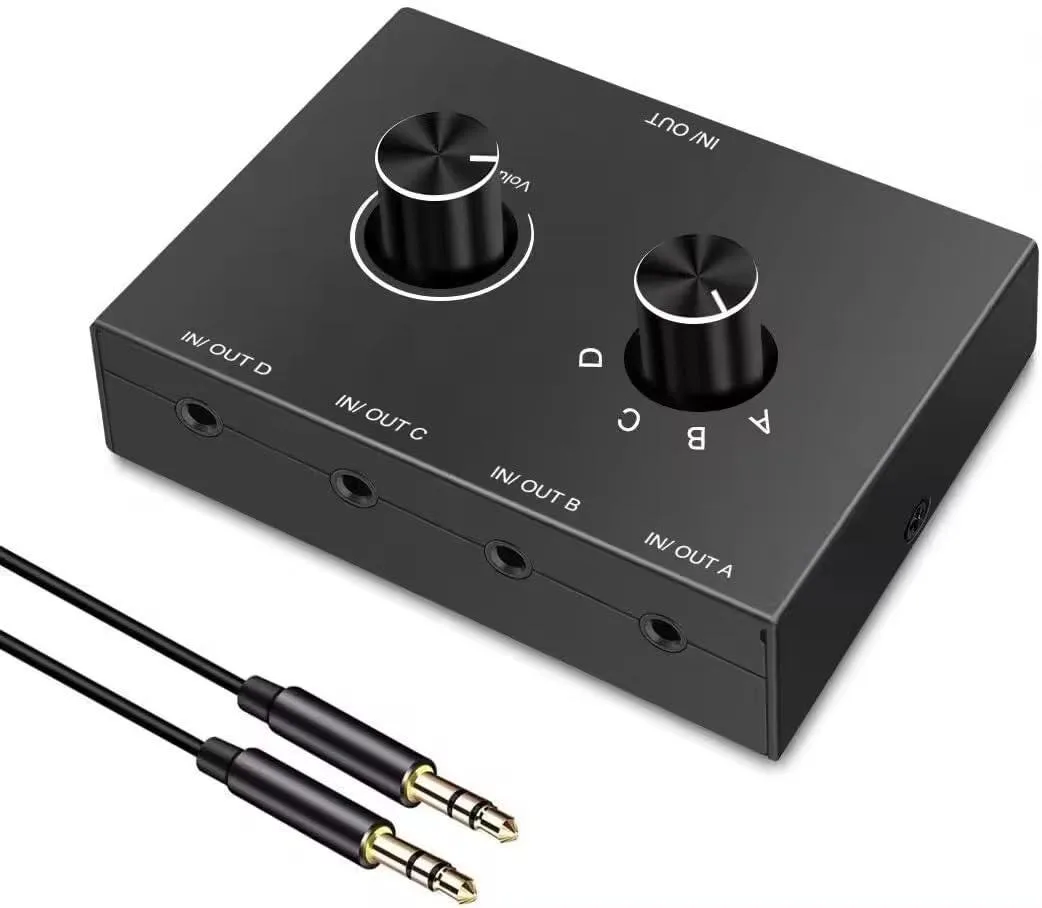


Bidirectional 3.5 mm switch routes four stereo sources to one output or one source to four outputs with selector buttons and volume control
The AVer 3.5 mm audio switch connects up to four stereo sources to one output or routes one source to four outputs. A manual selector button chooses the active channel so only one input plays at a time. Volume control is built into the unit. No external power supply is required and a 3.4 ft male-to-male cable is included.
Suits anyone who wants to switch a PC, phone, laptop or Blu-ray player between speakers, headphones or a sound bar without unplugging cables. Not for listeners who need simultaneous playback from several sources or who use four-segment headsets with inline microphones.
The single specification that decides fit is the bidirectional 4-in-1-out or 1-in-4-out stereo switching with manual A/B/C/D selection and a maximum cable run of 8 metres per channel.
| Brand | AVer |
|---|---|
| Wireless Support | 3.5mm Jack |
| Audio | 3.5mm Jack |
| SDI | 4 HD-SDI Out |
| Serial Interface | 3.5mm Jack |
| Network Interface | 3.5mm Jack |
| USB Port | 1 |
| Digital Aduio | 3.5mm Jack |
| Other Connector | 3.5mm Jack, Male-to-Male |
| Power Consumption | false |
| Power Supply | false |
| Feature | 3.5mm Jack, 15 days return |
| Weight | 0.13 pounds |
| Package Content | 1, NAKVMN, 3.5mm Jack, Male-to-Male |
Choose 4-in 1-out to switch between four sources like a computer, phone, CD player or Blu-ray player into one speaker or headphone set; choose 1-in 4-out to send one source to up to four different outputs such as speakers, headphones or a sound bar.
You can run standard 3.5 mm cables up to 8 metres between each source and the switch, and another 8 metres from the switch to each output, without signal loss or external power.
The jacks accept three-pole TRS plugs only, so they work with stereo headphones, powered speakers and line-level gear but not with four-pole headsets that carry a microphone.
Also in this aisle
Same shelf, same checkout — eight coins and a 30-minute rate lock.
What you pay in, and what you read prices in.
Sent from your wallet at checkout
Display only — the catalogue is priced in USD
No currency matches that.
Pick the language the site speaks to you in.
No language matches that.
New here?
Already have one?
There is no automatic reset: this shop sends no mail, so there is no one-time link to ask for. Leave the address on the account and it gets picked up by hand.
Request noted
Nothing is on its way to your inbox — this shop sends no mail at all. Someone picks these up by hand.
Remembered it?


