


YINGHUA
YINGHUA USB 3.0 KVM Switch 2 or 4 Port Share 4 USB Devices
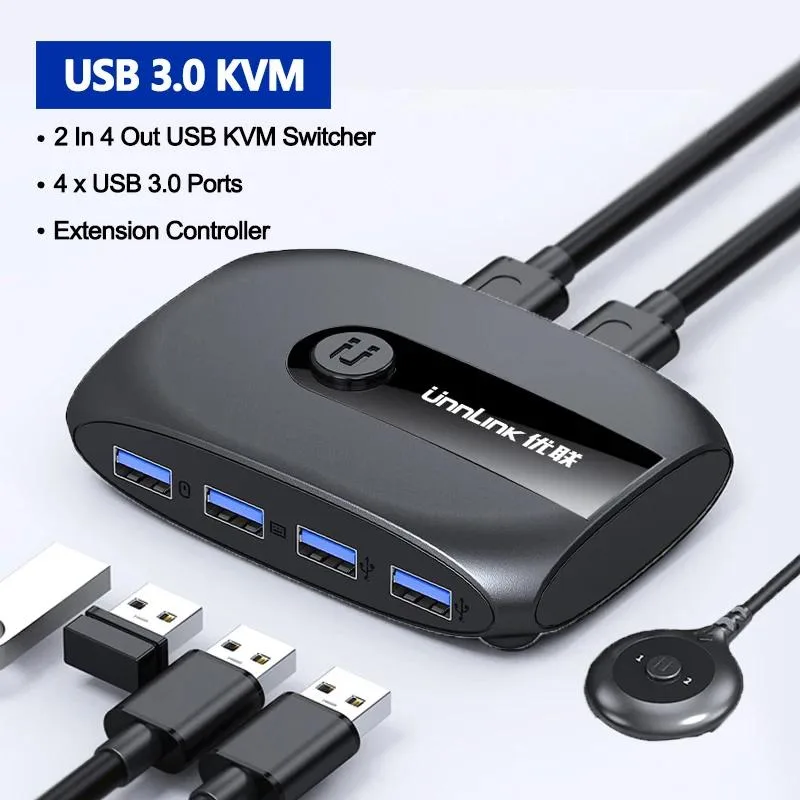
A USB 3.0 switch lets two or four computers share four peripherals such as a keyboard, mouse, flash drive and printer with one-key switching and an included remote extender
- TypeHDMI
- Share four USB devices across two or four computers
- USB 3.0 fast speed transmission for quick data transfer
- One-key switching via extender keeps desk tidy
- Plug-and-play operation with no driver installation needed
- Compatible with Windows XP, 7, 8/8.1, OS X and Linux
What this KVM switch does
The YINGHUA USB 3.0 KVM switch lets two or four computers share a single set of four USB peripherals such as a keyboard, mouse, flash drive and printer. It uses USB 3.0 for fast data transmission and includes an extender for one-key switching to keep the desk tidy. The package supplies the switch, two USB 3.0 male-to-male cables, a power cable and the extender.
Who this suits and who should look elsewhere
This device suits users who want to control multiple PCs with one keyboard and mouse without unplugging cables, and it supports Windows XP, Windows 7, Windows 8/8.1, Windows, OS X and Linux. Buyers who need to share video outputs such as HDMI or DisplayPort should look elsewhere, as this model handles USB devices only. Anyone relying on specific mice or keyboards that may have compatibility issues should be prepared to request driver files from customer service.
Capacity, headroom and limits
The switch provides four USB ports that operate synchronously, allowing a keyboard, mouse, U disk and printer to be used at the same time across the connected computers. It tops out at four shared devices and either two or four host computers depending on the chosen variant. Users needing more than four USB ports or more than four host connections will need a different solution.
Highlights
- Share four USB devices across two or four computers
- USB 3.0 fast speed transmission for quick data transfer
- One-key switching via extender keeps desk tidy
- Plug-and-play operation with no driver installation needed
- Compatible with Windows XP, 7, 8/8.1, OS X and Linux
Specifications
| Type | HDMI |
|---|
Questions about this item
Which cables do I need to connect two computers to this KVM switch?
The package includes two USB 3.0 male-to-male cables and a power cable, so you can connect both computers immediately without buying extra leads.
Will my older Windows 7 machine share the keyboard and mouse alongside a newer PC?
Yes, the switch supports Windows XP, Windows 7, Windows 8/8.1, Windows, OS X and Linux, so a Windows 7 system can share peripherals with a newer computer.
How do I confirm the switch is actively controlling the correct computer after setup?
Press the button on the included extender; the active port changes instantly, letting you verify that the keyboard, mouse and other USB devices follow the selected computer.
Also in this aisle
People compared these
Same shelf, same checkout — eight coins and a 30-minute rate lock.


Black Box Corporation
Black Box Corporation 4K60 HDMI Dual-Head KVM Switch 4 Port
$774.99
0.00912709BTC
In stock