


YINGHUA
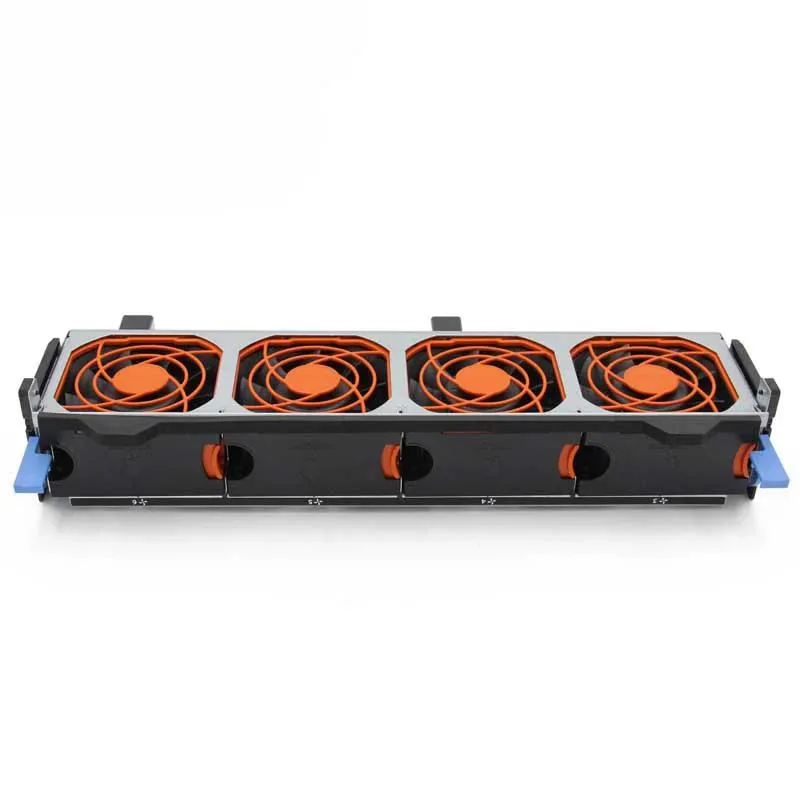
YINGHUA 56F1P 056F1P Fan Assembly for PowerEdge T630
Replacement fan assembly keeps a PowerEdge T630 server running cool and stable
- Direct replacement for PowerEdge T630 servers
- New condition ensures reliable cooling performance
- Fan assembly designed for tower and rack configurations
- 56F1P part number matches original specifications
Fan Assembly for PowerEdge T630
This replacement fan assembly is designed for the PowerEdge T630 tower and rack server. It serves as a direct spare part for the cooling system within compatible Dell server power supplies. System administrators and IT technicians use it to restore proper airflow after a fan failure. The unit is supplied new and ready for installation.
Replaces a worn or failed 56F1P fan
Swapping this assembly resolves overheating alerts and prevents thermal throttling in the T630 chassis. The upgrade is worth it when the original fan develops bearing noise, speed errors or stops spinning entirely. It is not suited for servers outside the T630 line or for workstations that use a different fan form factor.
Highlights
- Direct replacement for PowerEdge T630 servers
- New condition ensures reliable cooling performance
- Fan assembly designed for tower and rack configurations
- 56F1P part number matches original specifications
Specifications
No published specifications for this item yet.
Questions about this item
Does the 56F1P fan assembly fit the PowerEdge T630 chassis without modification?
The assembly is built for the PowerEdge T630 tower and rack server cooling system and matches the original mounting points exactly.
What is the common mistake when installing the 056F1P fan kit in the T630?
Installers often seat the connector before the bracket clips lock, leaving the fan loose; push the bracket home until it clicks, then attach the power lead.
New to this? Buying PC parts with Monero — what to check, what it costs to pay, and what is never asked for.
Also in this aisle
People compared these
Same shelf, same checkout — eight coins and a 30-minute rate lock.



Sunfounder
Sunfounder Raspberry Pi Ultimate Kit with PiCrawler AI Robot 337 components 131 projects
$174.99
0.00209855BTC
In stock
minisforum
minisforum MF-SRP01 SSD Heatsink accessories barebone
- SSD Heatsink
$6.99
0.00008383BTC
In stock