


YINGHUA
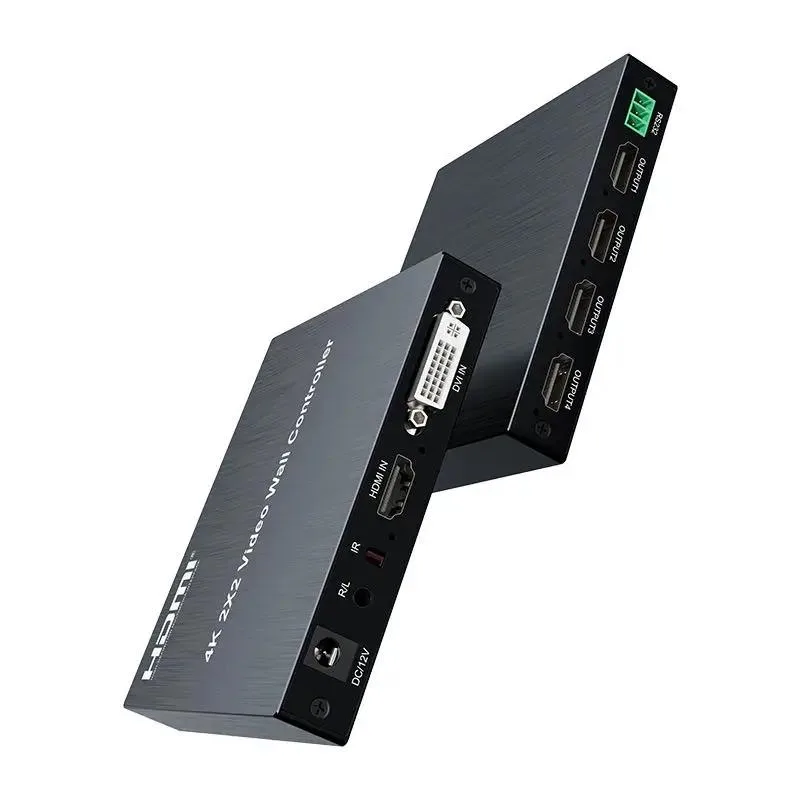
YINGHUA 4K 30Hz 2x2 DVI HDMI Video Wall Controller KVM Switch
A 2×2 video wall controller splits one HDMI or DVI source across four HDMI displays at up to 4K 30Hz or 1080p 60Hz with RS-232 control
- TypeHDMI
- Divides one HDMI or DVI signal across four displays for a 2x2 video wall
- Handles 4K at 30 Hz input and output on the 4K 30Hz version
- Delivers 1080p at 60 Hz input and output on the 1080p version
- Maintains RGB 4:4:4 colour fidelity across all four HDMI outputs
- Manages the wall via RS-232 and offers plug-and-play 2x2 auto-splicing
2×2 video wall controller
This 2×2 video wall controller splits a single HDMI or DVI source across four HDMI displays. It builds a 2×2 image wall or configures 1×2, 2×1 and 1×1 layouts. The unit handles stereo audio and offers RS232 control for integration.
Passive operation with 4K 30Hz input
The controller runs without active cooling and draws minimal power from the supplied adapter. It accepts 4K at 30 Hz or 1080p at 60 Hz on the input and mirrors that resolution on all four outputs. RGB 4:4:4 colour sampling is maintained throughout the chain.
Replaces multi-output graphics cards
Install this splicing box when a single GPU cannot drive four independent HDMI ports or when cabling length exceeds typical GPU limits. The jump is worth it for digital-signage installs, control-room walls or multi-monitor simulators that need plug-and-play 2×2 splicing without driver configuration.
Highlights
- Divides one HDMI or DVI signal across four displays for a 2x2 video wall
- Handles 4K at 30 Hz input and output on the 4K 30Hz version
- Delivers 1080p at 60 Hz input and output on the 1080p version
- Maintains RGB 4:4:4 colour fidelity across all four HDMI outputs
- Manages the wall via RS-232 and offers plug-and-play 2x2 auto-splicing
Specifications
| Type | HDMI |
|---|
Questions about this item
How do I install the YINGHUA 4K 30Hz video wall controller and which step is commonly missed?
Connect one HDMI or DVI source to the input, then link four displays to the HDMI outputs; the step often missed is selecting the correct 2x2 splicing mode via RS232 before powering on all screens.
What maintenance or replacement will this controller need over time?
The unit has no user-serviceable parts; plan to replace the AWG26 HDMI cables if runs exceed 5 metres or if signal dropouts appear after extended 4K 30Hz use.
What limit appears first during sustained 4K 30Hz operation?
The 4K 30Hz input and output ceiling is the first bottleneck; pushing higher refresh rates or resolutions beyond 4K 30Hz will cause immediate signal loss.
Also in this aisle
People compared these
Same shelf, same checkout — eight coins and a 30-minute rate lock.


Black Box Corporation
Black Box Corporation 4K60 HDMI Dual-Head KVM Switch 4 Port
$774.99
0.00917571BTC
In stock