


WRIARICH
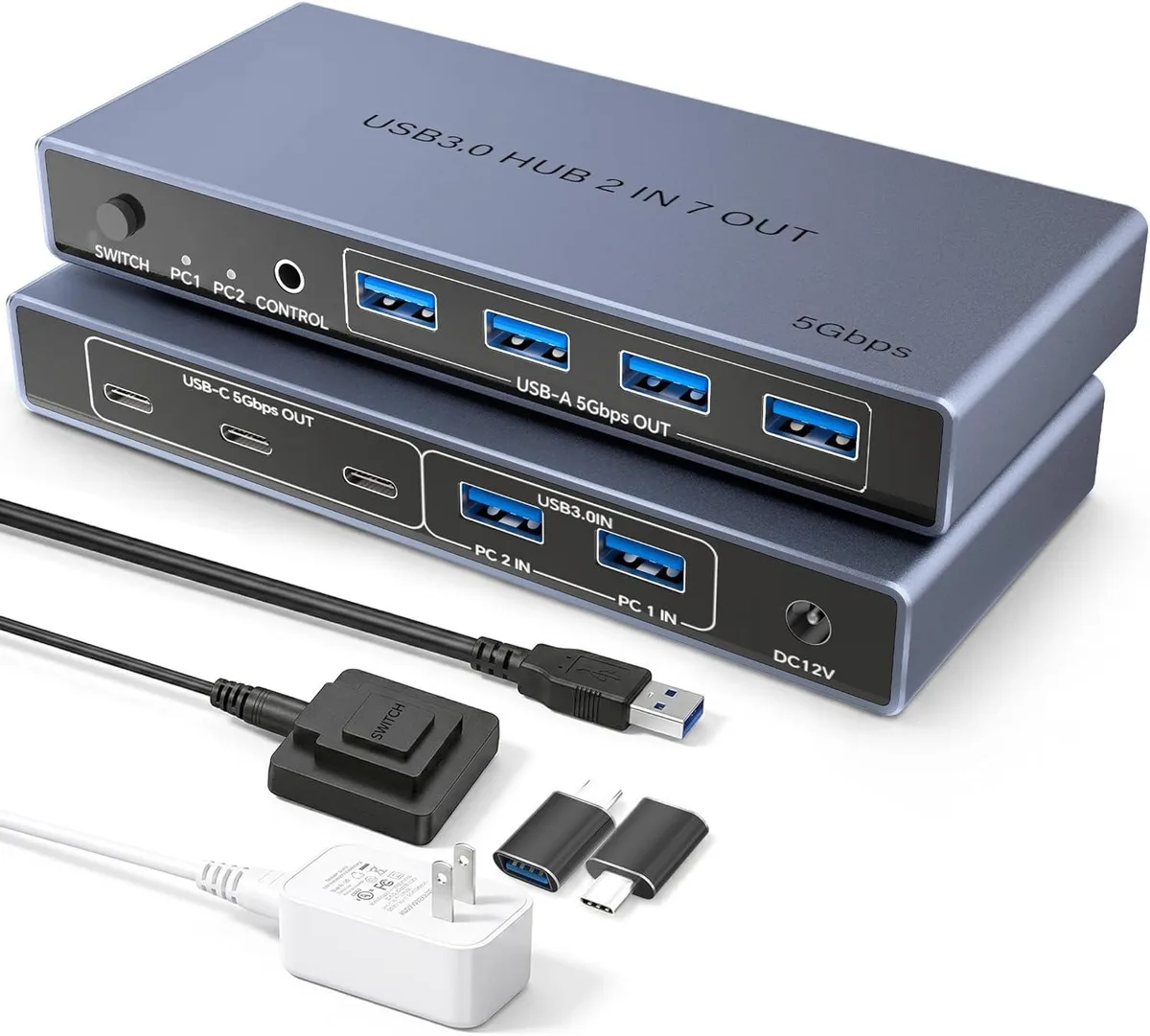
WRIARICH USB 3.0 Switch 2 in 7 Out 4 USB-A 3 USB-C
A USB 3.0 switch lets two computers share four USB-A and three USB-C peripherals with push-button or remote switching and a power adapter
- TypeUSB Switcher
- PC ConnectorsUSB 3.0
- Computer Connections2 Ports
- PC SelectionPush Buttons and Wired Remote
- LED IndicatorsYes
- Power FeaturesCome with Power Adapter
- Share 7 USB devices between two computers
- 5 Gbps USB 3.0 speed for fast data transfers
- 4 USB-A and 3 USB-C ports cover mixed peripherals
- Included power adapter keeps high-draw drives stable
- Wired remote lets you switch PCs without reaching the hub
Two-Computer USB 3.0 Switch
This USB 3.0 switch connects two computers to seven shared peripherals through four USB-A ports and three USB-C ports. It is designed for users who alternate between a work machine and a personal machine and want a single keyboard, mouse, printer and storage drives on one desk. The switch handles data traffic only and does not carry video signals. No drivers are required on Windows, macOS, Chrome OS or Linux.
Check Your Ports and Power Needs
Verify that each computer offers a USB 3.0 or USB 2.0 Type-A port for the upstream cables; the box includes two USB-C to USB-A adapters for hosts that only have Type-C sockets. The supplied power adapter must be connected when you attach bus-powered hard drives or other high-draw devices, otherwise the switch may not provide enough current for stable operation.
Desk Setup and Device Sharing
Place the switch within cable reach of both computers and plug the included wired controller where you can tap it to toggle between PC1 and PC2. The seven downstream ports stay live for the active computer, freeing you from swapping cables for keyboards, mice, printers, flash drives or external SSDs. The unit replaces multiple hubs and keeps the desktop tidy while delivering 5 Gbps bandwidth to the selected host.
Highlights
- Share 7 USB devices between two computers
- 5 Gbps USB 3.0 speed for fast data transfers
- 4 USB-A and 3 USB-C ports cover mixed peripherals
- Included power adapter keeps high-draw drives stable
- Wired remote lets you switch PCs without reaching the hub
Specifications
| Type | USB Switcher |
|---|---|
| PC Connectors | USB 3.0 |
| Computer Connections | 2 Ports |
| PC Selection | Push Buttons and Wired Remote |
| LED Indicators | Yes |
| Power Features | Come with Power Adapter |
| USB Features | Featuring 4 USB-A ports and 3 USB-C ports, this USB switch lets you connect all your peripherals – keyboard, mouse, printer, flash drive, external hard drive, and more – without constantly plugging and unplugging cables. |
| Application | Maximize your workspace efficiency with our USB 3.0 switcher, allowing two computers to share up to 7 USB devices simultaneously. |
| Package Contents | 1× USB 3.0 Switch, 1× Power Adapter, 1× Controller, 2× USB-C to USB-A Adapter, 1× User Manual. |
Questions about this item
What comes in the box and do I need to buy any cables separately?
The box contains the USB 3.0 switch, a power adapter, a wired controller, two USB-C to USB-A adapters and a user manual. Two USB 3.0 cables for connecting the computers are included, so no extra cables are required.
Should I pick the 4 USB-A or the 3 USB-C ports for my keyboard and mouse?
Both port types share the same 5Gbps bandwidth. Use the 4 USB-A ports for standard peripherals like keyboards and mice, and the 3 USB-C ports for newer devices; the included adapters let you mix either connector.
Will the 5Gbps speed hold up when I connect an external SSD to one of the 7 ports?
The switch supports 5Gbps USB 3.0 data transfer and is backward compatible with 2.0 and 1.1 devices. The included power adapter provides stable power for high-draw drives, so the SSD will run at full 5Gbps speed.
Also in this aisle
People compared these
Same shelf, same checkout — eight coins and a 30-minute rate lock.


Lenovo
Lenovo 42T3273 Black Replacement Keyboard for ThinkPad T60 T61
- Thinkpad T60 T61 Ke…
- Black
$29.99
0.00035702BTC
In stock