


WRIARICH
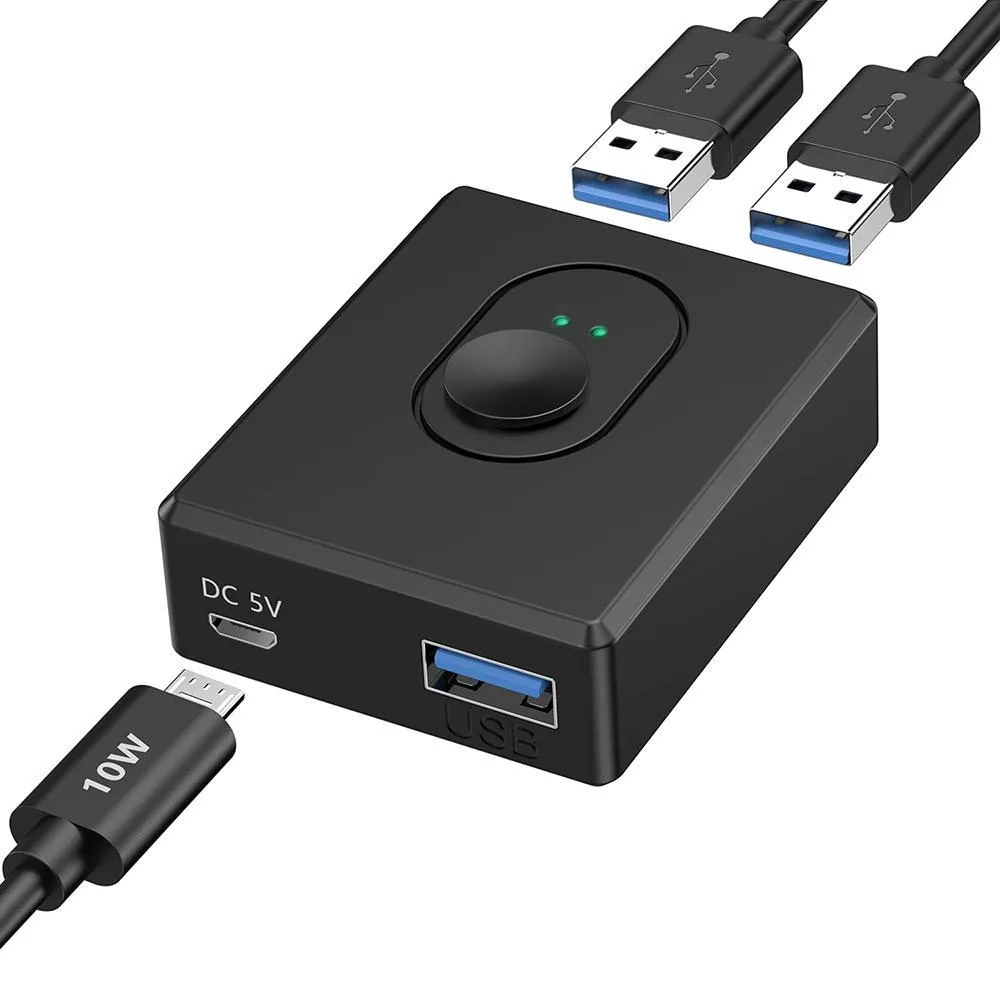
WRIARICH USB 3.0 Bi-Directional KVM Switch 2 PC 10 W
Bi-directional USB 3.0 switch shares one peripheral between two computers or two devices on one computer with a manual button, 5 Gbps transfer and a 10 W power port for stable operation
- TypeUSB
- PC Connectors2 PC
- PC SelectionManual Switch
- LED IndicatorsYes
- Power FeaturesRequires no additional power supply
- USB Featureswith USB support
- Share one USB 3.0 device between two PCs with a single button press
- Use two USB peripherals on one computer by flipping the same switch
- Transfer files at up to 5 Gbps thanks to USB 3.0 support
- 10 W micro USB port keeps power-hungry hubs and drives stable
- Works driver-free on Windows, Mac OS, Linux and Chrome OS
Bi-Directional Two-PC Sharing
This USB 3.0 KVM switch lets two computers share a single peripheral or one computer alternate between two devices. A manual button toggles the active connection without software installation. It suits home offices, developers and streamers who move a keyboard, mouse or printer between a desktop and a laptop. The compact unit weighs 190 g and draws power from the host ports.
Replaces Cable Swapping
The switch removes the need to unplug and replug USB cables when changing workstations. It upgrades a manual hub that requires physical reconnection by providing instant one-click selection. The jump is worth it when you switch several times a day and want to avoid wear on ports. No driver is required for Windows, Mac OS, Linux or Chrome OS.
Sustained 5 Gbps Throughput
Under continuous load the link maintains up to 5 Gbps transfer rates for large files and high-bandwidth peripherals. The included 10 W micro USB power port stabilises operation when a bus-powered hub or demanding device is attached. A 1 m micro USB power cable is supplied; the power adapter itself is not included. LED indicators show the active channel at all times.
Highlights
- Share one USB 3.0 device between two PCs with a single button press
- Use two USB peripherals on one computer by flipping the same switch
- Transfer files at up to 5 Gbps thanks to USB 3.0 support
- 10 W micro USB port keeps power-hungry hubs and drives stable
- Works driver-free on Windows, Mac OS, Linux and Chrome OS
Specifications
| Type | USB |
|---|---|
| PC Connectors | 2 PC |
| PC Selection | Manual Switch |
| LED Indicators | Yes |
| Power Features | Requires no additional power supply |
| USB Features | with USB support |
| Application | The USB switch allows you to switch between two computers with one click to share a USB 3.0 peripheral. Or switch between using 2 USB devices for one computer. Very suitable for mouse, keyboard, USB hub, printer, car and other devices. |
| Features | Bi-directional USB switch 2 PC: The USB switch allows you to switch between two computers with one click to share a USB 3.0 peripheral. Or switch between using 2 USB devices for one computer. Very suitable for mouse, keyboard, USB hub, printer, car and other devices. 5Gbps data transfer: One of the main features of this USB switch is its high-speed data transfer capability. By supporting USB 3.0, you can transfer data at up to 5 Gbps, which is more than ten times faster than the previous USB 2.0 standard. This means you can transfer large files and HD movies in just a few seconds, ma |
| Dimensions | 4 x 2 x 5 cm |
| Weight | 190 g |
| Package Contents | USB 3.0 switch / 2 USB 3.0 A to A cable (1 m) / micro USB cable (power cable) / 1 m / instruction manual |
Questions about this item
How much desk space does the 4 x 2 x 5 cm switch need?
The unit measures 4 x 2 x 5 cm and weighs 190 g, so it fits in a tight corner or behind a monitor stand without blocking adjacent ports.
Which cable do I plug in first when setting up the bi-directional switch?
Connect the two supplied 1 m USB 3.0 A-to-A cables to the PCs, attach your peripheral to the shared port, then add the micro USB power cable only if the device draws more than the bus can supply.
When should I use the included 10 W micro USB power port?
Plug the 1 m micro USB cable into a 10 W charger whenever you connect a powered hub, high-draw drive or multiple peripherals so the switch maintains stable 5 Gbps operation.
Also in this aisle
People compared these
Same shelf, same checkout — eight coins and a 30-minute rate lock.


Black Box Corporation
Black Box Corporation 4K60 HDMI Dual-Head KVM Switch 4 Port
$774.99
0.00922014BTC
In stock