


WRIARICH
WRIARICH SW523 KVM Switch 4K 120Hz 13-in-1 Dock Wired Remote
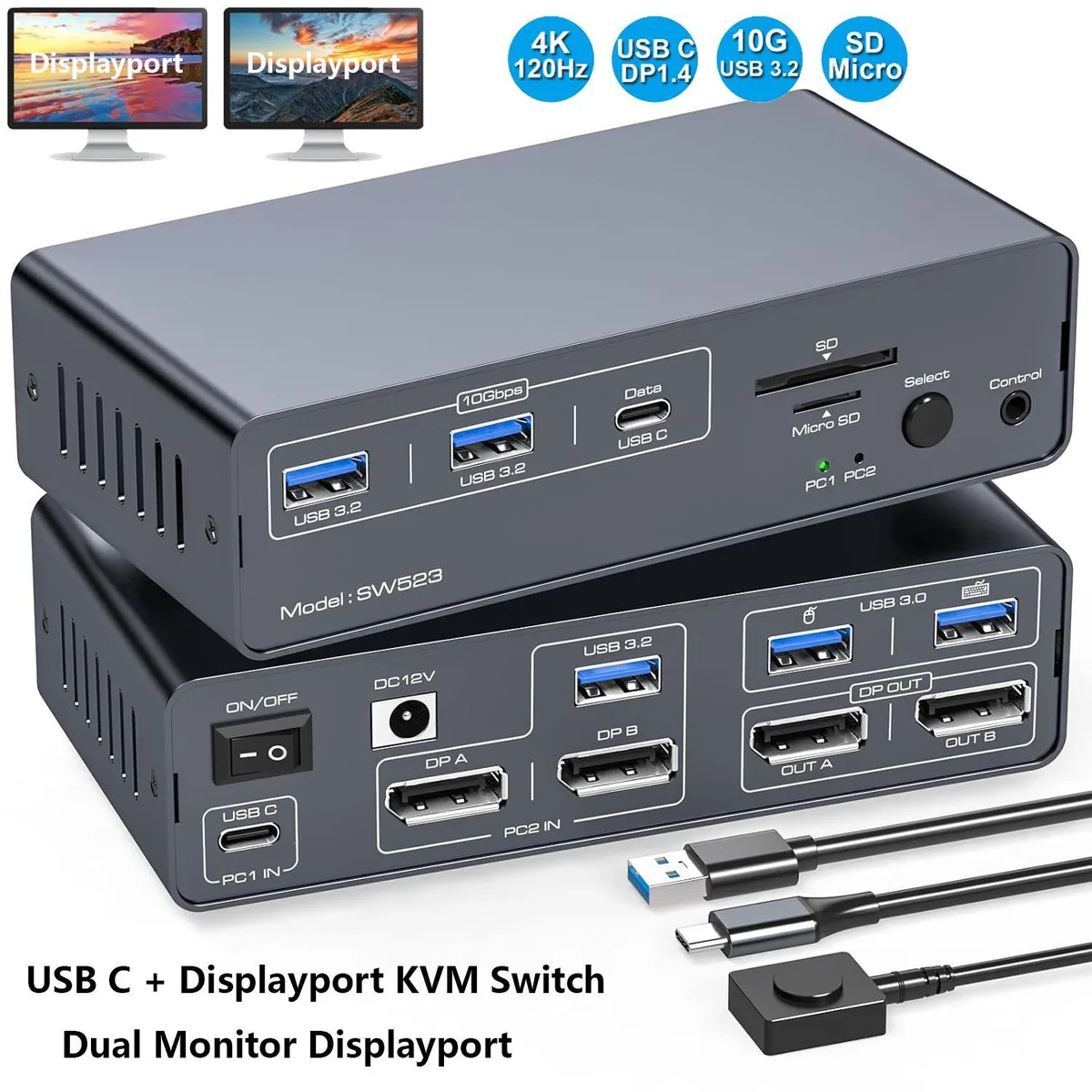
A 13-in-1 KVM switch and dock shares two 4K 120 Hz DisplayPort monitors, keyboard, mouse and high-speed USB peripherals between two USB-C or DisplayPort computers.
- TypeUSB C, Displayport
- PC ConnectorsUSB C, Displayport
- Computer Connections2 Ports
- Monitor Connections2 Ports Displayport
- Video Resolution4K 120Hz
- PC SelectionPush Buttons and Wired Remote
- Switch two computers with one dual-monitor dock
- 4K 120Hz video over DisplayPort for sharp motion
- 13-in-1 port array reduces cable clutter
- 10 Gbps USB 3.2 and USB-C data ports on front
- Wired remote and push buttons for instant PC selection
Dual-Monitor KVM Dock for Two Computers
This KVM switch lets two USB-C or DisplayPort computers share two monitors, a keyboard, a mouse and a 13-in-1 dock. It is aimed at users who split time between a work laptop and a personal desktop and want a single desk setup without constant cable swapping. A wired remote and front push buttons both change the active system.
4K 120Hz DisplayPort Video
The single specification that decides fit is the dual DisplayPort output locked to 4K at 120 Hz. Each connected computer must supply video over DisplayPort or a USB-C port that supports Thunderbolt 3 or higher; HDMI-only or lower-bandwidth USB-C ports will not drive both screens at the rated resolution and refresh rate.
13-in-1 Connectivity and Limits
The dock adds USB 3.0 ports for keyboard and mouse, 10 Gbps USB 3.2 and USB-C data ports on the front, plus SD and microSD slots for fast card access. Front USB-C is data only, with no power delivery or video. The 12 V adapter powers the switch and downstream devices, but the unit cannot charge a laptop or pass video through the front USB-C port.
Highlights
- Switch two computers with one dual-monitor dock
- 4K 120Hz video over DisplayPort for sharp motion
- 13-in-1 port array reduces cable clutter
- 10 Gbps USB 3.2 and USB-C data ports on front
- Wired remote and push buttons for instant PC selection
Specifications
| Model | SW523 |
|---|---|
| Type | USB C, Displayport |
| PC Connectors | USB C, Displayport |
| Computer Connections | 2 Ports |
| Monitor Connections | 2 Ports Displayport |
| Video Resolution | 4K 120Hz |
| PC Selection | Push Buttons and Wired Remote |
| Monitors Supported | Displayport, Displayport |
| LED Indicators | Yes |
| Power Features | with 12V Power Adapter |
| USB Features | with USB support |
| Application | The docking station allows USB C laptops and desktop computers to share a 13-in-1 multi-port docking station; you can share two monitors, a mouse, and a keyboard and switch seamlessly between your work laptops and personal computers, saving space and keeping your desktop neat and tidy, eliminating the need for repeated plugging and unplugging and improving work efficiency. Note: The computer's USB-C port needs to support Thunderbolt 3 or higher |
| Features | The combination of multifunctional ports of the KVM docking station simplifies complex tasks to a great extent.USB 3.0 ports for mouse and keyboard;10Gbps USB 3.2 and USB-C data transfer ports on the front panel for more high-speed usb devices;The SD card slot and Micro SD card slot provide faster data transfer methods. |
| Dimensions | 14x7x4cm |
| Weight | 300g |
| Package Contents | KVM Switch X 1; DC12V Power Adapter X1; USB-C-C Cable X1; UAB3.0 A-A Cable X1; Desktop Controller X1; User's Manual X1 |
Questions about this item
What does the 4K 120Hz rating mean when I connect two monitors to this KVM?
Both DisplayPort outputs can run at 4K resolution and 120Hz refresh rate simultaneously, provided each source computer supports that mode over its USB-C or DisplayPort connection.
Which interface standard limits the 10Gbps USB ports on the front panel?
The front USB-C and USB-A ports operate at USB 3.2 Gen 2 speeds, capped at 10Gbps for data only; the USB-C port does not carry power delivery or video.
What does the unit need to sit on a desk and connect to two computers?
It measures 14x7x4cm, weighs 300g, and includes a 12V power adapter, one USB-C-to-C cable and one USB 3.0 A-to-A cable for the two PC links.
Also in this aisle
People compared these
Same shelf, same checkout — eight coins and a 30-minute rate lock.


Black Box Corporation
Black Box Corporation 4K60 HDMI Dual-Head KVM Switch 4 Port
$774.99
0.00914561BTC
In stock