


WRIARICH
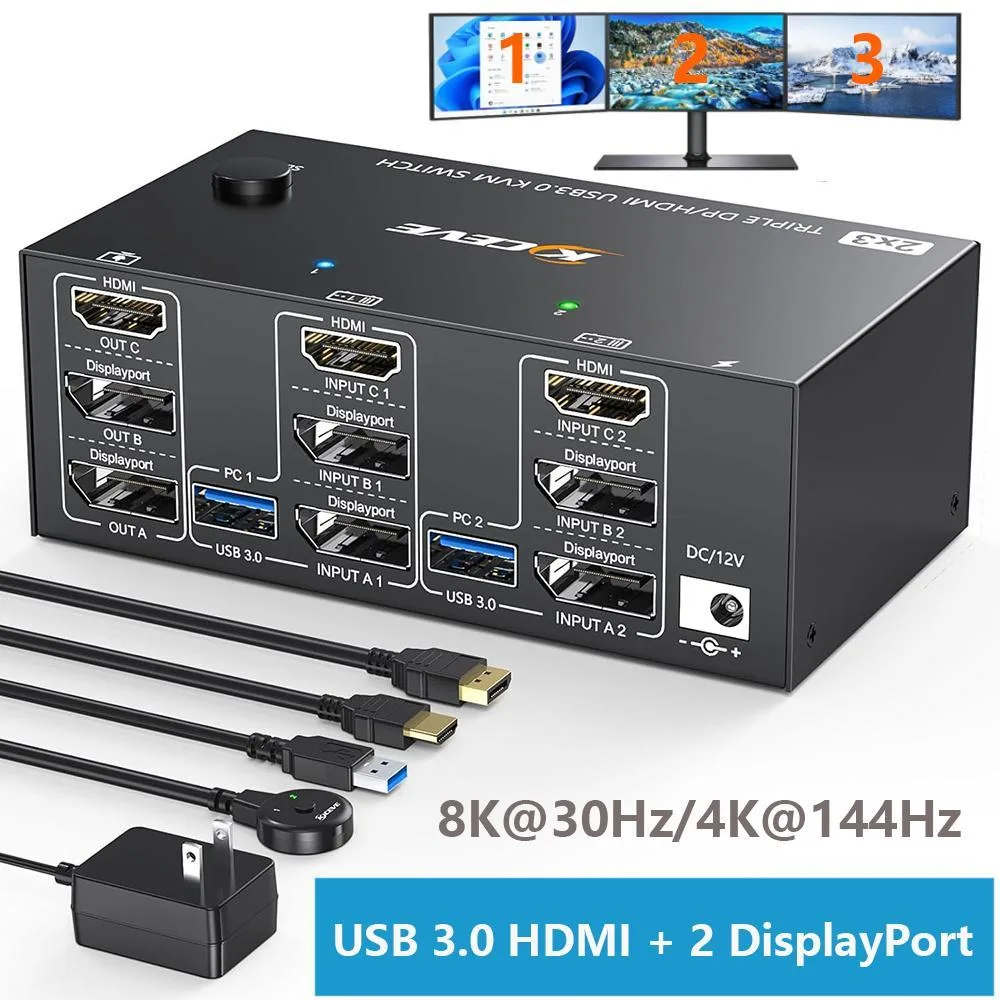
WRIARICH HDMI + 2 DisplayPort KVM Switch 2 PCs 3 Monitors 8K@30Hz/4K@144Hz
A KVM switch that lets two computers share three monitors at up to 8K@60 Hz and four USB 3.0 peripherals, switched by front buttons or wired remote
- TypeHDMI, Display
- PC Connectors2 PCs
- Computer Connections2 Ports
- Monitor Connections3 Ports
- Video Resolution8K@30Hz/4k@144Hz
- PC SelectionPush Buttons
- Control 2 PCs with one keyboard and mouse using 3 monitors
- View 8K at 30 Hz or 4K at 144 Hz on three displays
- Connect four USB 3.0 peripherals at 5 Gbps speeds
- Switch instantly via front buttons or wired remote
- Works with Windows, Linux and Mac without drivers
Triple-Monitor KVM for Two PCs
This WRIARICH KVM switch lets one keyboard, one mouse and three displays control two computers. It provides one HDMI and two DisplayPort outputs so each system can drive up to three monitors in extended or mirrored modes. Four USB 3.0 ports share peripherals such as printers or storage at up to 5 Gbps. The unit is aimed at multi-monitor workstations and streaming setups that need instant PC switching.
Verify Triple-Display Output on Both Systems
Each computer must be able to drive three simultaneous displays to use all three monitor ports. Check that your graphics hardware or integrated graphics supports the required number of video outputs and the target resolutions. The switch requires no external power supply, drawing what it needs from the attached USB cables. Confirm that your OS — Windows, Linux or Mac — recognises multi-monitor configurations without extra drivers.
Wired Remote and Cables Included for Desk
The package supplies two DisplayPort cables, one HDMI cable, two USB cables, a wired remote and a power adapter for optional use. Buttons on the unit and the remote both switch the active PC in two to four seconds. Four USB 3.0 ports free up motherboard headers by consolidating keyboard, mouse and accessory connections. LED indicators show the selected computer at a glance.
Highlights
- Control 2 PCs with one keyboard and mouse using 3 monitors
- View 8K at 30 Hz or 4K at 144 Hz on three displays
- Connect four USB 3.0 peripherals at 5 Gbps speeds
- Switch instantly via front buttons or wired remote
- Works with Windows, Linux and Mac without drivers
Specifications
| Type | HDMI, Display |
|---|---|
| PC Connectors | 2 PCs |
| Computer Connections | 2 Ports |
| Monitor Connections | 3 Ports |
| Video Resolution | 8K@30Hz/4k@144Hz |
| PC Selection | Push Buttons |
| Monitors Supported | 3 Monitors HDMI + 2 Displayport |
| LED Indicators | Yes |
| Power Features | Requires no additional power supply |
| USB Features | with USB support |
| Application | This KVM switch allow you to control 2 computers by only one set of wired or wireless keyboard mouse, share 4 USB 3.0 devices and 3 monitors. Only when your computer supports 3 display or multi display, you can use this KVM to achieve 2 PC to share 3 monitors.Unique design makes the desktop more tidy, say goodbye to cluttered cables and improve your productivity. |
| Features | KVM Switch Triple Monitor Supports a maximum of 8K@60Hz(7680*4320), 4K@60Hz (3840 × 2160) Ultra HD image quality, and also supports other lower. USB 3.0 KVM Switch with 4 integrated USB 3.0 ports for keyboard, mouse, printer and other USB devices. Supports ultra-fast USB 3.0 data transfer, data transfer speeds up to 5Gbps. KVM switch support physical button and wired control. You can press the button on the panel or use the wired remote to switch the computers. LED light indicates which computer is running. |
| Dimensions | 4.92 x 5.91 x 1.77 inches |
| Weight | 260g |
| Package Contents | 1 x KVM Switch, 2 x DP Cable, 1 x HD-MI Cable, 2 x USB Cable, 1 x Wired Remote, 1 x Power Adapter, 1 x User Manual |
Questions about this item
What cables and accessories are included so I know what to buy separately?
The box contains the KVM switch, two DisplayPort cables, one HDMI cable, two USB cables, a wired remote, a power adapter and a user manual. No extra cables are required for a basic two-computer, three-monitor setup.
How do I decide which video ports to use for 8K at 60 Hz versus 4K at 144 Hz?
The single HDMI output delivers 8K at 60 Hz (7680 × 4320) while each DisplayPort output handles 8K at 30 Hz; 4K at 144 Hz is available on all three outputs provided the connected PCs and monitors support those modes.
What does the 8K 60 Hz rating mean when the switch is connected to real hardware?
When a source and monitor both support HDMI 8K 60 Hz, the HDMI port passes the full 7680 × 4320 at 60 Hz signal; the two DisplayPort ports pass 8K at 30 Hz, and all ports fall back to lower resolutions such as 4K at 144 Hz automatically.
Also in this aisle
People compared these
Same shelf, same checkout — eight coins and a 30-minute rate lock.


Black Box Corporation
Black Box Corporation 4K60 HDMI Dual-Head KVM Switch 4 Port
$774.99
0.00933768BTC
In stock