

WMtec
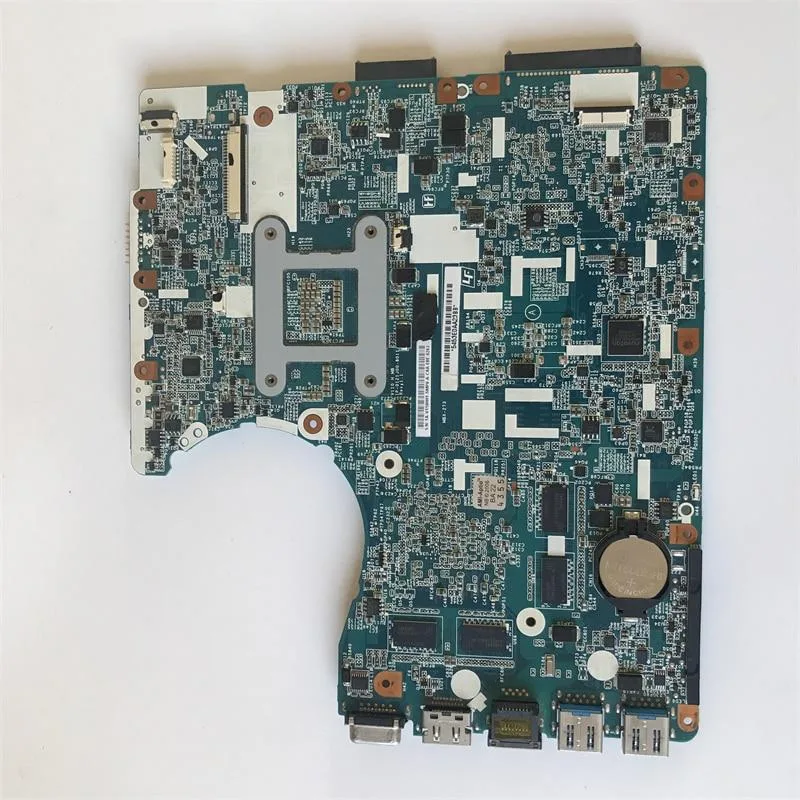
WMtec SVE14A E14135YCW Motherboard HM76 HD 7600M GPU laptop replacement part
Replacement motherboard with HM76 chipset and HD 7600M discrete graphics for compatible laptops
- CPU TypeIntel Xeon E5
- HM76 chipset supports Intel Xeon E5 processors
- Discrete HD 7600M GPU handles graphics workloads
- Direct fit for SVE14A E14135YCW laptop models
- Replaces part numbers MBX-276 and MBX-273
- New replacement motherboard restores system function
Direct replacement for SVE14A E14135YCW laptops
This motherboard carries part numbers A1898130A, 1P-0127500-8010, MBX-276 and MBX-273. It is built on the HM76 platform with a discrete HD 7600M graphics processor and supports an Intel Xeon E5 CPU. The unit is supplied new and ready for service work on the matching chassis.
Suited to technicians restoring a SVE14A E14135YCW
It matches the exact board revisions listed above, so it fits the original mounting points and connector layout. Builders needing a different chipset, a different GPU or a board for another laptop series should look elsewhere because this part will not align with those configurations.
Installation follows the standard laptop teardown
Remove the battery, disconnect the display and I/O cables, then unseat the cooling assembly before swapping the board. Common issues include forgotten cable routing, thermal-paste omission and screw-length mismatches, any of which can prevent POST or cause overheating.
Highlights
- HM76 chipset supports Intel Xeon E5 processors
- Discrete HD 7600M GPU handles graphics workloads
- Direct fit for SVE14A E14135YCW laptop models
- Replaces part numbers MBX-276 and MBX-273
- New replacement motherboard restores system function
Specifications
| CPU Type | Intel Xeon E5 |
|---|
Questions about this item
Which laptop chassis and display assembly must I already own for this HM76 motherboard to fit?
This board is built for the SVE14 and SVE14A series, specifically the E14135YCW model, so the original 14-inch chassis, screen, keyboard and palm-rest are required.
Can I reuse the existing HM76 heatsink and fan from my current board with this replacement?
The MBX-276 and MBX-273 board revisions share the same mounting points and thermal layout, so the original heatsink and fan assembly will bolt straight on.
How do I confirm the on-board HD 7600M graphics are active after installation?
Boot the laptop, open Device Manager and verify that the display adapter lists the HD 7600M; the Xeon E5 processor should also appear under Processors.
Also in this aisle
People compared these
Same shelf, same checkout — eight coins and a 30-minute rate lock.


Kensington
Kensington Desk Mount Cable Anchor K64613WW accessory
- Black
- Provides a secure a…
$19.99
0.00023817BTC
In stock
Panasonic
Panasonic CF-VDR291U laptop cooling pad
- Optical Drive
- Buffer Size: 2 MB B…
$213.99
0.00254959BTC
In stock
eReplacements
eReplacements PB992A-ER laptop battery 14.4V
- Battery
- Lithium-Ion
$65.99
0.00078624BTC
In stock