


Wavlink
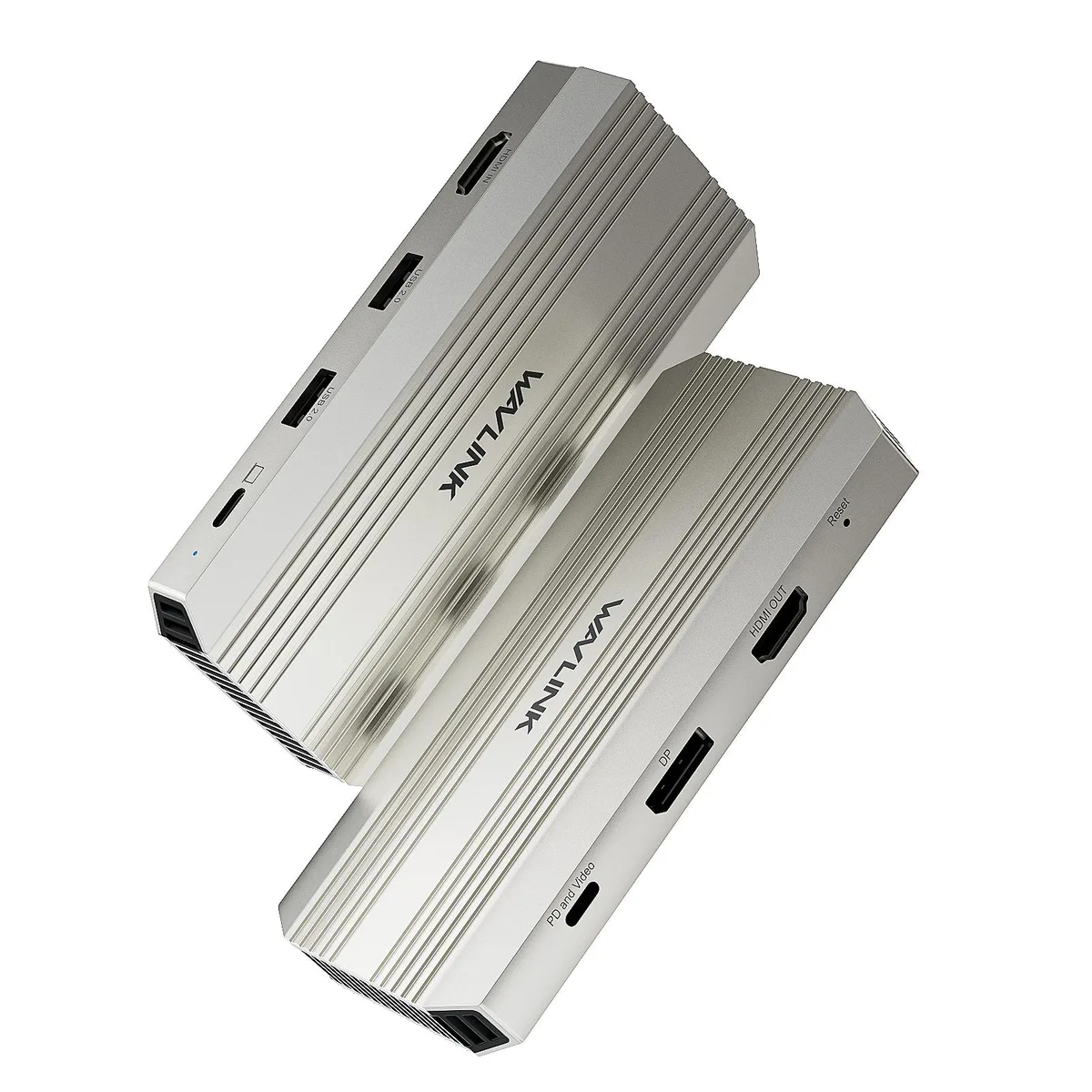
Wavlink WL-VR204 video capturing device
Captures 4K at 30 Hz via HDMI and USB-C, loops out the same signal, and adds a 4K 144 Hz display output with 90 W charging passthrough
- ColorSilver Gray
- CompatibilityDesigned for seamless integration. This device is compatible
- Ports SpecFront: HDMI IN port (4K@30Hz); 2 x USB 2.0 port (up to 480Mb
- Features- Supports capturing every detail of gameplay, streaming vid
- Capture 4K@30Hz gameplay with low-latency HDMI loop-out
- Output a single 4K@144Hz HDR display via DisplayPort or USB-C
- Deliver 90W PD passthrough to keep laptops charged during sessions
- Connect PS5, Xbox, Switch, cameras and USB-C laptops with broad OS support
- Add two USB 2.0 ports at 480Mbps for peripherals while streaming
Capture and Dock Hybrid
The Wavlink WL-VR204 combines a 4K@30Hz video capture card with a multi-port USB-C docking station. It targets solo creators, gamers and remote workers who need to record gameplay from a PS5, Xbox or Switch while simultaneously driving a high-refresh external display and charging their laptop through a single connection.
Interface and Bandwidth Limits
Capture input is capped at 4K@30Hz via HDMI IN or the USB-C host port, and the two cannot operate at the same time. Video output reaches a single 4K@144Hz HDR stream through either DisplayPort or the PD and Video USB-C port, but not both simultaneously. The laptop USB-C port must support DisplayPort Alt Mode 1.4 and Power Delivery for full function. Two front USB 2.0 ports provide 480 Mbps peripheral bandwidth.
Upgrade Path and Trade-offs
This device replaces a separate capture dongle plus a basic USB-C hub, consolidating capture, display output, peripheral expansion and 90W pass-through charging into one unit. The jump is worthwhile when you need simultaneous low-latency loop-out monitoring and high-refresh external display output. It is not for users who require dual extended displays on macOS, simultaneous HDMI IN and USB-C host capture, or capture rates above 30Hz.
Highlights
- Capture 4K@30Hz gameplay with low-latency HDMI loop-out
- Output a single 4K@144Hz HDR display via DisplayPort or USB-C
- Deliver 90W PD passthrough to keep laptops charged during sessions
- Connect PS5, Xbox, Switch, cameras and USB-C laptops with broad OS support
- Add two USB 2.0 ports at 480Mbps for peripherals while streaming
Specifications
| Brand | Wavlink |
|---|---|
| Model | WL-VR204 |
| Color | Silver Gray |
| Compatibility | Designed for seamless integration. This device is compatible with Windows, macOS. Supports popular software like OBS Studio, Zoom, and Teams. Connects effortlessly with PS5, Xbox, Switch, cameras, and most USB-C laptops. Ensure your laptop's USB-C port supports DisplayPort Alt Mode (DP1.4+ recommended) & PD for full functionality. |
| Ports Spec | Front: HDMI IN port (4K@30Hz); 2 x USB 2.0 port (up to 480Mbps); USB-C Host (4K@30Hz); Rear: PD and Video port (Single 4K@144Hz,PD IN 100W); DP port (Single 4K@144Hz); HDMI OUT port (4K@30Hz). |
| Features | - Supports capturing every detail of gameplay, streaming video, live broadcasts with one 4K@30Hz HDMI IN and one USB-C host. - Supports loop-out for an immersive and clear viewing experience with a 4K@30Hz HDMI OUT. - Supports working with third party software to capture or stream your HD game or other HD video sources and enhance your workflow with ultra-low latency technology. - Supports up to a single 4K@144Hz extend with one DP, one PD and Video port. - Supports PD passthrough IN 100W for capture card and 90W charging for upstream USB-C host with one USB-C PD. - Supports stable a |
Questions about this item
Should I choose the HDMI input or the USB-C host for 4K capture?
They cannot operate together; if both are connected the HDMI input takes priority and captures at 4K@30Hz.
What does the 4K@30Hz capture figure mean when I am actually streaming?
You can record or broadcast gameplay or camera footage at 4K resolution and 30 frames per second with low latency, using uncompressed YUY2 video over USB 3.0.
Which display output should I use for 4K@144Hz, the DisplayPort or the PD and Video USB-C port?
Only one can drive video at a time; pick either the DisplayPort or the PD and Video port for a single 4K@144Hz HDR screen, and the other serves solely as power input.
Also in this aisle
People compared these
Same shelf, same checkout — eight coins and a 30-minute rate lock.


WRIARICH
WRIARICH HDMI to USB/Type-C Video Capture Device 4K 1080P 60FPS Black
- HDMI
- 4K
$35.99
0.00041558BTC
In stock

Blackmagic Design Pty. Ltd.
Blackmagic Design ATEM SDI Live Production Switcher
$278.99
0.00322156BTC
In stock