
Wavlink
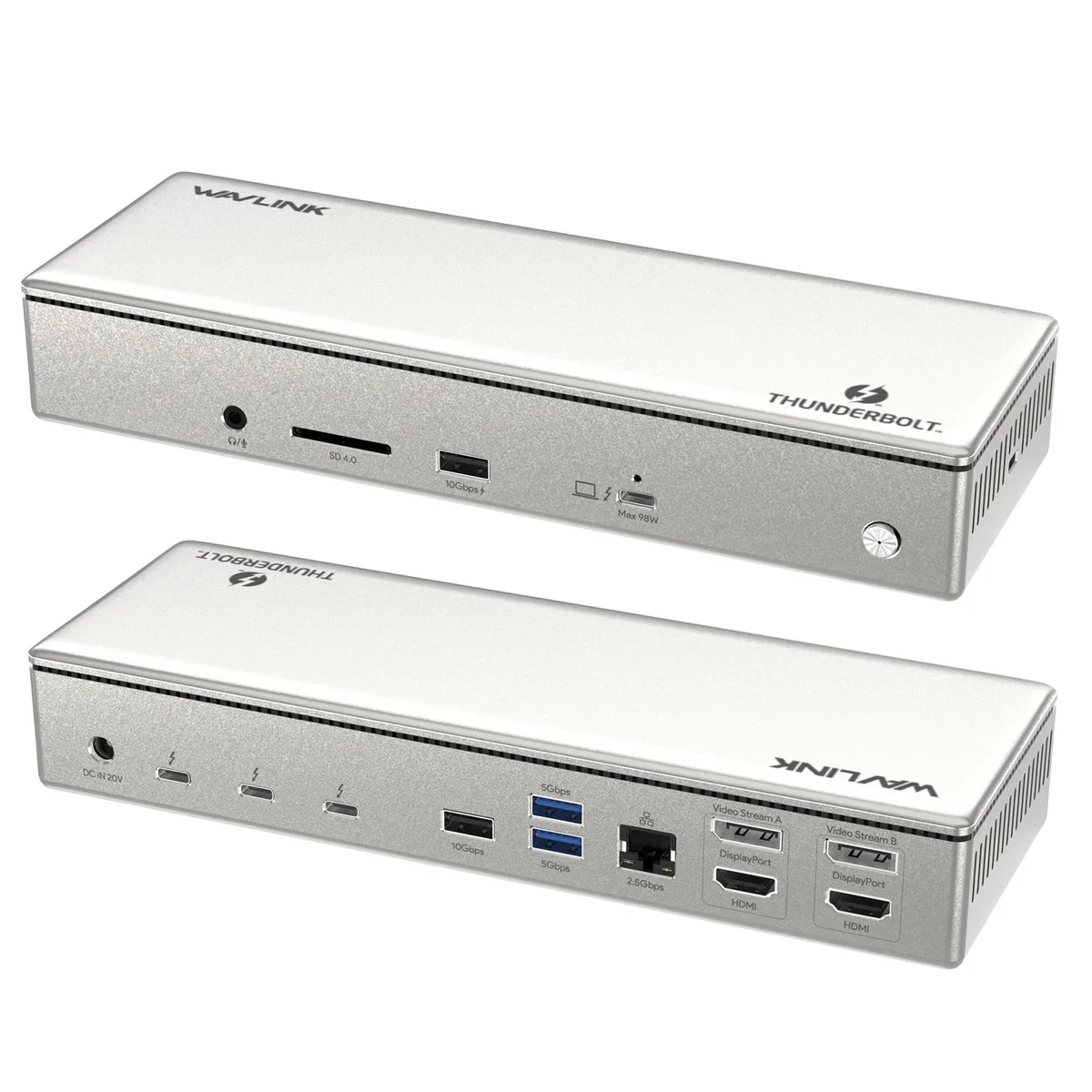
Wavlink V1C43EA Thunderbolt 4 Docking Station 98W 40Gbps
- Silver
- Thunderbolt 4
$168.99
0.00199107BTC
In stockWe take cryptocurrency — so the coins you hold can buy real hardware.Pay in crypto, spend it on real hardware. Free insured shipping worldwide over $399. Plain, unbranded boxes, sent from Germany.Free insured shipping over $399. Your rate is locked for 30 minutes once checkout opens.Rate locked 30 minutes. Every item sealed, serial-checked and covered by a 24-month warranty.Sealed, 24-month warranty.


Wavlink
A 13-port Thunderbolt 4 dock adds single 8K or triple 4K video, 40 Gbps data, 2.5 GbE, SD 4.0 cards and 96 W laptop charging
Option Thunderbolt 4 - Triple Monitor
The Wavlink V1C43EA is a 13-in-1 Thunderbolt 4 docking station built for laptops that need maximum display and data throughput from a single cable. It targets creative professionals and power users who run Windows 10 or 11 or macOS 11 and later on Thunderbolt 3, Thunderbolt 4 or full-feature USB4 hosts.
This dock fits setups that demand a single 8K screen at 60 Hz or up to three 4K screens at 60 Hz, plus 2.5 GbE wired networking, fast card ingest at 312 MB/s and up to 96 W laptop charging. It is not for buyers whose Macs use M1 or M2 silicon because those chips only drive one external monitor, nor for anyone whose host lacks Thunderbolt or full-function USB-C with DisplayPort alt-mode and power delivery.
The package includes a 0.8 m Thunderbolt 4 cable and a 160 W power brick, so desk placement is straightforward and the upstream port can deliver the full 96 W charge. The main friction points are macOS display limits: M1 and M2 Macs cannot extend to a second screen, M3 Macs require the lid closed for dual-display operation, and using both HDMI ports on any Mac mirrors the image instead of extending it.
| Brand | Wavlink |
|---|---|
| Model | WL-UTD45 |
| Part Number | Front Panel: 1x 4-Pole Phone Jack; SD/TF Card Slots(312MB/s), 1x USB-C(10Gbps, PD 30W), 1x USB-A 10Gbps, 1x Thunderbolt 4 Host(40Gbps, 96W); Rear Panel: 1x DC IN (20V/8A, 160W); 2x 8K HDMI; 1x Thunderbolt 4 Downstream(8K, 40Gbps, 15W); 1x USB-A 10Gbps; 2x USB-A 5Gbps; 1x RJ45(2500Mbps) |
| Color | Silver |
| Compatibility | Compatible Systems -Thunderbolt 4 PC running Windows 10/11. -Thunderbolt 3/4 Mac running Mac OS 11 or later. -Compatible with Other USB4 and MFDP Hosts (Full-functional USB-C, supports DisplayPort+USB3.1+Power Delivery) |
| Thunderbolt 3 | Thunderbolt 4 |
| Ports Spec | Windows Unleashes 8K Brilliance: Dive into breathtaking 8K visuals on Windows with a single display setup. *MacBook limits to 4K@60Hz in single display mode due to hardware constraints. Blazing 40Gbps TBT4 Speeds: Harness the power of the Thunderbolt 4 interface for lightning-fast data transfers at an impressive 40Gbps, ensuring seamless connectivity. Single/Multi-4K Display: Enjoy crisp triple 4K@60Hz visuals in single or multiple display modes both on Windows and Mac OS, enhancing your viewing experience. Versatile Charging Options: Keep your devices juiced up efficiently with 96W |
| Features | - 1*TBT 4 downstream and 2*HDMI 2.1 provide single 8K@60Hz and triple 4K@60Hz video output. - TBT 4 upstream port transfers speed up to 40Gb/s and supports a smart Max. 96W upstream charging. - TBT 4 downstream port transfers speed up to 40Gb/s and supports Max. 8K@60Hz and PD 15W charging. - 1*USB-C transfers speed up to 10Gbps and provides PD 30W downstream charging. - 2*USB-A transfer speed up to 10Gbps and 2*USB-A transfer speed up to 5Gbps. - 2.5G RJ45 Ethernet provides high-speed wired network and is backward compatible with 1000/100/10Mbps network. - Built-in SD 4.0 card reade |
| Function | Warm Tips 1.M1/M2 based Macs only support single monitor. 2.For M3-based Macs, pls close the host screen to support dual display. 3.Using two HDMI ports for multiple displays on Mac will show mirrored content. 4.Single 8K@60Hz is enabled for Windows TBT4 PC with DP 1.4 or higher and DSC. 5.MacBook limits to 4K@60Hz in single/dual/triple display mode due to hardware constraints. 6. Performance may be limited for non-Thunderbolt 4 systems. 7. The downstream Thunderbolt 4 port and the USB-C PD port support offline charging. Devices can be charged when disconnected from the computer or w |
| Content | 1 x Thunderbolt 4 Triple Display Docking Station 1 x 0.8M Thunderbolt 4 Cable 1 x 160W Power Adapter 1 x AC Power Cable 1 x Cable Holder 1 x Quick Start Guide |
Other versions of this model
Same family, different memory, cooler or clock — compare before you commit.
Yes, the Thunderbolt 4 host port requires a Thunderbolt 4 or Thunderbolt 3 laptop running Windows 10/11 or macOS 11 or later to deliver 40Gbps data and up to 96W power.
No, on M1 and M2 Macs the dock supports only a single external monitor; using both HDMI ports will show mirrored content.
Connect a Thunderbolt 4 device to the downstream port and check the OS link speed or power meter — it should report 40Gbps capability and up to 15W charging.
Also in this aisle
Same shelf, same checkout — eight coins and a 30-minute rate lock.
What you pay in, and what you read prices in.
Sent from your wallet at checkout
Display only — the catalogue is priced in USD
No currency matches that.
Pick the language the site speaks to you in.
No language matches that.
New here?
Already have one?
There is no automatic reset: this shop sends no mail, so there is no one-time link to ask for. Leave the address on the account and it gets picked up by hand.
Request noted
Nothing is on its way to your inbox — this shop sends no mail at all. Someone picks these up by hand.
Remembered it?


