

Wavlink
Wavlink WL-UG39DK3 USB 3.0 Dual Monitor Docking Station
- Black
- System Support: Win…
$64.99
0.00077879BTC
In stockWe take cryptocurrency — so the coins you hold can buy real hardware.Pay in crypto, spend it on real hardware. Free insured shipping worldwide over $399. Plain, unbranded boxes, sent from Germany.Free insured shipping over $399. Your rate is locked for 30 minutes once checkout opens.Rate locked 30 minutes. Every item sealed, serial-checked and covered by a 24-month warranty.Sealed, 24-month warranty.


Wavlink
Universal laptop dock adds dual 4K monitors, six USB 3.0 ports and Gigabit Ethernet over a single USB-C or USB-A link
Color Black
Option Dual Monitor - 2xDP + 2xHDMI
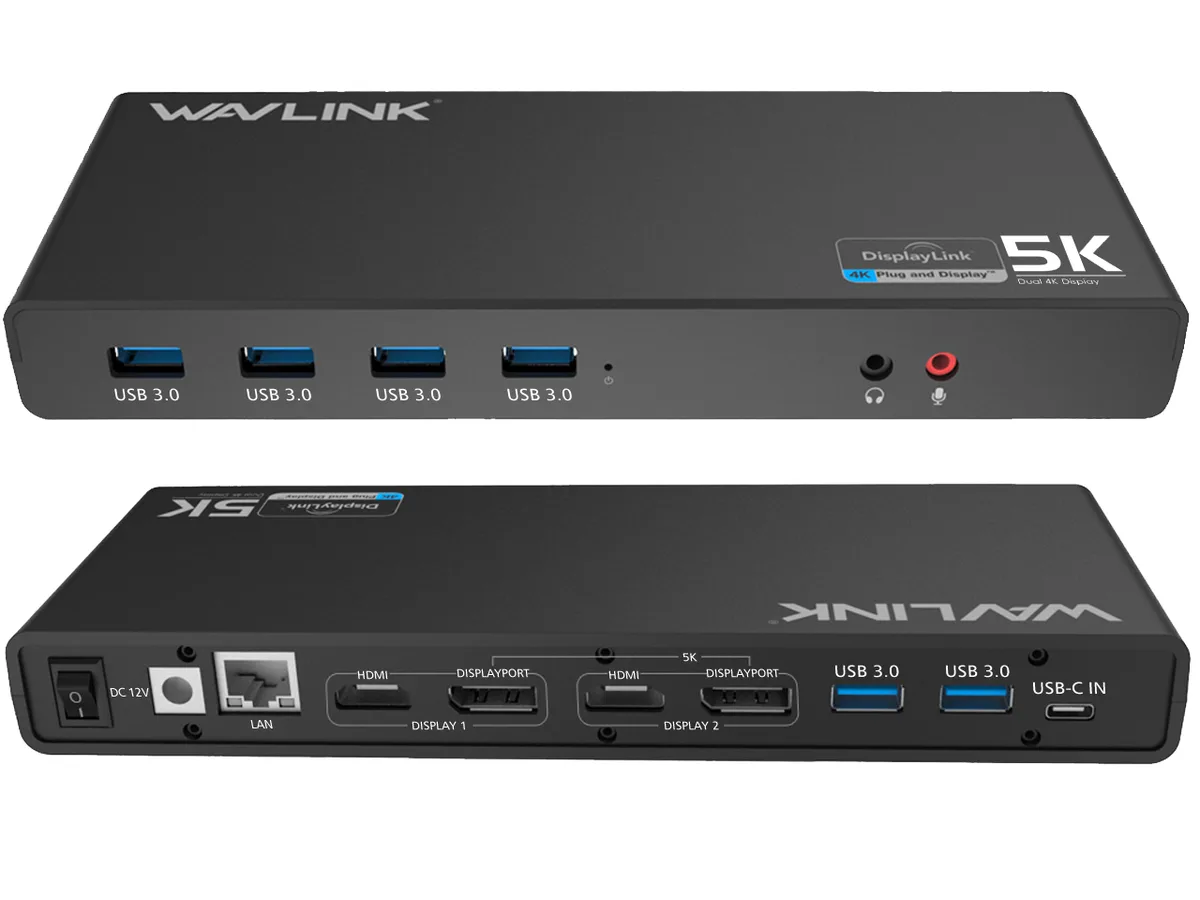
The Wavlink UG69DK1 docking station connects to laptops and desktops through USB Type-C or Type-A ports using a single cable. It adds two external monitors, six USB 3.0 peripherals, Gigabit Ethernet and audio connections for home office, education or entertainment setups. The dock does not charge the host laptop.
This dock replaces basic video adapters or single-monitor hubs when a user needs dual 4K outputs or a single 5K display at 60 Hz. The jump is worth it for productivity workflows that require extended desktop space across two screens. It is not suited for gaming or high-motion video playback because the DisplayLink driver relies on CPU rendering.
All video, data and Ethernet traffic shares the host USB 3.0 link capped at 5 Gbps, so sustained 4K 60 Hz on both monitors plus heavy USB storage transfers can saturate the bus. macOS 10.14 or later and Windows 7 through 11 are supported with driver installation; Linux, Unix and Surface RT are not supported.
| Brand | Wavlink |
|---|---|
| Model | UG69DK1 |
| Color | Black |
| Compatibility | Support for Apple M1/M2 and Intel Macs (with macOS 10.14 or later) .Support Windows 11, 10, 8.x, and 7 with driver installation.Surface RT, Linux/Unix are not supported. (see Display Link website for more details).Docking station is suggested for use with web and productivity software; not recommended for gaming,video playback, 2D/3D graphic tools. |
| Ports Spec | 6 x USB 3.0 ports give you access to SuperSpeed data transfer rates of up to 5Gbps.Integrates 2 HDMI & 2 DP Dual Video Outputs, Gigabit Ethernet, Audio out and Mic in are also offers enhanced your laptop's performance capabilities |
| Dimension | 5.91" x 7.87" x 3.15" |
| Features | USB3.1 Gen1 Type-C and Type-A connectors compatible with Type-C/A laptops Built-in USB3.0 GPU, plug and display certified by DisplayLink 2 x DisplayPort++ (Dual Mode DisplayPort 1.2) and 2 x HDMI (Version 2.0) support resolution up to dual (4K)4096 x 2160@60Hz/(5k)5120x1440@60hz Support resolution (5K)5120 x 2880p60 when dual dp ports are connected Supports extend and mirror video modes. 5.1 channel surround sound through DisplayPort interface Gigabit Ethernet network RJ-45 backwards compatible with 10/100 Ethernet 2.0 Audio Line-out Jack for earphone and line-in Jack microphone 6 x |
Other versions of this model
Same family, different memory, cooler or clock — compare before you commit.
The unit measures 5.91 inches wide, 7.87 inches deep and 3.15 inches high, so allow roughly a 6 by 8 inch footprint on the desk.
Download and run the latest DisplayLink driver from displaylink.com/downloads before connecting the dock; the dock will not activate its video outputs until that driver is present.
Reinstall the current DisplayLink driver after any macOS upgrade, because system updates frequently remove the kernel extension that drives the dock's video outputs.
Also in this aisle
Same shelf, same checkout — eight coins and a 30-minute rate lock.
What you pay in, and what you read prices in.
Sent from your wallet at checkout
Display only — the catalogue is priced in USD
No currency matches that.
Pick the language the site speaks to you in.
No language matches that.
New here?
Already have one?
There is no automatic reset: this shop sends no mail, so there is no one-time link to ask for. Leave the address on the account and it gets picked up by hand.
Request noted
Nothing is on its way to your inbox — this shop sends no mail at all. Someone picks these up by hand.
Remembered it?


