microMICR Corporation
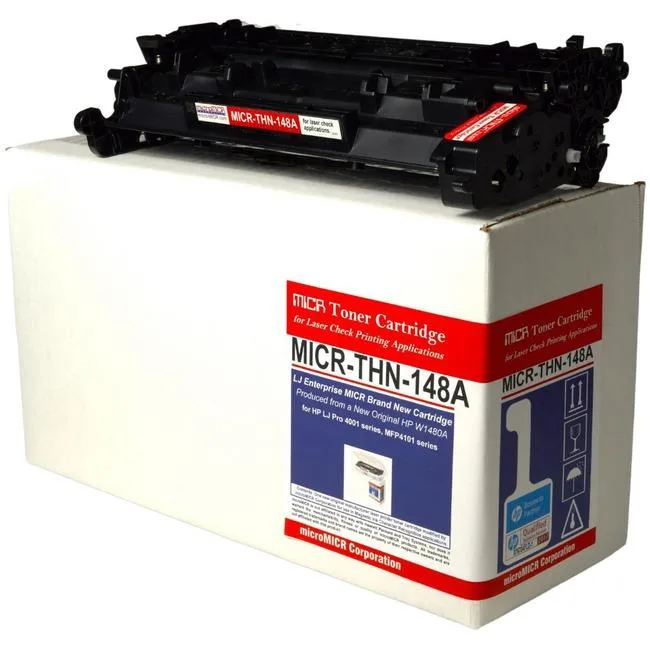
microMICR High Yield MICR Toner Cartridge 9500 Pages Black W1480A
$258.99
0.00302962BTC
In stockWe take cryptocurrency — so the coins you hold can buy real hardware.Pay in crypto, spend it on real hardware. Free insured shipping worldwide over $399. Plain, unbranded boxes, sent from Germany.Free insured shipping over $399. Your rate is locked for 30 minutes once checkout opens.Rate locked 30 minutes. Every item sealed, serial-checked and covered by a 24-month warranty.Sealed, 24-month warranty.


Vszerda
Connects a USB 3.0 computer to a VGA display for dual-screen working, supporting 1920x1080 resolution on USB 3.0 and 800x600 on USB 2.0, compatible with Windows 7 through 10
This Vszerda adapter connects a USB-enabled laptop or desktop to a VGA monitor, projector or HDTV for a multi-monitor setup. It suits Windows users who need an extra display for split-screen work or mirrored presentations. Chromebook, Linux and macOS systems are not supported.
When plugged into a USB 3.0 port the adapter delivers up to 1920x1080 at 60 Hz; on USB 2.0 the resolution falls to 800x600 at 60 Hz. A built-in driver must be installed before first use to enable the higher resolution mode.
The device draws power directly from the USB connection with no external supply required. Operation is silent because there are no moving parts, and thermal output is negligible during normal extended-screen use.
No published specifications for this item yet.
The adapter delivers up to 1920x1080 at 60 Hz over USB 3.0, matching the native 1080p timing of most VGA displays and projectors.
USB 3.0 provides enough throughput for 1080p60; if the host falls back to USB 2.0 the adapter drops to 800x600 at 60 Hz because the bus cannot sustain higher pixel rates.
It plugs into a standard USB-A 3.0 port and requires no external power, so it fits any laptop or desktop with an available Type-A socket.
Also in this aisle
Same shelf, same checkout — eight coins and a 30-minute rate lock.
What you pay in, and what you read prices in.
Sent from your wallet at checkout
Display only — the catalogue is priced in USD
No currency matches that.
Pick the language the site speaks to you in.
No language matches that.
New here?
Already have one?
There is no automatic reset: this shop sends no mail, so there is no one-time link to ask for. Leave the address on the account and it gets picked up by hand.
Request noted
Nothing is on its way to your inbox — this shop sends no mail at all. Someone picks these up by hand.
Remembered it?