


Vszerda
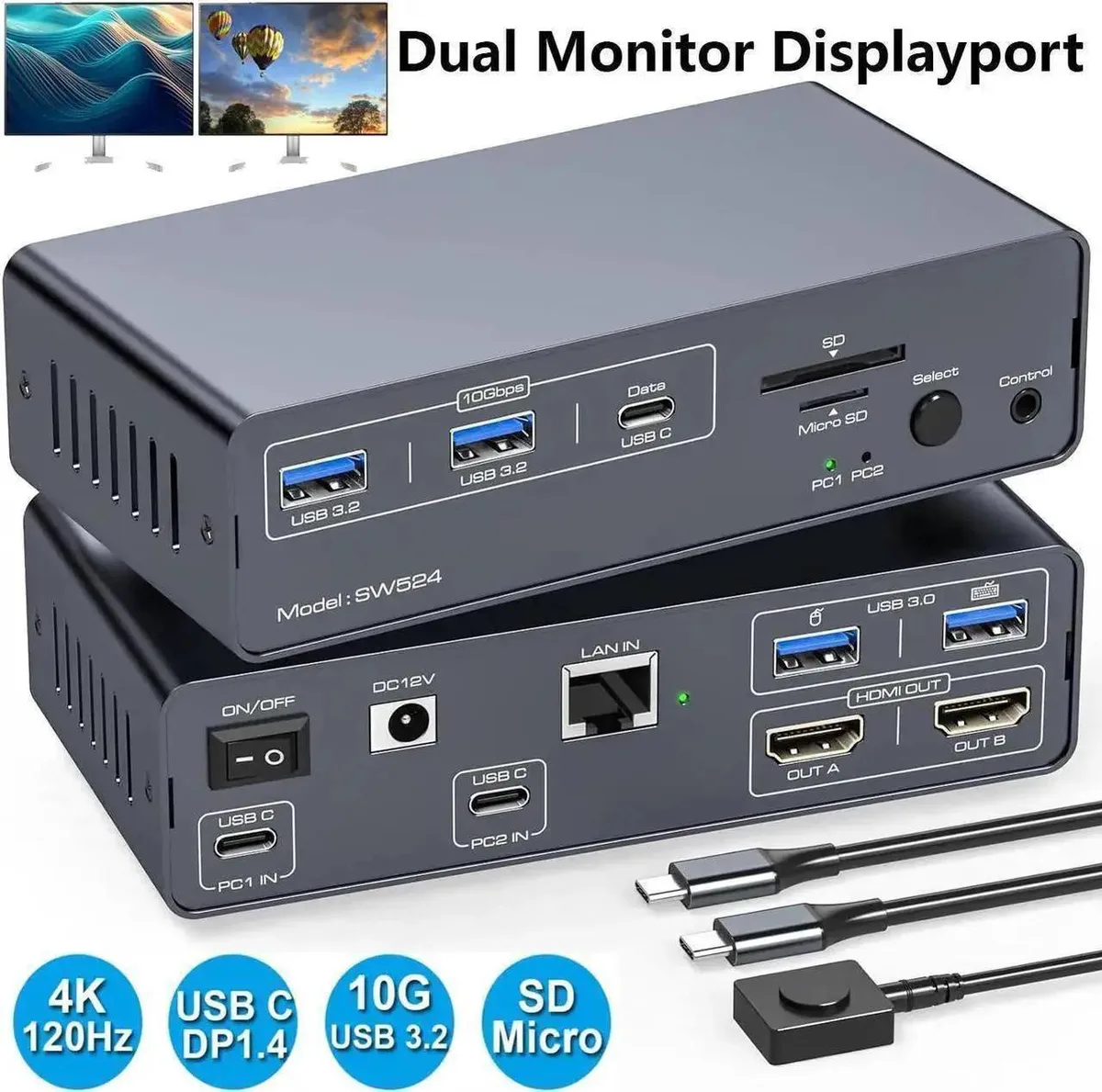
Vszerda 13-in-1 USB-C DP KVM Switch 4K 120Hz
Share two 4K 120 Hz monitors and 13 peripherals between a laptop and desktop with one keyboard and mouse
- Share two computers on dual monitors via USB-C and DisplayPort inputs
- 4K 120Hz output on both displays with backward compatibility
- 13-in-1 dock adds three 10Gbps USB 3.2 ports plus SD and Micro SD slots
- Mirrored or extended desktop modes for flexible workflows
- Front panel and wired remote buttons for instant switching
13-in-1 USB-C DP KVM Switch
This Vszerda KVM switch lets one laptop and one desktop share two DisplayPort monitors plus a full set of USB peripherals. It targets professionals and creators who move between a portable Mac or Windows machine and a stationary workstation without unplugging cables. The single USB-C MST input handles the laptop side while a combined DP and USB-A link serves the desktop, giving instant two-computer control from one keyboard and mouse.
120 Hz 4K output with bus power
Dual 4K 120 Hz video streams run over the DisplayPort links and the unit draws its operating power from the included 12 V adapter, so the host computers are not burdened. Front-panel buttons and a wired remote provide silent, instant switching with no audible fan or coil noise in normal office use. Backward compatibility covers 4K 60 Hz, 1440p and 1080p displays automatically.
10 Gbps USB 3.2 and SD slots on a compact dock
Three 10 Gbps ports (two Type-A, one Type-C) plus two USB 3.0 ports and dedicated SD and Micro SD readers give broad peripheral connectivity in a desktop-friendly footprint. The package supplies one-meter USB-C Gen 2 and USB 3.0 cables plus a desktop control kit, so cable reach suits typical side-by-side laptop and tower layouts without extra extensions.
Highlights
- Share two computers on dual monitors via USB-C and DisplayPort inputs
- 4K 120Hz output on both displays with backward compatibility
- 13-in-1 dock adds three 10Gbps USB 3.2 ports plus SD and Micro SD slots
- Mirrored or extended desktop modes for flexible workflows
- Front panel and wired remote buttons for instant switching
Specifications
No published specifications for this item yet.
Questions about this item
How do I connect my laptop and desktop to the 13-in-1 KVM so both can drive the two DisplayPort monitors?
Plug the laptop into the single USB-C MST input and the desktop into the integrated dual-DisplayPort plus USB-A input; then connect each monitor to a DisplayPort output and press the front-panel or remote button to switch the active host.
Which parts of the 13-in-1 KVM will need replacement first under daily switching?
The mechanical front-panel switch and the external push-button are the only moving parts; the 12 V power adapter and the supplied 1-metre USB 3.2 Gen 2 and USB 3.0 cables are the components most likely to wear out over time.
What resolution and refresh-rate ceiling will I hit first when running both monitors continuously?
The KVM caps each DisplayPort output at 3840×2160 at 120 Hz, so sustained dual-monitor use cannot exceed 4K 120 Hz per screen; higher refresh rates or resolutions are not supported.
Also in this aisle
People compared these
Same shelf, same checkout — eight coins and a 30-minute rate lock.


Black Box Corporation
Black Box Corporation 4K60 HDMI Dual-Head KVM Switch 4 Port
$774.99
0.0090586BTC
In stock