
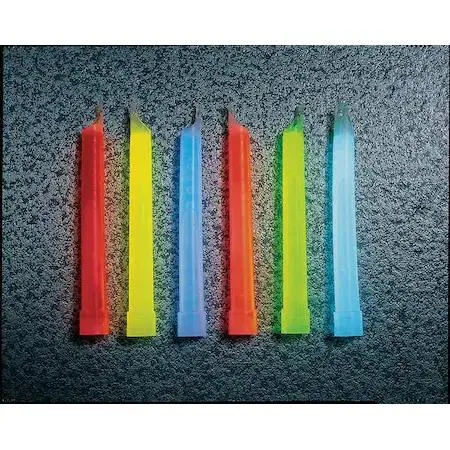
Chemlight By Cyalume Technologies
Chemlight By Cyalume Technologies 9-55590 Red Lightstick 6 in 12 hr PK10
$22.99
0.00026855BTC
In stockWe take cryptocurrency — so the coins you hold can buy real hardware.Pay in crypto, spend it on real hardware. Free insured shipping worldwide over $399. Plain, unbranded boxes, sent from Germany.Free insured shipping over $399. Your rate is locked for 30 minutes once checkout opens.Rate locked 30 minutes. Every item sealed, serial-checked and covered by a 24-month warranty.Sealed, 24-month warranty.


vaddio
Thin-profile wall bracket secures RoboSHOT 12 or 30 PTZ cameras with precise angle adjustment
This thin-profile wall mount is designed exclusively for Vaddio RoboSHOT 12 and 30 PTZ cameras. It provides a secure mounting platform for video conferencing or surveillance installations. The bracket suits integrators and installers who need a low-profile solution for these specific camera models. It is not intended for other camera brands or heavier PTZ units.
As a passive mechanical bracket, the mount generates no heat, produces no noise and draws no electrical power. It adds no thermal load to the camera or the mounting surface. Operation is completely silent because there are no moving parts or fans. Installers do not need to account for any power budget or cooling clearance.
The bracket allows precise adjustment of the camera angle and position to achieve optimal coverage. Its slim profile keeps the camera close to the wall, reducing protrusion and visual clutter in the room. This design frees up valuable space compared to bulkier mounts. No additional accessories or software are included with the mount.
| Brand | Vaddio |
|---|---|
| Mount Style | Wall Mount |
Align the mount's camera-specific screw pattern with the base of the RoboSHOT 12 or 30, then tighten each fastener evenly to prevent the bracket from sitting crooked on the wall.
Check the mounting screws and wall anchors every few months to confirm they remain tight, and wipe the bracket with a dry cloth if dust collects on its thin profile.
The range of motion is bounded by the fixed wall bracket itself, so the camera stops when its housing contacts the mount's side edges during pan movement.
Also in this aisle
Same shelf, same checkout — eight coins and a 30-minute rate lock.
What you pay in, and what you read prices in.
Sent from your wallet at checkout
Display only — the catalogue is priced in USD
No currency matches that.
Pick the language the site speaks to you in.
No language matches that.
New here?
Already have one?
There is no automatic reset: this shop sends no mail, so there is no one-time link to ask for. Leave the address on the account and it gets picked up by hand.
Request noted
Nothing is on its way to your inbox — this shop sends no mail at all. Someone picks these up by hand.
Remembered it?


