
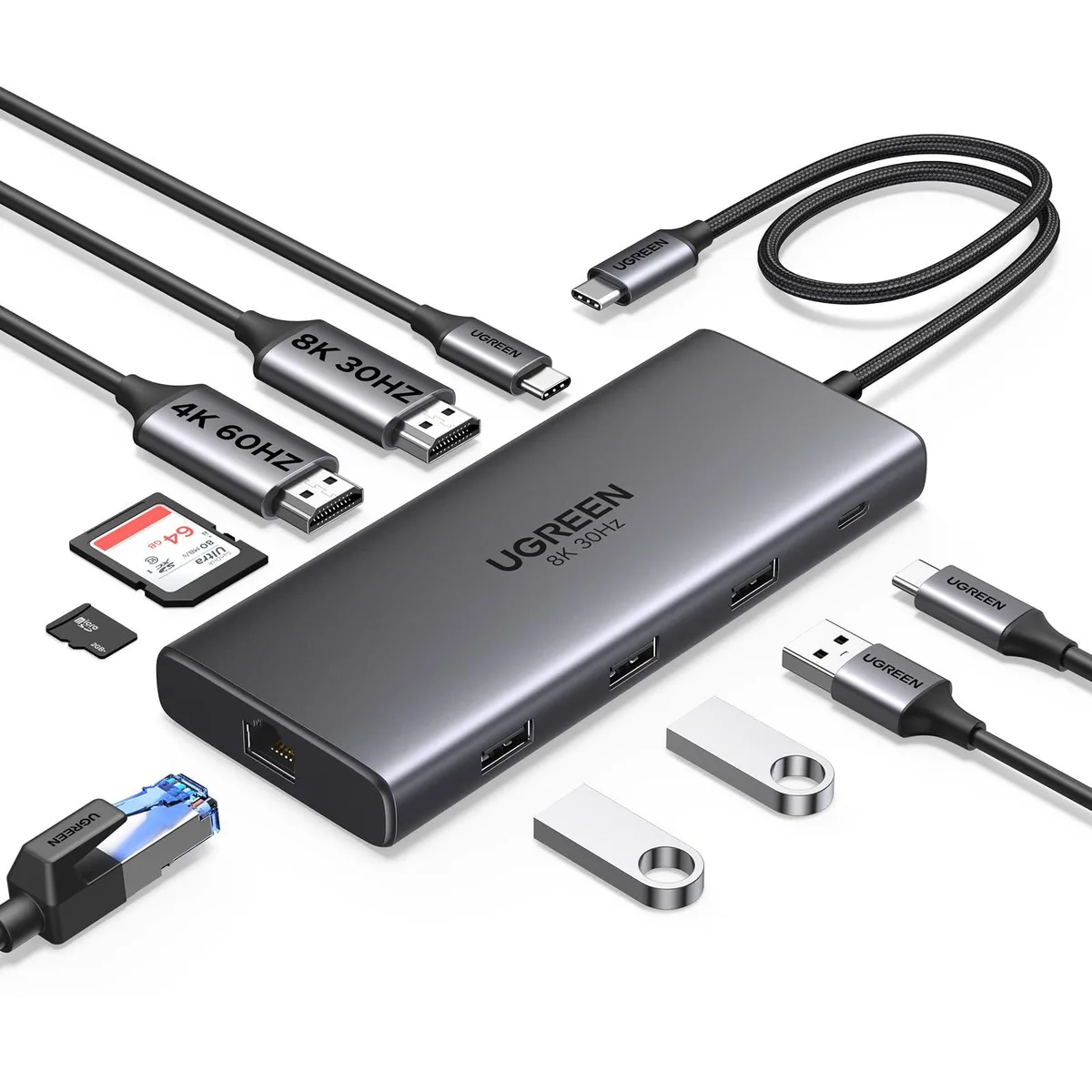


Ugreen Revodok Pro 210 15534 Docking Station
A 10-in-1 USB-C docking station with dual HDMI outputs up to 4K@60Hz, 100W power delivery, 5Gbps data ports, gigabit Ethernet and SD card reader
- ColorGrey
- CompatibilityFull Functional USB C Lenovo/HP/Dell laptops, Macbook (For m
- Ports Spec1 x USB 2.0
- Dimension11.4 cm x 4.45 cm x 1.6 cm
- Weight100 grams
- Featuresethernet, hdmi, microsd, usb, 10, 5, 2, Full Functional USB
- Dual 4K 60 Hz monitors extend desktop space via two HDMI ports
- 100 W pass-through charging powers the laptop while the dock runs on 15 W reserve
- 5 Gbps USB-C and USB-A 3.0 ports move large files in seconds
- Gigabit Ethernet delivers stable wired internet for video calls and transfers
- Built-in SD and microSD reader imports photos and footage without extra adapters
Ten-port USB-C dock for dual-display workflows
The Ugreen Revodok Pro 210 15534 expands a single USB-C port into ten connections. Two HDMI outputs, a 5 Gbps USB-C data port, one USB-A 3.0 port, two USB-A 2.0 ports, a 2.0 port, gigabit Ethernet and SD or Micro-SD card slots are included. Up to 85 W pass-through charging is reserved for the host laptop while 15 W powers the hub itself. The grey aluminium enclosure measures 11.4 cm by 4.45 cm by 1.6 cm and weighs 100 grams.
Check host port capabilities before ordering
Your laptop must provide a full-featured USB-C interface that carries both video and data. Windows machines can drive two independent 4K 60 Hz screens or a single 8K 30 Hz display. On macOS both external monitors show identical content because the operating system does not support MST over USB-C. The PD input accepts up to 100 W from your original charger; the hub passes 85 W to the laptop. Data ports do not supply charging current or video signals.
Suits professionals needing two screens
This dock serves users who want dual 4K monitors, gigabit Ethernet and legacy USB-A peripherals from one compact hub. Buyers whose laptops lack full-featured USB-C or who require Thunderbolt bandwidth should look elsewhere. Mac users who need independent content on each external display will not achieve that with this device. Anyone needing more than two video outputs or faster than 5 Gbps data transfer should consider a different class of dock.
Highlights
- Dual 4K 60 Hz monitors extend desktop space via two HDMI ports
- 100 W pass-through charging powers the laptop while the dock runs on 15 W reserve
- 5 Gbps USB-C and USB-A 3.0 ports move large files in seconds
- Gigabit Ethernet delivers stable wired internet for video calls and transfers
- Built-in SD and microSD reader imports photos and footage without extra adapters
Specifications
| Brand | Ugreen |
|---|---|
| Series | 15534 |
| Model | 15534 |
| Part Number | 15534 |
| Color | Grey |
| Compatibility | Full Functional USB C Lenovo/HP/Dell laptops, Macbook (For macOS, the displays on the both external monitors are identical) |
| Ports Spec | 1 x USB 2.0 |
| Dimension | 11.4 cm x 4.45 cm x 1.6 cm |
| Weight | 100 grams |
| Features | ethernet, hdmi, microsd, usb, 10, 5, 2, Full Functional USB C Lenovo/HP/Dell laptops, Macbook (For macOS, the displays on the both external monitors are identical), 24 months |
| Function | Full Functional USB C Lenovo/HP/Dell laptops, Macbook (For macOS, the displays on the both external monitors are identical) |
Questions about this item
What cables or adapters come in the box with the Revodok Pro 210, and do I need to buy a separate power supply?
The docking station includes the unit itself and a USB-C host cable. A 100W USB-C power adapter is required for the 85W pass-through charging and must be purchased separately if you do not already have one.
How do I choose between the dual 4K@60Hz and single 8K@30Hz display modes on the two HDMI ports?
Connect two monitors to the HDMI ports for dual 4K@60Hz output on Windows. Use only the HDMI 2 connector for a single display up to 8K@30Hz. On macOS both external screens always mirror each other regardless of resolution.
What does the 100W Power Delivery rating mean for my laptop's actual charging speed when the dock is fully loaded?
The USB-C PD port delivers up to 85W to the laptop while reserving 15W for the dock's other ports. The port handles charging only and does not carry data or video signals.
Also in this aisle
People compared these
Same shelf, same checkout — eight coins and a 30-minute rate lock.


