


TSUJ
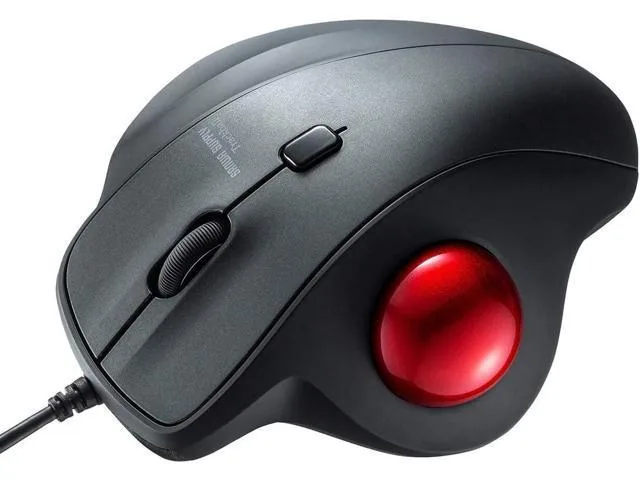
TSUJ Wired Ergonomic Trackball Mouse 34mm 600/800/1200/1600 DPI Silent Buttons
Wired trackball mouse with a 34 mm thumb ball, adjustable 600/800/1200/1600 DPI and silent clicks for quiet use
- Thumb trackball stays put for cursor control on any surface
- Vertical shape keeps wrist neutral to reduce muscle strain
- Four DPI settings 600 800 1200 1600 suit precision or speed
- Silent left and right clicks suit quiet environments
- Works with Windows 10 8.1 8 7 and macOS 10.1310 15
Wired Trackball for Desk and Sofa Use
The TSUJ wired ergonomic trackball uses a 34mm thumb-controlled ball so the cursor moves without sliding the device across a surface. It works on a desk, a sofa or a lap, keeping the hand in one place. The vertical shape puts the wrist and arm in a neutral posture to reduce muscle tension. No driver installation is required on supported systems.
Silent Clicks and Adjustable Sensitivity
Left and right buttons use noiseless switches suited to quiet environments such as libraries, hospitals or late-night work. Sensitivity cycles through four fixed steps of 600, 800, 1200 and 1600 DPI, with the current level shown by a flash count when the switch button is pressed. Power comes from the USB cable so there is no battery to charge or replace.
Replaces a Conventional Mouse for Static Setups
This trackball replaces a standard mouse where desk space is limited or where moving a mouse causes discomfort. The jump is worth it for users who want stationary cursor control on irregular surfaces and silent clicks in shared spaces. It is not for buyers who need wireless freedom, more than four DPI steps, or full macOS feature parity.
Highlights
- Thumb trackball stays put for cursor control on any surface
- Vertical shape keeps wrist neutral to reduce muscle strain
- Four DPI settings 600 800 1200 1600 suit precision or speed
- Silent left and right clicks suit quiet environments
- Works with Windows 10 8.1 8 7 and macOS 10.1310 15
Specifications
No published specifications for this item yet.
Questions about this item
How do I install the trackball mouse and what step do people often miss?
Plug the USB cable into a Windows 10, 8.1, 8, 7 or macOS 10.1310.15 device; no driver is required. The step often missed is pressing the DPI button to confirm the active level by counting its LED flashes.
What maintenance will the 34mm trackball need later?
Remove the 34mm ball periodically and clean the sensor window and support bearings with a dry cloth or compressed air to keep cursor movement smooth.
What limit appears first during sustained use?
The fixed 1600 DPI ceiling limits precision for very high-resolution or multi-monitor setups during long sessions.
Also in this aisle
People compared these
Same shelf, same checkout — eight coins and a 30-minute rate lock.


Lenovo
Lenovo 42T3273 Black Replacement Keyboard for ThinkPad T60 T61
- Thinkpad T60 T61 Ke…
- Black
$29.99
0.00036062BTC
In stock