

Accsoon
Accsoon CineView SE Multi-Spectrum Wireless Video Transmitter 1200ft 1080p HDMI SDI
$181.99
0.00217746BTC
In stockWe take cryptocurrency — so the coins you hold can buy real hardware.Pay in crypto, spend it on real hardware. Free insured shipping worldwide over $399. Plain, unbranded boxes, sent from Germany.Free insured shipping over $399. Your rate is locked for 30 minutes once checkout opens.Rate locked 30 minutes. Every item sealed, serial-checked and covered by a 24-month warranty.Sealed, 24-month warranty.


TSUJ
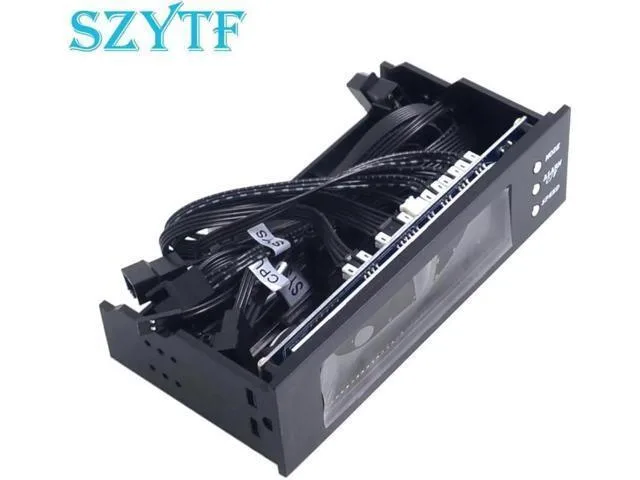
A 5.25 inch 12V front-panel unit controls three fan speeds and shows temperature on an LCD display
The TSUJ Kepler-C72J-OYS-0074 is a 5.25 inch drive-bay controller that manages three 12 V fans. An integrated temperature sensor feeds an LCD readout so you can monitor thermal conditions at a glance.
Builders wanting manual or automatic speed control for up to three fans in a single 5.25 inch bay will find it useful. Systems without a free 5.25 inch slot or setups requiring more than three fan channels should consider other options.
| Brand | TSUJ |
|---|---|
| Part Number | Kepler-C72J-OYS-0074 |
| Features | 5.25 inch 12V PC Computer Fan Controller 3 Fan Speed Controller Temperature Sensor LCD Digital Display Front Panel for PC |
Slide the unit into a free 5.25 inch front bay, secure it with screws, connect a 12V power lead from the PSU, then plug each of the three fans into the labelled headers on the rear.
Wipe the LCD panel with a dry microfibre cloth when dust builds up; the sensor is sealed and needs no calibration, while the three fan headers should be checked annually for loose pins.
Also in this aisle
Same shelf, same checkout — eight coins and a 30-minute rate lock.
What you pay in, and what you read prices in.
Sent from your wallet at checkout
Display only — the catalogue is priced in USD
No currency matches that.
Pick the language the site speaks to you in.
No language matches that.
New here?
Already have one?
There is no automatic reset: this shop sends no mail, so there is no one-time link to ask for. Leave the address on the account and it gets picked up by hand.
Request noted
Nothing is on its way to your inbox — this shop sends no mail at all. Someone picks these up by hand.
Remembered it?



