TP-Link
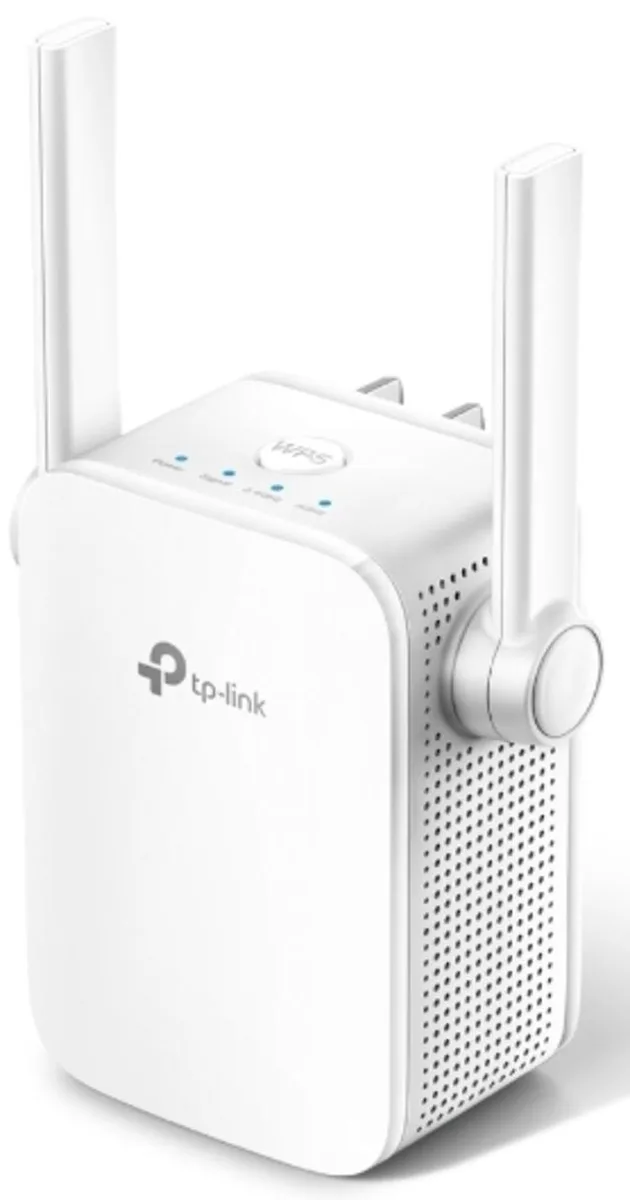
TP-Link RE205 AC750 wireless range extender
Dual-band extender delivers up to 750 Mbps over 2.4 GHz and 5.0 GHz with two external antennas and a 10/100M Ethernet port
- StandardsIEEE 802.11ac, IEEE 802.11a/b/g/n
- Frequency Band2.4 GHz / 5.0 GHz
- Wireless Data RatesUp to 750Mbps
- Security64 / 128-bit WEP WPA-PSK / WPA2-PSK
- WPA/WPA2WPA2
- Antenna2 x External
- Dual-band 2.4 GHz and 5 GHz operation for stable coverage
- Combined wireless speeds up to 750 Mbps for faster connections
- Two external antennas boost signal into hard-to-reach areas
- 10/100 Ethernet port adds a wired device to the network
- WPS button enables quick secure setup without typing passwords
Home dead-zone coverage
The TP-Link RE205 AC750 wireless range extender connects to an existing router and expands its signal into areas that previously had no usable Wi-Fi. It operates on both 2.4 GHz and 5.0 GHz bands with two external antennas for broader reach. A single 10/100M Ethernet port allows a wired device to join the extended network. The unit plugs directly into a wall outlet and draws a maximum of 7.3W.
Sustained throughput and stability
Combined wireless data rates reach up to 750 Mbps, split between 300 Mbps on the 2.4 GHz band and 433 Mbps on the 5 GHz band. The extender supports IEEE 802.11ac and legacy 802.11a/b/g/n standards for wide device compatibility. Receiving sensitivity figures such as -94 dBm at 6 Mbps on 5 GHz and -79 dBm at 54 Mbps on 2.4 GHz indicate reliable reception at distance. WPA2-PSK encryption secures the extended link.
Upgrade from single-band repeaters
This model replaces older single-band extenders that only use 2.4 GHz and often top out at lower speeds. The dual-band design lets compatible devices shift to the less congested 5 GHz band for smoother streaming and browsing. It is not suited for buyers who need gigabit wired backhaul or mesh roaming with a single network name. Households with many high-bandwidth 5 GHz clients may require a higher-class solution.
Highlights
- Dual-band 2.4 GHz and 5 GHz operation for stable coverage
- Combined wireless speeds up to 750 Mbps for faster connections
- Two external antennas boost signal into hard-to-reach areas
- 10/100 Ethernet port adds a wired device to the network
- WPS button enables quick secure setup without typing passwords
Specifications
| Brand | TP-Link |
|---|---|
| Model | RE205 |
| Standards | IEEE 802.11ac, IEEE 802.11a/b/g/n |
| Frequency Band | 2.4 GHz / 5.0 GHz |
| Wireless Data Rates | Up to 750Mbps |
| Security | 64 / 128-bit WEP WPA-PSK / WPA2-PSK |
| WPA/WPA2 | WPA2 |
| Antenna | 2 x External |
| Transmit Power | < 19.5 dBm (2.4 GHz) < 19.5 dBm (5 GHz) |
| Receiving Sensitivity | 5 GHz: 11a 6 Mbps: -94 dBm @ 10% PER 11a 54 Mbps: -77 dBm @ 10% PER 11ac HT20: -69 dBm @ 10% PER 11ac HT40: -66 dBm @ 10% PER 11ac HT80: -63 dBm @ 10% PER 2.4 GHz 11g 54 Mbps: -79 dBm @ 10% PER 11n HT20: -77 dBm @ 10% PER 11n HT40: -74 dBm @ 10% PER |
| Interface | 1 x 10/100M Ethernet Port (RJ45) |
| Button | Reset, WPS |
| Power | Power Consumption: 7.3W (max power consumption) |
| System Requirements | Microsoft Windows 98SE, NT, 2000, XP, Vista or Windows 7, 8, 10, Mac OS, NetWare, UNIX or Linux. |
| Dimensions | 3.00" x 3.10" x 3.00" |
| Features | Brings Wi-Fi dead zone to life with strong Wi-Fi expansion at combined speed of up to 750 Mbps Operates over both the 2.4 GHz band (300 Mbps) and 5 GHz band (433 Mbps) for more stable wireless experience Intelligent signal light helps to fi-nd the best location for optimal Wi-Fi coverage by showing the signal strength Works with any Wi-Fi router or wireless access point |
| Operating Temperature | 0 ~ 40 degree Celsius (32 ~ 104 degree Fahrenheit) |
| Operating Humidity | 10% - 90%, Non-Condensing |
| Storage Temperature | -40 ~ 70 degree Celsius (-40 ~ 158 degree Fahrenheit) |
| Storage Humidity | 5% - 95%, Non-Condensing |
| Package Contents | AC750 Wi-Fi Range Extender RE205 Quick Installation Guide |
Questions about this item
How much power does the RE205 draw when running continuously?
The RE205 has a maximum power consumption of 7.3 W, so it adds very little to the electricity bill even when left on all day.
What must I already have for the RE205 to extend my network?
You need an existing Wi-Fi router or access point broadcasting on 2.4 GHz or 5 GHz, plus a device with a web browser for the initial setup.
Will the 10/100 Ethernet port on the RE205 slow down my older wired desktop?
The single RJ45 port is limited to 100 Mbps, so a desktop with a Gigabit NIC will be capped at Fast Ethernet speeds when connected through the extender.
Also in this aisle
People compared these
Same shelf, same checkout — eight coins and a 30-minute rate lock.