TERRAMASTER
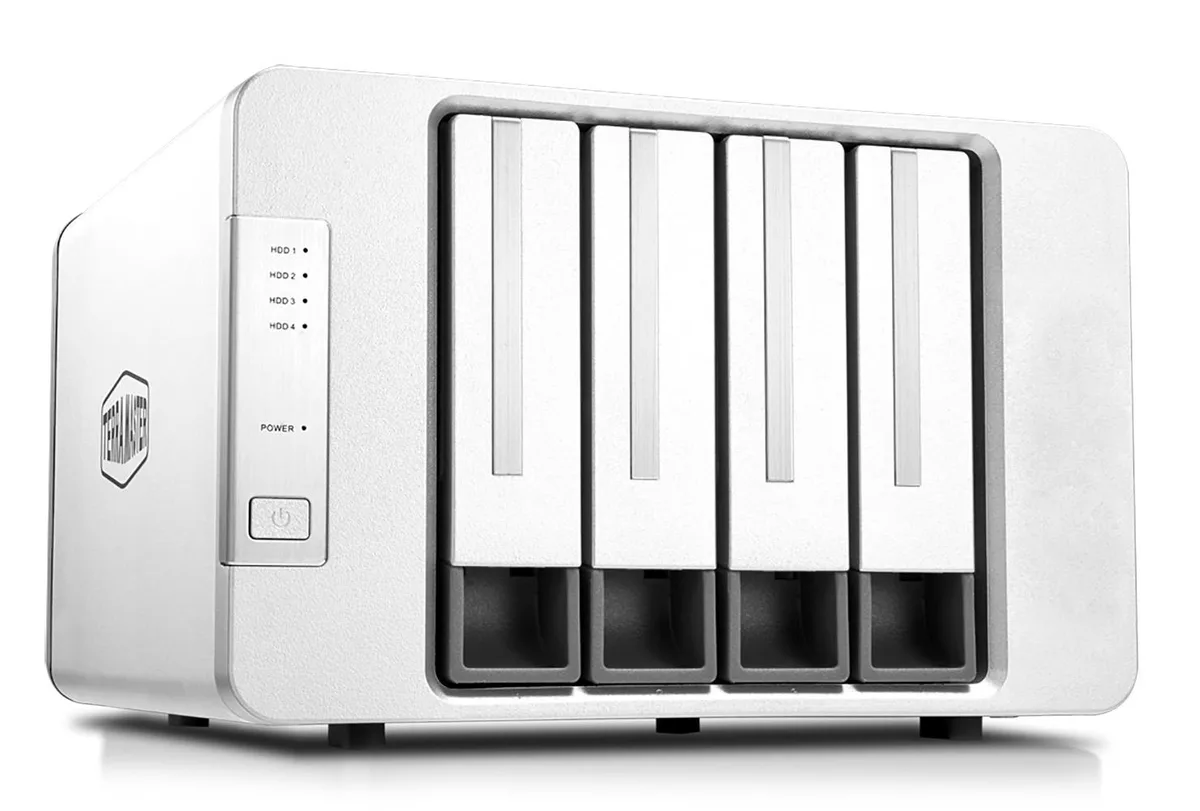
TERRAMASTER D4-320 4-bay USB 3.2 Gen2 10Gbps drive enclosure
- 8.74"L x 7.05"W x 6…
- Black
$158.99
0.00188683BTC
In stockWe take cryptocurrency — so the coins you hold can buy real hardware.Pay in crypto, spend it on real hardware. Free insured shipping worldwide over $399. Plain, unbranded boxes, sent from Germany.Free insured shipping over $399. Your rate is locked for 30 minutes once checkout opens.Rate locked 30 minutes. Every item sealed, serial-checked and covered by a 24-month warranty.Sealed, 24-month warranty.


TERRAMASTER
A six-bay SATA enclosure with USB 3.2 Gen2 10 Gbps bandwidth, holding up to 22 TB per drive for 132 TB total, hot-swappable and driver-free
Model 6 Bay D6-320 USB 3.2
The TerraMaster D6-320 is a six-bay direct-attached storage enclosure that connects through a USB 3.2 Gen2 Type-C link running at 10Gbps. It accepts up to six 3.5-inch or 2.5-inch SATA hard drives and 2.5-inch SATA SSDs, each up to 22TB, for a total raw capacity of 132TB. The unit operates in single-disk mode only and requires no driver installation on Windows, macOS or Linux. An intelligent temperature-controlled fan adjusts speed automatically to keep drives cool.
This enclosure suits users who want a simple, driver-free way to attach multiple large SATA drives as independent volumes for backups, media libraries or archival storage. It is not for administrators who need hardware RAID 0, 1, 5 or 10 presented as a single logical volume, nor for anyone needing drive types beyond SATA. The lack of built-in array management means each drive appears separately to the operating system.
The single specification that determines whether this enclosure fits a workflow is the USB 3.2 Gen2 10Gbps host connection. With six drives installed the manufacturer cites sequential throughput up to 1,030MB/s, while a single drive can deliver up to 510MB/s. If the host system only provides a 5Gbps or slower USB port, those speeds cannot be reached.
| Type | Enclosure |
|---|---|
| Material | Metal / Plastic |
Other versions of this model
Same family, different memory, cooler or clock — compare before you commit.
With six SATA HDDs installed, simultaneous read/write reaches 1,016MB/s; a single SATA SSD hits 510MB/s read.
It takes 3.5-inch and 2.5-inch SATA HDDs or 2.5-inch SATA SSDs, each up to 22TB for a total of 132TB.
Slide each SATA drive into a hot-swap tray, secure it with the supplied screws, insert the tray until it clicks, then power on — forgetting the tray screws causes disconnects and recognition failures.
New to this? Paying with USDT: TRC-20 or ERC-20 — what to check, what it costs to pay, and what is never asked for.
Also in this aisle
Same shelf, same checkout — eight coins and a 30-minute rate lock.
What you pay in, and what you read prices in.
Sent from your wallet at checkout
Display only — the catalogue is priced in USD
No currency matches that.
Pick the language the site speaks to you in.
No language matches that.
New here?
Already have one?
There is no automatic reset: this shop sends no mail, so there is no one-time link to ask for. Leave the address on the account and it gets picked up by hand.
Request noted
Nothing is on its way to your inbox — this shop sends no mail at all. Someone picks these up by hand.
Remembered it?