
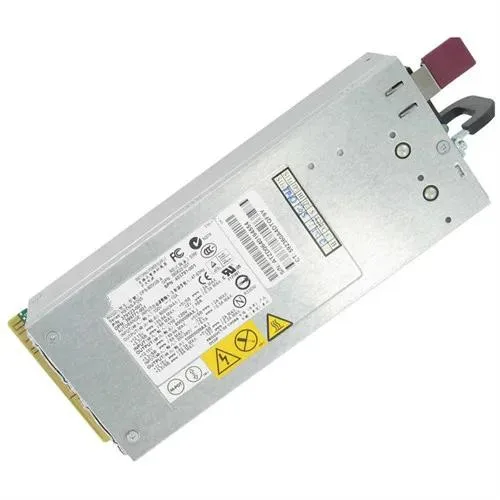


Supersuperuncle
Supersuperuncle DPS-800GB A server power supply 800W for HP DL380G5 ML350G5
800 W server power supply compatible with HP DL380 G5 and ML350 G5 systems
- Compatible with HP ProLiant DL380 G5 servers
- Compatible with HP ProLiant ML350 G5 servers
- 800 W output supports demanding server workloads
- Replaces OEM part numbers 379123-001 and 403781-001
HP DL380 G5 / ML350 G5 replacement power supply
This 800 W server power supply is built as a direct replacement for the HP DL380 G5 and ML350 G5 platforms. It matches part numbers 379123-001 and 403781-001 so it fits the existing hot-plug bay without modification. Administrators maintaining those specific ProLiant models can swap units and restore redundant power immediately. It is not suited for newer server generations or desktop chassis that use different form factors or pin-outs.
Thermals, noise and power draw in normal use
The unit delivers up to 800 W of continuous output for the supported DL380 G5 and ML350 G5 systems. Internal fan speed scales with load and inlet temperature to keep component temperatures within specification. Acoustic output rises under heavy load but remains consistent with the original equipment design for data-centre environments. No efficiency rating or standby power figure is supplied in the source data.
Highlights
- Compatible with HP ProLiant DL380 G5 servers
- Compatible with HP ProLiant ML350 G5 servers
- 800 W output supports demanding server workloads
- Replaces OEM part numbers 379123-001 and 403781-001
Specifications
No published specifications for this item yet.
Questions about this item
How do I install the DPS-800GB A into an HP DL380G5 and what step is often missed?
Slide the unit into the hot-plug bay until the latch clicks, then verify the green LED lights; the step often missed is not pushing firmly enough to fully seat the connector.
What maintenance will the DPS-800GB A need after extended use in an ML350G5?
Clean the intake vents and fan blades periodically with compressed air; replace the unit if the front LED turns amber or the server logs a power-supply fault.
New to this? Buying PC parts with Monero — what to check, what it costs to pay, and what is never asked for.
Also in this aisle
People compared these
Same shelf, same checkout — eight coins and a 30-minute rate lock.



Sunfounder
Sunfounder Raspberry Pi Ultimate Kit with PiCrawler AI Robot 337 components 131 projects
$174.99
0.00210072BTC
In stock
minisforum
minisforum MF-SRP01 SSD Heatsink accessories barebone
- SSD Heatsink
$6.99
0.00008391BTC
In stock