


STARTECH
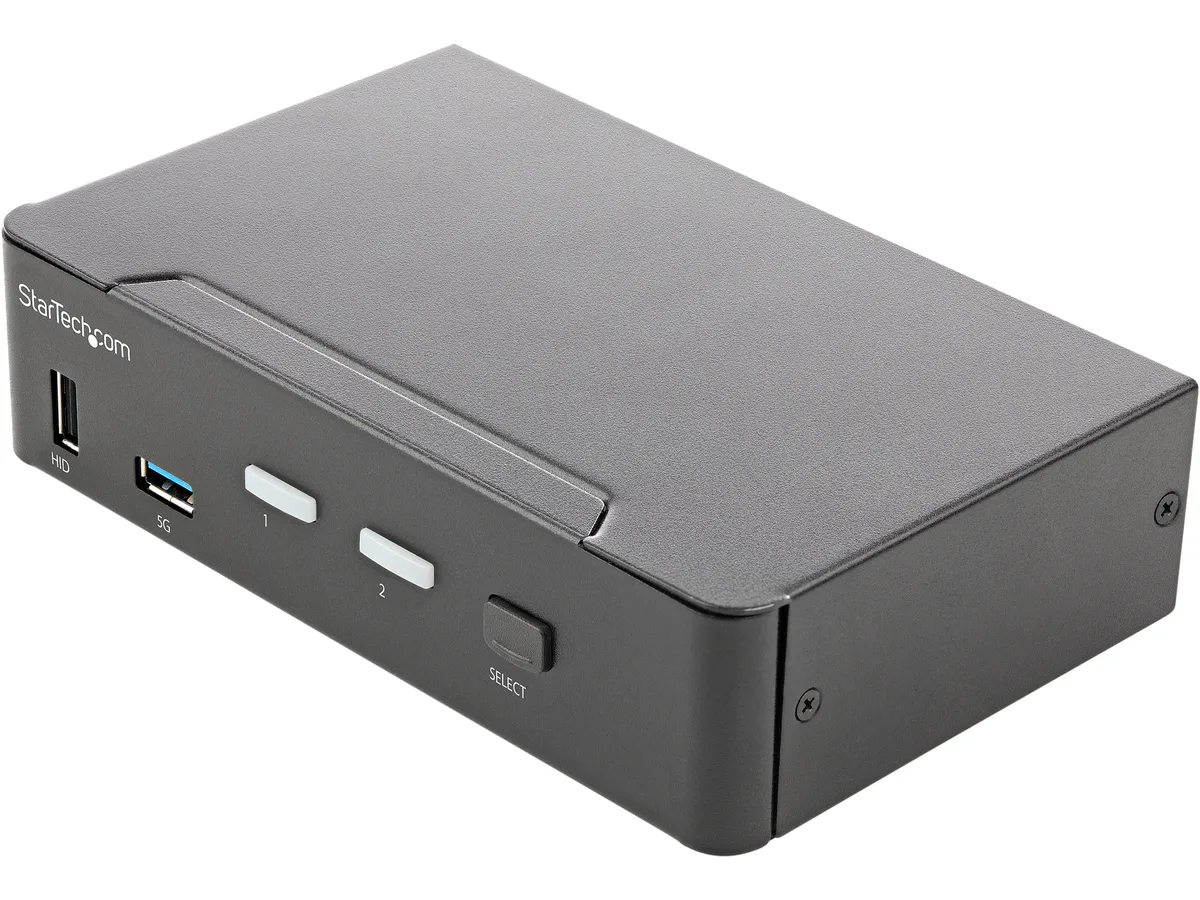
STARTECH SV231HU34K6 2 Port HDMI KVM Switch 4K 60Hz USB 3.0 Hub
A two-port HDMI KVM switch drives one monitor at 3840 x 2160 at 60 Hz with HDR10 and 7.1-channel audio while sharing a USB 3.0 hub and four HID ports between two computers
- TypeHDMI, USB
- Video Resolution3840 x 2160
- PC SelectionPush Buttons/Hot Keys
- Temperature0ºC to 40ºC(32ºF to 104ºF)
- Humidity0% to 80%,Non-Condensing
- Power FeaturesPower Source: AC Adapter Included Input Voltage: 100 - 240 A
- Switch two computers from one 4K 60 Hz monitor
- Share two USB 3.0 peripherals at 5 Gbps between systems
- Keep display settings stable with EDID and HDCP emulation
- Choose push-button or hotkey control for instant switching
- Powered by included universal AC adapter for reliable operation
Two-system HDMI KVM
The SV231HU34K6 lets one keyboard, mouse and monitor control two computers with HDMI 2.0 outputs. It supports a single display at 3840 x 2160 resolution and 60 Hz refresh rate with HDR10 colour. EDID and HDCP 2.2 emulation keep the monitor synced during switching. Two USB 3.0 hub ports at 5 Gbps and four USB HID ports share peripherals. Stereo and 7.1-channel audio pass through HDMI or the 3.5 mm jack.
Desktop integration
Connect each computer with an HDMI cable and a USB link to the rear ports. The front-facing USB 3.0 port adds a convenient 5 Gbps connection for flash drives or cameras. An included universal AC adapter powers the unit from 100 to 240 V AC and delivers 12 V DC at 3 A. No software drivers are required; the switch works with any operating system that supports standard USB HID and HDMI inputs.
Thermals and power
The steel enclosure operates reliably between 0 °C and 40 °C in up to 80 % non-condensing humidity. Maximum power draw is 36 W from the supplied adapter. Passive cooling keeps the switch silent with no moving parts. Rubber feet prevent vibration on the desk. The compact 1.60" x 6.30" x 3.90" footprint fits easily beside a monitor.
Highlights
- Switch two computers from one 4K 60 Hz monitor
- Share two USB 3.0 peripherals at 5 Gbps between systems
- Keep display settings stable with EDID and HDCP emulation
- Choose push-button or hotkey control for instant switching
- Powered by included universal AC adapter for reliable operation
Specifications
| Brand | StarTech.com |
|---|---|
| Model | SV231HU34K6 |
| Type | HDMI, USB |
| Video Resolution | 3840 x 2160 |
| PC Selection | Push Buttons/Hot Keys |
| Temperature | 0ºC to 40ºC(32ºF to 104ºF) |
| Humidity | 0% to 80%,Non-Condensing |
| Power Features | Power Source: AC Adapter Included Input Voltage: 100 - 240 AC Input Current: 1.0A Output Voltage: 12V DC Output Current: 3A Center Tip Polarity: Positive Plug Type: M Power Consumption (In Watts): 36W |
| USB Features | 2x USB 3.0 Hub (5Gbps) 4x USB HID |
| Features | 4K 60Hz Picture and Full Audio Support The HDMI KVM switch supports resolutions up to 4K at 60Hz. It drives one large monitor at the full 4K resolution. Includes EDID and HDCP signal emulation so monitors always remain synced for faster switching times, and desktop settings are maintained to avoid disrupting your workflow. With support for digital audio (with supporting displays and sources) and separate 3.5 mm stereo audio, the HDMI 2.0 KVM switch delivers full audio compatibility. Integrated USB Hub The integrated USB 3.0 hub shares two peripherals (in addition to keyboard and mous |
| Dimensions | 1.60" x 6.30" x 3.90" |
| Weight | 1.41 lbs. |
| Package Contents | 1 - Included in Package: KVM Switch Universal Power Adapter (NA/JP, EU, UK, NZ) 4 - Included in Package: Rubber Feet 1 - Included in Package: Quick-Start Guide |
| Shipping weight | 0.15 kg |
| Package size | 238 × 189 × 91 mm |
Questions about this item
Does the 36 W power adapter limit how many USB peripherals I can run at once?
The included 12 V 3 A adapter delivers up to 36 W, which powers the KVM, the two USB 3.0 ports at 5 Gbps and the four USB HID ports without needing an extra supply.
How much heat does the steel chassis produce when the switch runs 24/7 at 4K 60 Hz?
The unit is rated for 0 °C to 40 °C ambient temperature and 36 W maximum draw; the steel housing acts as a passive heatsink, so no fan noise is generated during continuous operation.
Which cables must I already own to connect two computers to one 4K monitor?
You need two HDMI 2.0 cables (one per computer) and two USB cables to link each system to the KVM’s console ports; the monitor connects with a single HDMI cable.
Also in this aisle
People compared these
Same shelf, same checkout — eight coins and a 30-minute rate lock.


Black Box Corporation
Black Box Corporation 4K60 HDMI Dual-Head KVM Switch 4 Port
$774.99
0.00916638BTC
In stock