


STARTECH
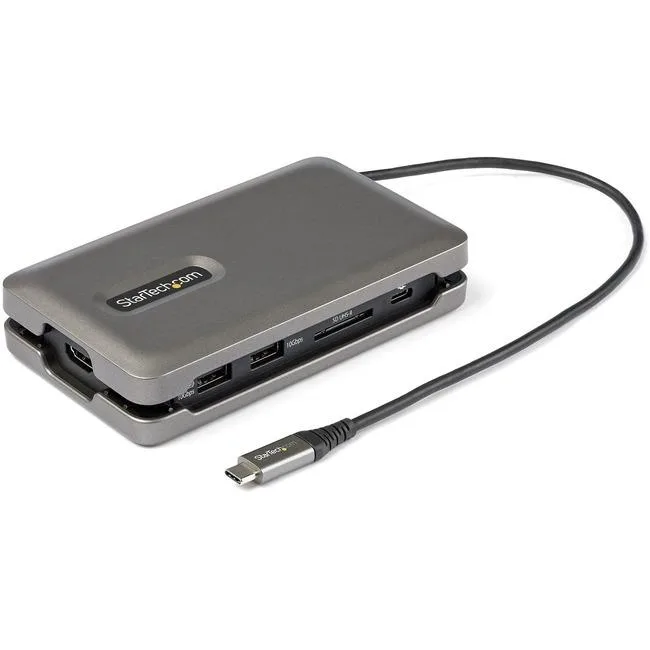
STARTECH DKT31CSDHPD3 docking station USB-C 4K 60Hz HDMI 2.0 2-port 10Gbps 100W PD GbE SD/MicroSD 10" cable
A USB-C dock adds 4K 60 Hz HDMI, two 10 Gbps USB ports, Gigabit Ethernet, SD/MicroSD slots and 100 W pass-through power in a 10-inch cable
- ColorSpace Gray
- CompatibilitymacOS High Sierra (10.13) macOS Mojave (10.14) macOS Catalin
- Ports Spec1 x USB 3.1 Gen 2 USB Type-A (9 pin, 10 Gbps) 1 x USB 3.1 Ge
- Dimension1.10" x 3.20" x 5.60"
- Weight0.33 lb.
- Connect an external 4K display at 60 Hz through the HDMI 2.0 port
- Transfer files at 10 Gbps using the two USB 3.1 Gen 2 ports
- Keep your laptop powered with up to 100 W USB Power Delivery pass-through
- Add a wired Gigabit Ethernet link via the RJ-45 connector
- Read SD and MicroSD cards directly from the built-in card slot
Compact USB-C dock with 4K 60 Hz HDMI
The StarTech DKT31CSDHPD3 is a 10-inch cable docking station that adds HDMI 2.0 video at 4K 60 Hz, gigabit Ethernet, an SD/MicroSD reader and two 10 Gbps USB 3.1 Gen 2 ports through a single USB-C connection. It supports 100 W power-delivery pass-through so the host can stay charged while peripherals are attached. The space-grey enclosure measures 1.10" x 3.20" x 5.60" and weighs .33 lb.
Suits thin laptops and tablets needing one-cable
Compatible with Windows 8, 10, 11, macOS 10.13 through 12.0, Chrome OS, iPadOS and Android 9 through 11, it works for travellers who want video, wired networking, card access and fast USB-A and USB-C ports in a pocket-sized block. Buyers who need more than one video output or additional legacy ports should look at a larger dock.
Single USB-C host port with 100 W PD pass-through
The dock draws its upstream link and charging path from one USB-C male connector on a fixed 10" cable, so the host must supply a USB-C port that supports video alt mode and power delivery simultaneously. If the host port lacks either capability the HDMI output or charging will not function.
Highlights
- Connect an external 4K display at 60 Hz through the HDMI 2.0 port
- Transfer files at 10 Gbps using the two USB 3.1 Gen 2 ports
- Keep your laptop powered with up to 100 W USB Power Delivery pass-through
- Add a wired Gigabit Ethernet link via the RJ-45 connector
- Read SD and MicroSD cards directly from the built-in card slot
Specifications
| Brand | StarTech.com |
|---|---|
| Model | DKT31CSDHPD3 |
| Color | Space Gray |
| Compatibility | macOS High Sierra (10.13) macOS Mojave (10.14) macOS Catalina (10.15) macOS Big Sur (11.0) macOS Monterey (12.0) Windows 8 Windows 10 Windows 11 Chrome OS iPadOS Android 9, 10, 11 |
| Ports Spec | 1 x USB 3.1 Gen 2 USB Type-A (9 pin, 10 Gbps) 1 x USB 3.1 Gen 2 USB Type-C (Fast-Charge, 24 Pin, 10 Gbps) 1 x SD / MMC Slot 1 x USB Type-C (24 pin) USB Power Delivery only 1 x HDMI (19 pin) 1 x RJ-45 1 x USB 3.1 Gen 2 USB Type-C (24 pin, 10 Gbps) |
| Dimension | 1.10" x 3.20" x 5.60" |
| Weight | 0.33 lb. |
| Shipping weight | 0.23 kg |
| Package size | 229 × 152 × 51 mm |
Questions about this item
Should I choose the USB-C port with Fast-Charge or the one marked Power Delivery only for my laptop charger?
Use the USB-C Power Delivery only port for your laptop charger; it accepts up to 100W pass-through. The other USB-C port is a 10 Gbps data port with Fast-Charge for peripherals.
What does the 4K 60Hz HDMI 2.0 label mean when I plug in a monitor?
It means the HDMI port can drive a 4K display at 60 Hz using the HDMI 2.0 standard, giving smooth video for work or streaming.
The box says 10Gbps USB hub — what speed will I actually see with a flash drive?
Each USB 3.1 Gen 2 port runs at 10 Gbps, so a fast flash drive will hit near its rated sequential speed, limited only by the drive itself.
Also in this aisle
People compared these
Same shelf, same checkout — eight coins and a 30-minute rate lock.


Kensington
Kensington Desk Mount Cable Anchor K64613WW accessory
- Black
- Provides a secure a…
$19.99
0.00023667BTC
In stock
Panasonic
Panasonic CF-VDR291U laptop cooling pad
- Optical Drive
- Buffer Size: 2 MB B…
$213.99
0.00253357BTC
In stock
eReplacements
eReplacements PB992A-ER laptop battery 14.4V
- Battery
- Lithium-Ion
$65.99
0.0007813BTC
In stock