


SMUGDESK
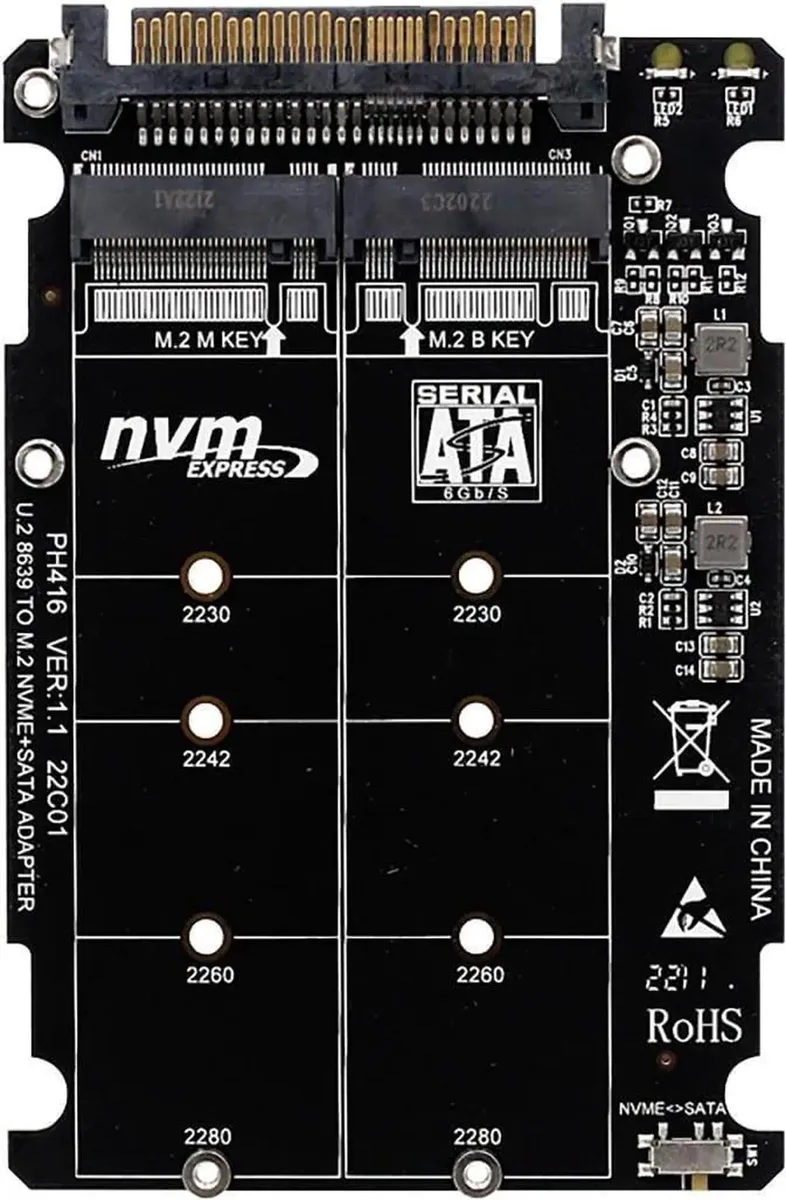
SMUGDESK PH416 M.2 NVMe PCIe 3.0 X4 to U.2 SFF8639 Adapter 6Gbps SATA 2.5" M-Key B-Key 2230 2242 2260 2280
Converts M.2 NVMe or SATA SSDs in 2230, 2242, 2260 and 2280 sizes to U.2 SFF8639 or 2.5" SATA using PCIe 3.0 X4
- Supports M-Key NVMe and B-Key SATA drives for flexible upgrades
- PCIe 3.0 X4 and 6Gbps SATA ensure fast data transfer
- Fits 2230 2242 2260 2280 M.2 sizes for broad compatibility
- Connects to U.2 SFF8639 and 2.5 SATA drives for multi-scenario use
- Stable circuitry provides reliable connectivity for long-term operation
Dual-Key M.2 Adapter for NVMe and SATA
The SMUGDESK PH416 adapter converts an M.2 slot into a U.2 SFF8639 connection while accepting both M-Key NVMe and B-Key SATA solid-state drives. It supports the 2230, 2242, 2260 and 2280 form factors so a single card covers the most common drive lengths. The design targets desktop, workstation and server builders who need to add U.2 or 2.5-inch SATA storage without replacing the motherboard.
Passive Circuitry With No Active Cooling
The card uses a passive PCB layout that draws power directly from the host slot and requires no fan or external power connector. Because it contains no active components, it adds no audible noise and its thermal contribution is negligible inside a ventilated chassis. Power draw is limited to the drive itself plus minimal trace losses on the adapter.
PCIe 3.0 X4 Host Interface Decides Compatibility
The adapter communicates with the system over a PCIe 3.0 X4 link, so the host must provide an M.2 slot wired for four lanes of third-generation PCIe to reach full NVMe throughput. If the slot is limited to PCIe 2.0 or fewer lanes, NVMe drives will operate at reduced speed while SATA drives remain at 6Gbps. Buyers whose platforms lack a PCIe 3.0 X4 M.2 slot cannot realise the adapter’s peak NVMe performance.
Highlights
- Supports M-Key NVMe and B-Key SATA drives for flexible upgrades
- PCIe 3.0 X4 and 6Gbps SATA ensure fast data transfer
- Fits 2230 2242 2260 2280 M.2 sizes for broad compatibility
- Connects to U.2 SFF8639 and 2.5 SATA drives for multi-scenario use
- Stable circuitry provides reliable connectivity for long-term operation
Specifications
No published specifications for this item yet.
Questions about this item
How do I install the PH416 adapter and which screw position do I use for a 2280 drive?
Insert the M.2 SSD into the slot matching its key — M-Key for NVMe or B-Key for SATA — then secure it with the standoff screw at the 2280 mounting hole before connecting the U.2 SFF8639 cable to your system.
What maintenance or replacement will the PH416 adapter need over time?
The adapter has no moving parts and requires no scheduled maintenance; only replace it if the U.2 SFF8639 connector or the M.2 slot shows physical damage or signal loss.
What limit appears first when the PH416 runs under sustained PCIe 3.0 X4 load?
The bottleneck is the PCIe 3.0 X4 lane bandwidth and the 6Gbps SATA ceiling for B-Key drives, so throughput caps at those interface speeds during continuous transfers.
New to this? Which coin should you pay with — what to check, what it costs to pay, and what is never asked for.
Also in this aisle
People compared these
Same shelf, same checkout — eight coins and a 30-minute rate lock.



Black Box Corporation
Black Box Corporation CAT6 EZ-RJ45 Modular Plugs 100-Pack
$95.99
0.00114981BTC
In stock
