


SMUGDESK
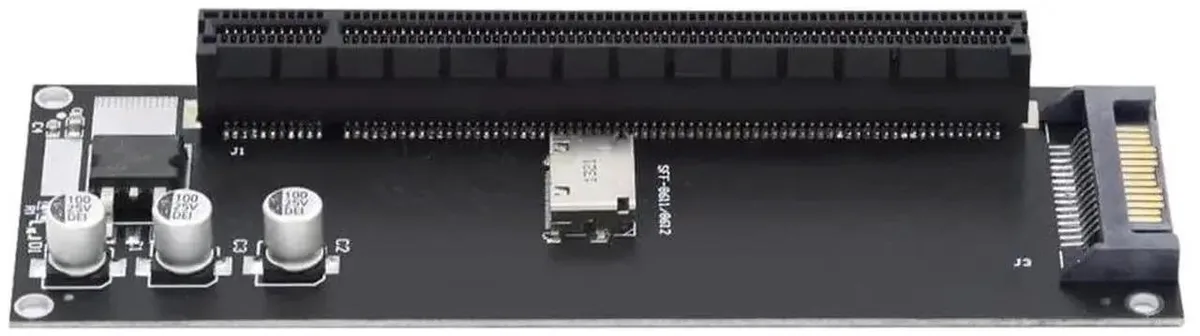
SMUGDESK Oculink SFF-8611 SFF-8612 to PCIe X16 X4 Data Adapter with SATA Power
Converts Oculink SFF-8611/SFF-8612 to a PCIe x16 slot running at x4 with a SATA 15-pin power port for stable GPU operation
- Converts Oculink SFF-8611/8612 to PCIe x16 slot for external GPU expansion
- SATA 15-pin power port delivers stable 12V supply to prevent GPU recognition failure
- PCIe x4 bandwidth with lower loss than Thunderbolt eGPU solutions
- Gold-plated OCuLink connectors resist oxidation and loosening under heavy gaming loads
- Compatible with Windows, macOS and Linux for ITX, NUC and laptop eGPU setups
OCuLink to PCIe x16 adapter for mini PCs
This adapter converts the SFF-8611 or SFF-8612 OCuLink interface on compact motherboards into a full-size PCIe x16 slot running at x4 bandwidth. It targets builders expanding ITX, NUC or laptop systems with an external desktop graphics card or other PCIe expansion card.
Replaces Thunderbolt eGPU docks
The OCuLink connection delivers lower latency and more stable throughput than Thunderbolt-based external GPU enclosures. The upgrade is worthwhile when the host board exposes an OCuLink port and the project demands consistent bandwidth for rendering or gaming workloads.
Handles full-size GPU.
The x4 lane and 12 V SATA 15-pin auxiliary power support typical external graphics cards and PCIe x4 storage or capture devices. It cannot supply enough power for cards that require multiple 8-pin or 12VHPWR connectors, and it does not support hot-plug operation.
Highlights
- Converts Oculink SFF-8611/8612 to PCIe x16 slot for external GPU expansion
- SATA 15-pin power port delivers stable 12V supply to prevent GPU recognition failure
- PCIe x4 bandwidth with lower loss than Thunderbolt eGPU solutions
- Gold-plated OCuLink connectors resist oxidation and loosening under heavy gaming loads
- Compatible with Windows, macOS and Linux for ITX, NUC and laptop eGPU setups
Specifications
No published specifications for this item yet.
Questions about this item
Does the SFF-8611/SFF-8612 Oculink adapter card require a full-size PCIe x16 bracket opening in the case?
The adapter presents a standard full-size PCIe x16 slot that runs on x4 lanes, so the chassis must provide a full-height x16 bracket cut-out and enough depth for the graphics card you plan to install.
Which step is most often missed when installing the SATA-powered Oculink-to-PCIe adapter?
Connecting the 15-pin SATA power cable to the adapter’s auxiliary port is essential; without it the onboard 12 V supply cannot supplement the motherboard’s limited Oculink power and the GPU may fail to initialise.
What maintenance does the gold-plated Oculink connector need over time?
The locking-type gold-plated terminals resist oxidation and loosening; periodic visual inspection and reseating the cable if vibration occurs is the only upkeep required.
New to this? Which coin should you pay with — what to check, what it costs to pay, and what is never asked for.
Also in this aisle
People compared these
Same shelf, same checkout — eight coins and a 30-minute rate lock.



Black Box Corporation
Black Box Corporation CAT6 EZ-RJ45 Modular Plugs 100-Pack
$95.99
0.00115432BTC
In stock
