


SIIG, Inc
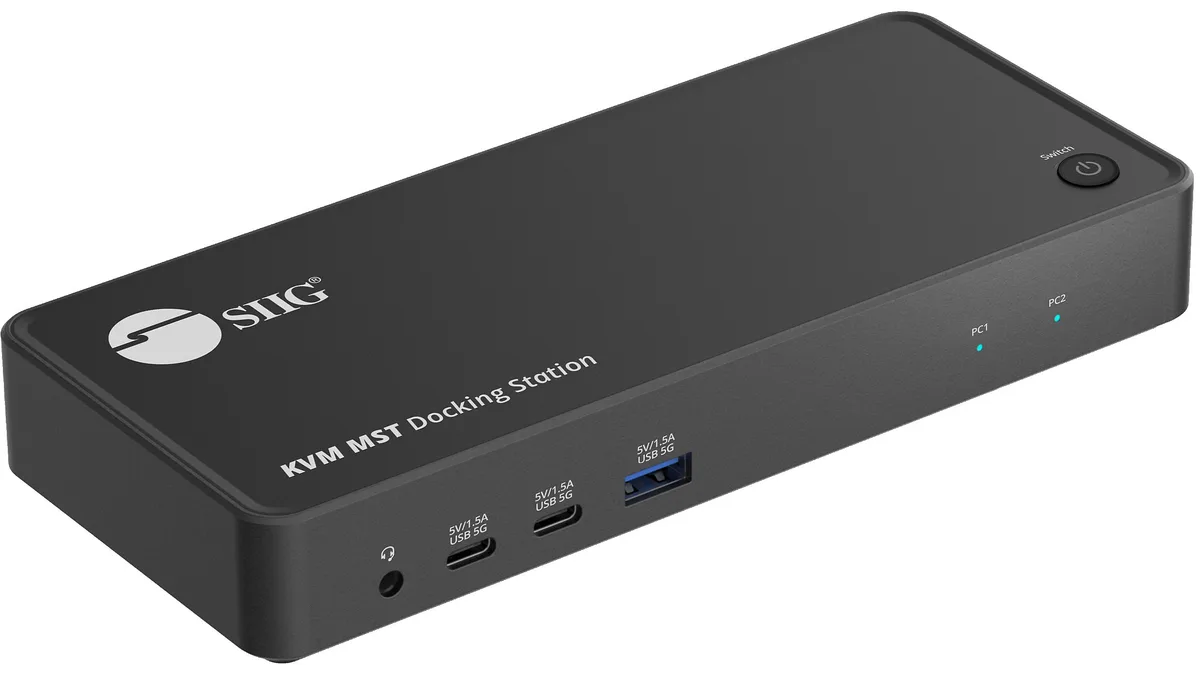
SIIG, Inc CE-DK0111-S1 Dual Host 4K USB-C KVM MST Docking Station
A dual-host KVM dock with MST drives two 4K displays and shares USB, Ethernet and audio between two USB-C laptops
- ColorBlack
- Ports SpecInput: 2x 24-pin, USB-C 3.2 Gen 1, Female (Host) 1x 24-pin,
- Dimension1.10" x 7.28" x 3.11"
- Weight0.55 lb.
- Content1x Dual Host 4K USB-C KVM MST Docking Station with PD 2x USB
- Switch between two hosts with one button
- Drive two 4K displays from a single USB-C link
- Connect wired network and audio without extra adapters
- Charge peripherals at up to 1.5 A per USB port
- Compact 1.10" x 7.28" x 3.11" design fits any desk
Dual-Host 4K KVM Docking Station
The SIIG CE-DK0111-S1 connects two USB-C 3.2 Gen 1 hosts to a single DisplayPort, HDMI and peripheral set. A front-panel button and an included 3.5 mm remote switch let users toggle keyboard, video and mouse control between the two computers. It suits desk setups that share one monitor, wired network and USB accessories across a work and a personal laptop.
Sustained Multi-Display Operation
Both video outputs support MST so a single DisplayPort or HDMI cable can drive two 4K streams from the active host. The dock draws 20 V/6 A from its external adapter and delivers up to 1.5 A on each USB-C and USB-A charging port while the Gigabit Ethernet link remains active. Thermal design is passively cooled inside the 1.10 by 7.28 by 3.11 inch metal enclosure.
Driver-Free Installation
The unit enumerates as standard USB, DisplayPort and Ethernet devices on Windows, macOS and Linux without extra software. Common issues arise when a host USB-C port lacks DisplayPort Alt Mode or cannot supply the required video bandwidth, causing the external monitors to stay dark. The Kensington lock slot secures the dock to the desk.
Highlights
- Switch between two hosts with one button
- Drive two 4K displays from a single USB-C link
- Connect wired network and audio without extra adapters
- Charge peripherals at up to 1.5 A per USB port
- Compact 1.10" x 7.28" x 3.11" design fits any desk
Specifications
| Brand | SIIG |
|---|---|
| Model | CE-DK0111-S1 |
| Color | Black |
| Ports Spec | Input: 2x 24-pin, USB-C 3.2 Gen 1, Female (Host) 1x 24-pin, USB-C PD only, Female (for PC 1) 1x 3.5mm switch (for PC 1 & PC 2 switch) 1x DC power jack, 20V/6A (for PC 2) 1x Power/Switch button Output 1x 20-pin, DisplayPort with MST, Female 1x 19-pin, HDMI with MST, Female 2x 24-pin, USB-C 3.2 Gen 1, 5V/1.5A charging, 5Gbps, Female 1x 9-pin, USB-A 3.2 Gen 1, 5V/1.5A charging, 5Gbps, Female 2x 9-pin, USB-A 3.2 Gen 1, 5Gbps, Female 1x 8-pin, Gigabit Ethernet, RJ45 1x 3.5mm, Headset jack, stereo audio & mic 1x Kensington security lock |
| Dimension | 1.10" x 7.28" x 3.11" |
| Weight | 0.55 lb. |
| Content | 1x Dual Host 4K USB-C KVM MST Docking Station with PD 2x USB-C 3.2 Gen 1 to C cables 1x 3.5mm switch cable 1x Power Adapter, 20V/6A 1x User Reference Guide |
| Shipping weight | 1.11 kg |
| Package size | 250 × 205 × 50 mm |
Questions about this item
How much heat or fan noise does the CE-DK0111-S1 produce when both hosts are connected all day?
The unit has no internal fan and draws power from the included 20V/6A adapter, so it runs silently with only mild warmth during continuous dual-host operation.
Which cables or adapters must I already own to link two laptops to the CE-DK0111-S1?
Two USB-C 3.2 Gen 1 to C cables and a 3.5 mm switch cable are supplied in the box, so no extra host cables are required.
Will my older USB-A 3.0 flash drives and 1080p monitor work through the CE-DK0111-S1 without extra dongles?
Yes, the dock provides two USB-A 3.2 Gen 1 ports and an HDMI output with MST, both backward compatible with USB 3.0 devices and 1080p displays.
Also in this aisle
People compared these
Same shelf, same checkout — eight coins and a 30-minute rate lock.


Kensington
Kensington Desk Mount Cable Anchor K64613WW accessory
- Black
- Provides a secure a…
$19.99
0.0002365BTC
In stock
Panasonic
Panasonic CF-VDR291U laptop cooling pad
- Optical Drive
- Buffer Size: 2 MB B…
$213.99
0.00253171BTC
In stock
eReplacements
eReplacements PB992A-ER laptop battery 14.4V
- Battery
- Lithium-Ion
$65.99
0.00078073BTC
In stock