


Sanyo
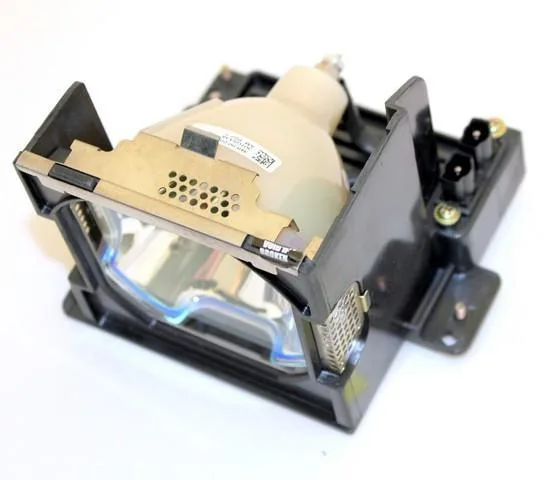
Sanyo POA-LMP99-A DLP Replacement Lamp
Replacement lamp and housing compatible with Sanyo projectors including Cinema-20HD and PLC-XP45L
- TypeProject Lamp
- Weight0.9900
- Ready-to-install lamp and housing module
- Compatible with Sanyo Cinema-20HD, PLC-XP45L and Vivid-LX35
- Replaces original part POA-LMP99 and 003-120061
- Genuine AL Series lamp for reliable brightness
- 90-day warranty on a brand-new unit
Compatible Sanyo projector lamp
The POA-LMP99-A is a new aftermarket lamp-and-housing module built for Sanyo projectors that use the POA-LMP99 lamp code. It suits owners of models such as the Cinema-20HD, LC-X1000L, PLC-XP45L and Vivid-LX35 who need a direct replacement.
Pre-assembled housing for simple installation
The unit arrives as a complete lamp-and-housing assembly, so no separate bulb handling or alignment is required. At .9900 kg it is light enough for one-person replacement, and the housing mates with the projector’s existing latch mechanism for a secure fit.
90-day warranty defines the coverage period
The supplier backs the module with a 90-day warranty, limiting long-term protection to that window. Buyers planning extended heavy use or institutional deployments should factor the shorter coverage into their maintenance budget.
Highlights
- Ready-to-install lamp and housing module
- Compatible with Sanyo Cinema-20HD, PLC-XP45L and Vivid-LX35
- Replaces original part POA-LMP99 and 003-120061
- Genuine AL Series lamp for reliable brightness
- 90-day warranty on a brand-new unit
Specifications
| Brand | Advanced Lamps |
|---|---|
| Model | POA-LMP99-A |
| Part Number | POA-LMP99-A |
| Type | Project Lamp |
| Weight | 0.9900 |
Questions about this item
Which projector models accept the POA-LMP99-A lamp module?
The POA-LMP99-A lamp and housing fits Sanyo models including the 003-120061, Cinema-20HD, LC-X1000L, PLC-XP45L and Vivid-LX35 projectors.
What physical form does the POA-LMP99-A ship in?
It arrives as a complete lamp-and-housing assembly weighing 0.9900 kg, ready to slide into the projector's lamp bay without separate bulb handling.
How is the POA-LMP99-A installed and what step is often missed?
Power off and unplug the projector, let it cool, remove the lamp cover, slide out the old module, insert the new POA-LMP99-A until it seats firmly, replace the cover, then reset the lamp timer in the menu so the projector tracks hours correctly.
Also in this aisle
People compared these
Same shelf, same checkout — eight coins and a 30-minute rate lock.



Parsec Technologies, Inc.
Parsec Technologies, Inc. PRO4A4L15W TV Antenna
$271.99
0.00314953BTC
In stock
SIERRA WIRELESS DATA INC
SIERRA WIRELESS DATA INC 6001363 6-in-1 Dome TV Antenna
$202.99
0.00235054BTC
In stock
NEC Display Solutions
NEC Display Solutions 10 Point Infrared Touch Overlay for C431 OLR431R
$326.99
0.0037864BTC
In stock