


SANOXY
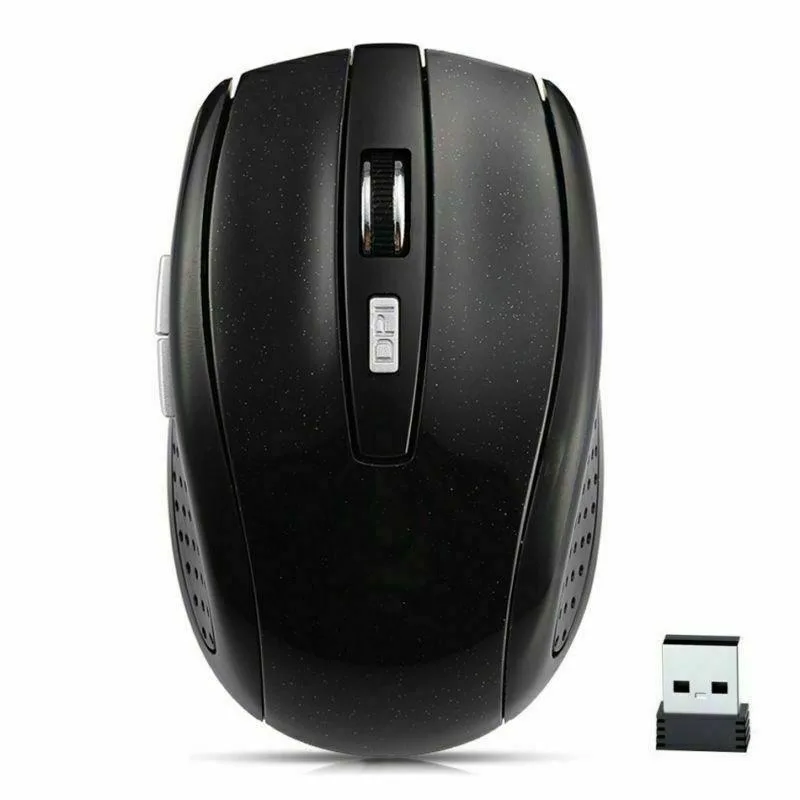
SANOXY 2.4GHz Wireless Optical Mouse Black
A 2.4 GHz wireless optical mouse with three selectable DPI levels up to 1600 and a 10 m range
- ColorBlack
- Wireless freedom up to 10 metres range
- Adjustable precision with 800-1200-1600 DPI settings
- Compact ergonomic design measuring 100x60x36 mm
- Plug-and-play simplicity via 2.4 GHz USB receiver
- Three-button layout for essential navigation control
What the product is and who it is for
The SANOXY wireless optical mouse uses 2.4GHz radio to connect a desktop PC or laptop without cables. Three selectable DPI steps of 800 1200 and 1600 suit everyday office work and casual browsing. It runs on two AAA batteries which are not included.
Practical limits of the 2.4GHz interface
The link is rated for up to 10 metres of clear line of sight. Obstructions or other 2.4GHz devices can shorten the reliable range. The tiny USB receiver stores inside the mouse base so it stays with the unit during transport.
The specification that decides fit
The body measures 100 by 60 by 36 millimetres and has three buttons plus a scroll wheel. Buyers who need more buttons programmable macros or a different hand size should look elsewhere.
Highlights
- Wireless freedom up to 10 metres range
- Adjustable precision with 800-1200-1600 DPI settings
- Compact ergonomic design measuring 100x60x36 mm
- Plug-and-play simplicity via 2.4 GHz USB receiver
- Three-button layout for essential navigation control
Specifications
| Brand | SANOXY |
|---|---|
| Color | Black |
Questions about this item
Which DPI setting should I pick — 800, 1200 or 1600?
Start at 1200 DPI for everyday office work; drop to 800 DPI if you need finer control for detail tasks, or raise to 1600 DPI when you want the cursor to cross the screen with less hand travel.
What does the 1600 DPI top setting actually give me in daily use?
At 1600 DPI the pointer moves farther for each millimetre of hand motion, letting you navigate large displays or multi-monitor setups with shorter strokes while the optical sensor keeps tracking smooth.
How far can I sit from the PC with the 2.4 GHz USB receiver?
The 2.4 GHz link is rated for up to 10 metres line of sight; in practice walls or other wireless devices may reduce that, so keep the receiver in a front USB port for the most reliable range.
Also in this aisle
People compared these
Same shelf, same checkout — eight coins and a 30-minute rate lock.


Lenovo
Lenovo 42T3273 Black Replacement Keyboard for ThinkPad T60 T61
- Thinkpad T60 T61 Ke…
- Black
$29.99
0.00034576BTC
In stock