American Solutions Inc.
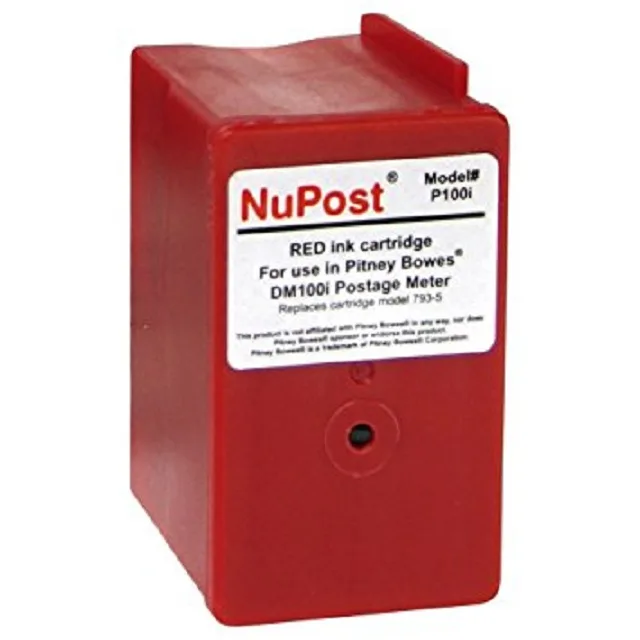
American Solutions Inc. 793-5 Red Ink Cartridge 3000 Pages
- 1
- Red
$25.99
0.00030213BTC
In stockWe take cryptocurrency — so the coins you hold can buy real hardware.Pay in crypto, spend it on real hardware. Free insured shipping worldwide over $399. Plain, unbranded boxes, sent from Germany.Free insured shipping over $399. Your rate is locked for 30 minutes once checkout opens.Rate locked 30 minutes. Every item sealed, serial-checked and covered by a 24-month warranty.Sealed, 24-month warranty.


Ricoh
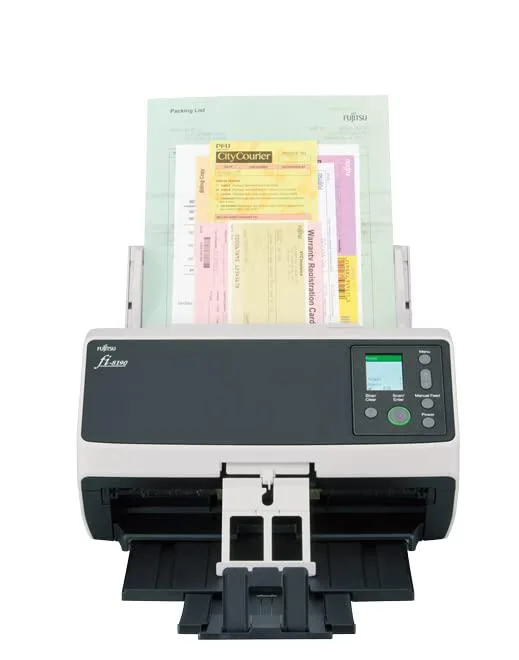
Duplex document scanner with 100-sheet ADF, 90 ppm simplex and 180 ipm duplex at 600 dpi optical resolution
The Ricoh fi-8190 PA03810-B005 handles up to 90 pages per minute in simplex and 180 images per minute in duplex at 200 or 300 dpi. Its dual CIS sensors and RGB LED illumination capture both sides of a document in a single pass. A 100-sheet automatic document feeder accepts pages up to 8.5 by 14 inches. USB 3.2 Gen1 and gigabit Ethernet provide flexible connectivity.
Upgrading from a simplex-only device or one rated well below 90 ppm removes the need to re-feed pages for two-sided capture. The jump is worthwhile when daily batches regularly exceed the feeder capacity of an older unit or when duplex throughput becomes a bottleneck. Eco mode drops operating draw to 17 watts, and sleep power stays at 2 watts or less over LAN.
Departments that process contracts, invoices or legal pages up to 8.5 by 14 inches benefit from the large-format feeder and straight-through paper path. Buyers needing higher optical resolution than 600 dpi or a larger feeder capacity should evaluate other models. The scanner supports Windows, macOS and Ubuntu without requiring a dedicated server.
| Brand | Ricoh |
|---|---|
| Series | fi-8190 |
| Model | PA03810-B005 |
| Type | ADF (Automatic Document Feeder) / Manual Feed, Duplex |
| Element Type | CIS x 2 (front x 1, back x 1) |
| Light Source | RGB LED x 2 (front x 1, back x 1) |
| Scanning Speed | Simplex: 90 ppm (200/300 dpi) Duplex: 180 ipm (200/300 dpi) |
| Optical Resolution | 600 dpi |
| Max. Document Size | 8.5" x 14" |
| Automatic Document Feeder (ADF) | Yes |
| ADF Capacity | 100 sheets (A4 80 g/m2 or Letter 20 lb) |
| USB Ports | USB 3.2 Gen1x1 / USB 2.0 / USB 1.1 |
| Other Ports | Ethernet: 10BASE-T, 100BASE-TX, 1000BASE-T |
| Power Requirements | AC 100 - 240V, 50 / 60 Hz |
| Power Consumption | Operating Mode: 30 W or less / 17 W (Eco mode) Sleep Mode: LAN: 2.0 W or less; USB: 1.4 W or less Auto Standby (Off) Mode: 0.2 W or less |
| Operating Systems Supported | Windows 11*16, Windows 10*16, Windows 8.1, Windows 7, Windows Server 2022, Windows Server 2019, Windows Server 2016, Windows Server 2012 R2, Windows Server 2012, Windows Server 2008 R2, macOS, Linux (Ubuntu) |
| Dimensions | 11.80" x 6.70" x 6.40" |
| Weight | 8.80 lbs. |
| Package Contents | Included Items: ADF paper chute, AC cable, AC adapter, USB cable, Setup DVD-ROM |
| Shipping weight | 4.08 kg |
| Package size | 330 × 203 × 203 mm |
The unit measures 11.80" deep by 6.70" wide by 6.40" high and weighs 8.80 lbs, so allow at least that footprint plus cable clearance behind it.
Install the driver from the Setup DVD-ROM or the manufacturer site before plugging in the USB cable; the scanner will not be recognised on Windows 11, Windows 10, macOS or Linux (Ubuntu) without it.
Clean the front and back CIS glass and LED arrays whenever streak lines appear or after every 100-sheet batch of 80 g/m2 paper to maintain the 600 dpi optical resolution.
Also in this aisle
Same shelf, same checkout — eight coins and a 30-minute rate lock.
What you pay in, and what you read prices in.
Sent from your wallet at checkout
Display only — the catalogue is priced in USD
No currency matches that.
Pick the language the site speaks to you in.
No language matches that.
New here?
Already have one?
There is no automatic reset: this shop sends no mail, so there is no one-time link to ask for. Leave the address on the account and it gets picked up by hand.
Request noted
Nothing is on its way to your inbox — this shop sends no mail at all. Someone picks these up by hand.
Remembered it?