microMICR Corporation
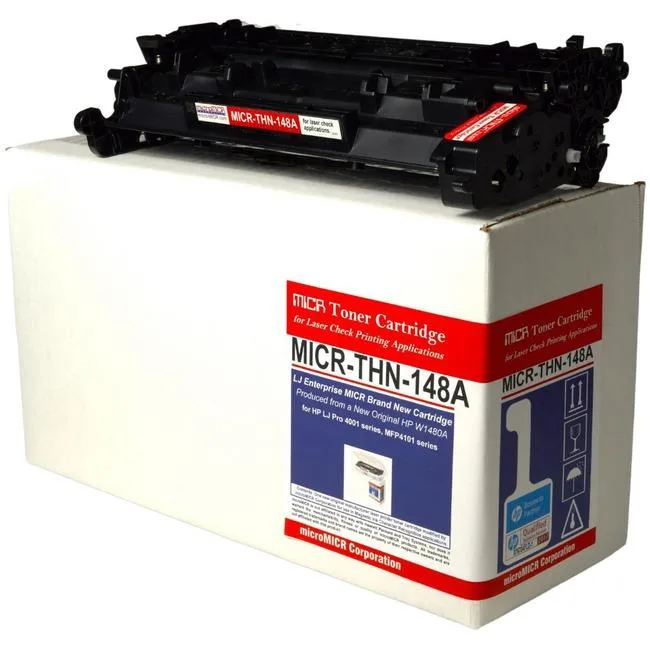
microMICR High Yield MICR Toner Cartridge 9500 Pages Black W1480A
$258.99
0.00303129BTC
In stockWe take cryptocurrency — so the coins you hold can buy real hardware.Pay in crypto, spend it on real hardware. Free insured shipping worldwide over $399. Plain, unbranded boxes, sent from Germany.Free insured shipping over $399. Your rate is locked for 30 minutes once checkout opens.Rate locked 30 minutes. Every item sealed, serial-checked and covered by a 24-month warranty.Sealed, 24-month warranty.


QOMO
13 MP 4K document camera with extendable arm for textbooks and small objects, connects via HDMI or USB
The QOMO QPC100S is a 13-megapixel document camera that captures 4K video and still images. Its extendable arm provides flexible positioning for textbooks, documents and small objects. The unit connects directly to displays or computers using HDMI or USB.
This camera suits users who want a single device for live demos, lesson recording and video conferencing without a separate webcam. Buyers who require automatic document feeding, high-speed batch scanning or a flatbed glass surface should look at dedicated scanners instead.
The QPC100S offers both HDMI and USB interfaces so you can send 4K footage straight to a projector or into conferencing software on a computer. Choose the connection that matches your room setup and recording workflow.
| Brand | Qomo |
|---|---|
| Type | Camera |
| Shipping weight | 2.27 kg |
| Package size | 279 × 153 × 132 mm |
The 13MP sensor captures 4K video and photos, and the extendable arm provides flexible positioning to frame documents or objects at various distances.
The unit operates silently with no moving parts, drawing power only through the connected HDMI or USB cable for cool, quiet all-day sessions.
You need an available HDMI input on a monitor or projector, or a free USB port on a computer, plus the matching cable for the chosen connection.
Also in this aisle
Same shelf, same checkout — eight coins and a 30-minute rate lock.
What you pay in, and what you read prices in.
Sent from your wallet at checkout
Display only — the catalogue is priced in USD
No currency matches that.
Pick the language the site speaks to you in.
No language matches that.
New here?
Already have one?
There is no automatic reset: this shop sends no mail, so there is no one-time link to ask for. Leave the address on the account and it gets picked up by hand.
Request noted
Nothing is on its way to your inbox — this shop sends no mail at all. Someone picks these up by hand.
Remembered it?