


QGeeM
QGeeM 10-in-1 Thunderbolt Docking Station Grey
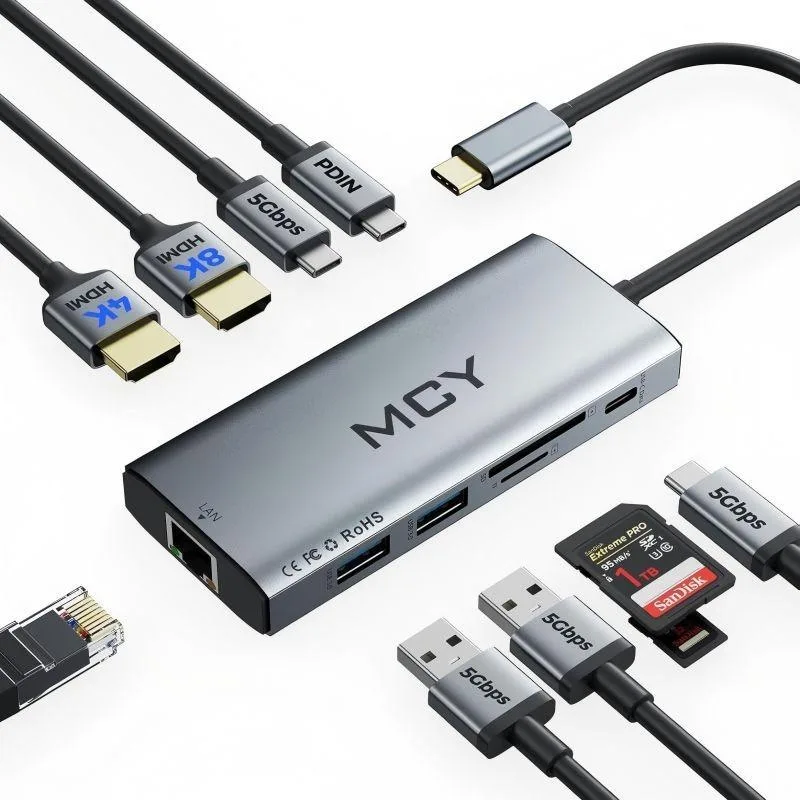
A 10-in-1 Thunderbolt dock delivering single 8K at 30 Hz or dual 4K at 60 Hz, 100 W charging, gigabit Ethernet and SD/TF card slots
- ColorGrey
- Thunderbolt 3Yes
- Single 8K at 30 Hz or dual 4K at 60 Hz for expansive multi-monitor work
- 100 W Power Delivery keeps your laptop charged while every port stays active
- Gigabit Ethernet plus SD and TF card slots up to 512 GB for wired speed and media access
- Two USB-A 3.0 and two USB-C data ports at 5 Gbps move large files in seconds
- Thunderbolt 3 host support gives plug-and-play compatibility with MacBook, Windows and Chrome devices
10-in-1 Thunderbolt Dock
This QGeeM docking station adds ten connections through one USB-C port. It suits professionals who need multiple displays, wired networking, card access and laptop charging from a single compact hub.
Dual 4K or single 8K upgrade
The dock drives one 8K screen at 30 Hz or two 4K screens at 60 Hz, replacing basic adapters that only handle one 1080p output. The jump is worth it when your workflow demands extended desktop space or higher resolution, provided the host supports DisplayPort 1.4 for 8K; Mac systems are limited to 4K and some Windows DP 1.2/1.4 devices mirror only at 1080p or 1440p.
Compatibility and power check
Verify your laptop has a Thunderbolt 3 or 4 USB-C port that supports video output and power delivery up to 100 W. Confirm the operating system can handle dual-mirror or extend modes at the stated resolutions. Ensure SD or TF cards do not exceed 512 GB and that simultaneous card reading is not required.
Highlights
- Single 8K at 30 Hz or dual 4K at 60 Hz for expansive multi-monitor work
- 100 W Power Delivery keeps your laptop charged while every port stays active
- Gigabit Ethernet plus SD and TF card slots up to 512 GB for wired speed and media access
- Two USB-A 3.0 and two USB-C data ports at 5 Gbps move large files in seconds
- Thunderbolt 3 host support gives plug-and-play compatibility with MacBook, Windows and Chrome devices
Specifications
| Brand | MCY |
|---|---|
| Part Number | 10 |
| Color | Grey |
| Thunderbolt 3 | Yes |
Questions about this item
What laptop port does the grey Thunderbolt dock need for its single-cable connection?
It connects through one Thunderbolt 3 or Thunderbolt 4 USB-C port on the host computer.
Which driver step is required before the dual 4K 60 Hz monitors appear in Windows display settings?
Install the host GPU driver that supports DisplayPort 1.4; DP 1.2 systems may limit mirror mode to 1080p or 1440p at 60 Hz.
When the SD and microSD slots stop reading cards above 512 GB, what should be checked first?
Verify each card is 512 GB or smaller and insert only one card at a time, as the reader does not support simultaneous access.
Also in this aisle
People compared these
Same shelf, same checkout — eight coins and a 30-minute rate lock.


Kensington
Kensington Desk Mount Cable Anchor K64613WW accessory
- Black
- Provides a secure a…
$19.99
0.00023121BTC
In stock
Panasonic
Panasonic CF-VDR291U laptop cooling pad
- Optical Drive
- Buffer Size: 2 MB B…
$213.99
0.00247502BTC
In stock
eReplacements
eReplacements PB992A-ER laptop battery 14.4V
- Battery
- Lithium-Ion
$65.99
0.00076324BTC
In stock