Produplicator
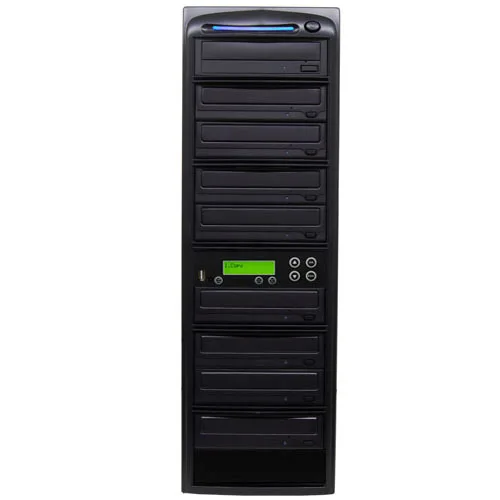
Produplicator DVDUSB04SATA20X 1-to-4 CD DVD Duplicator
- USB to CD/DVD Dupli…
- 1 to 4
$748.99
0.00877274BTC
In stockWe take cryptocurrency — so the coins you hold can buy real hardware.Pay in crypto, spend it on real hardware. Free insured shipping worldwide over $399. Plain, unbranded boxes, sent from Germany.Free insured shipping over $399. Your rate is locked for 30 minutes once checkout opens.Rate locked 30 minutes. Every item sealed, serial-checked and covered by a 24-month warranty.Sealed, 24-month warranty.

Produplicator
Copies USB flash drives or optical discs to two Blu-ray, DVD or CD targets at up to 48× CD and 16× DVD speeds with 128 MB buffer
The Produplicator PUSBR02 copies data from a single USB flash drive to one or two blank CDs, DVDs or Blu-ray discs without a computer. It also duplicates optical discs directly. A 128 MB buffer and SATA controller handle the transfer. The LCD screen and simple buttons guide the process.
This unit replaces software-driven burning on a desktop. The jump is worth it when you need unattended, repeatable copies without tying up a workstation. Automatic format detection removes the manual setup step. Copy-protected or encrypted retail discs cannot be duplicated.
The duplicator accepts USB 1.1, 2.0 and 3.0 drives as sources and writes to CD-R, CD-RW, DVD±R, DVD±RW, DVD±R DL, DVD-RAM and BD-R media. It operates standalone, so it only needs a power outlet and blank discs. No host system, driver or cooling downtime is required.
| Brand | Produplicator |
|---|---|
| Model | PUSBR02 |
| Type | USB to CD/DVD/BD Duplicator |
| Target | 1 to 2 |
| Buffer Memory | 128MB |
| Supported Media | USB Drive: USB 1.1, USB 2.0, USB 3.0 Optical Disc: DVD-ROM, DVD-Video, DVD+R, DVD+RW, DVD-R, DVD-RW, BD-R, Dual Layer DVD±R, CD-ROM, CD-I, Audio CD, Video CD, Bootable CD, Mixed-mode CD, Multi-session CD, CD-Plus, Business Card CD, 3"" Mini CD- R, Standard CD-R/RW |
| ROM_CD-ROM | 48X |
| ROM_DVD-ROM | 16X |
| Burner_CD-ROM | 48X |
| Burner_DVD-ROM | 16X |
| CD-R | 48X |
| CD-RW | 32X |
| DVD-R | 24X |
| DVD-RW | 8X |
| DVD+R DL | 12X |
| DVD-R DL | 12X |
| DVD-RAM | 12X |
| Language Support | English, Japanese, Spanish, Portuguese |
| Display | LCD Screen |
| Operating Type | Standalone |
| Connector | SATA |
| Panel Color | Black |
| Load Type | Slot |
| Features | Duplicates Audio CD, Video CD or DVD Video, and virtually any data disc in a matter of minutes without a computer. Backup multiple small capacity USB drives into one CD or DVD. Automatically distributes files to multiple target discs when copying a memory card with more data than one disc can hold. |
| Power Supply | AC: 115/230 V, 50/60 Hz, 250 W |
| Package Contents | see pictures for details |
Other versions of this model
Same family, different memory, cooler or clock — compare before you commit.
The unit is a standalone tower that requires a power outlet and a flat surface; it accepts one USB flash drive at its front port and holds up to two optical discs in its internal burners.
Insert the source USB drive, load blank discs, then press the single USB Copy button; the step often missed is waiting for the LCD to show the source is recognised before loading the target discs.
The two SATA optical drives are the only moving parts; their laser pickups and tray mechanisms wear over time and are the components most likely to require replacement.
New to this? Paying with USDT: TRC-20 or ERC-20 — what to check, what it costs to pay, and what is never asked for.
Also in this aisle
Same shelf, same checkout — eight coins and a 30-minute rate lock.
What you pay in, and what you read prices in.
Sent from your wallet at checkout
Display only — the catalogue is priced in USD
No currency matches that.
Pick the language the site speaks to you in.
No language matches that.
New here?
Already have one?
There is no automatic reset: this shop sends no mail, so there is no one-time link to ask for. Leave the address on the account and it gets picked up by hand.
Request noted
Nothing is on its way to your inbox — this shop sends no mail at all. Someone picks these up by hand.
Remembered it?