


Perixx
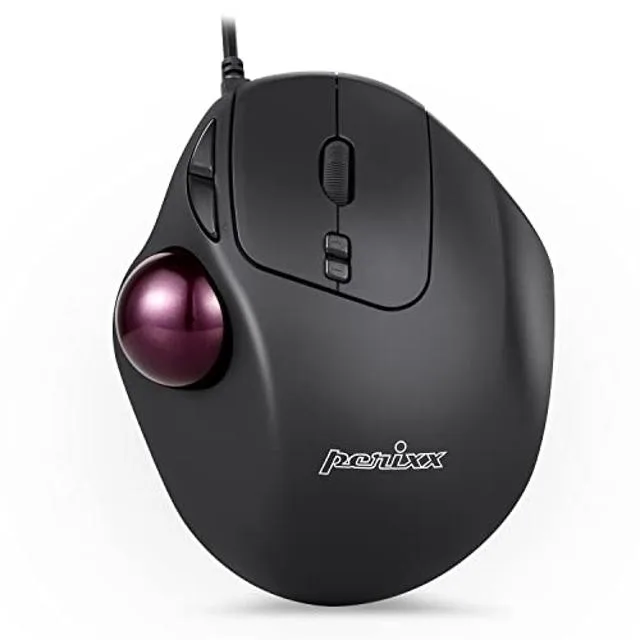
Perixx Perimice-517 Wired Trackball Mouse 34mm 7 Button
Right-handed ergonomic trackball mouse with a 34 mm ball, seven programmable buttons and selectable 400, 1000, 1600 or 2000 DPI for precise, low-strain control
- Ergonomic shape reduces wrist strain during long sessions
- 34 mm trackball lets you navigate without moving your arm
- Seven programmable buttons give full control at your fingertips
- Three DPI levels (400, 1000, 1600, 2000) match cursor speed to any task
- Removable ball makes cleaning quick and hassle-free
Right-Handed Ergonomic Trackball
The Perixx Perimice-517 is a wired trackball mouse built for right-handed users who spend long hours at a computer. A 34 mm trackball sits under the thumb so the cursor moves without shifting the whole arm. Seven programmable buttons include left, right, forward, backward and two DPI switches. A laser sensor delivers three fixed resolutions of 400, 1000 and 1600 dpi. Silent clicks reduce noise in shared spaces. The sculpted shape supports the palm and wrist to help lower strain during extended sessions.
Suits Desk-Bound Users With Limited Space
Office workers, gamers and anyone managing repetitive strain injuries benefit from the stationary design that keeps the forearm still. The compact footprint of 130 x 107 x 45 mm fits tight desks and eliminates the need for a mouse pad. Buyers who prefer a traditional sliding mouse or need left-handed ergonomics should look elsewhere. The fixed DPI steps and lack of software customisation also limit appeal for users who want per-game sensitivity profiles or macro programming.
34 mm Thumb Trackball With Three Fixed DPI Steps
The 34 mm ball diameter and laser sensor combine to give precise control across 400, 1000 and 1600 dpi settings changed by dedicated buttons. This specification decides whether the device matches a workflow that values stationary operation and discrete speed tiers over free-gliding movement or on-the-fly sensitivity adjustment.
Highlights
- Ergonomic shape reduces wrist strain during long sessions
- 34 mm trackball lets you navigate without moving your arm
- Seven programmable buttons give full control at your fingertips
- Three DPI levels (400, 1000, 1600, 2000) match cursor speed to any task
- Removable ball makes cleaning quick and hassle-free
Specifications
No published specifications for this item yet.
Questions about this item
How do I install the Perimice-517 and what is the common mistake?
Connect the USB cable to a Windows PC; the mouse works without extra drivers. The step users miss is placing the 34 mm trackball into its socket before first use.
What maintenance will the Perimice-517 need later?
Remove the 34 mm ball whenever dust affects tracking, wipe the ball and the three support bearings, then snap the ball back in. No lubrication or spare parts are required.
What limit appears first during sustained use of the Perimice-517?
The laser sensor tops out at 2000 DPI, so cursor speed cannot exceed that setting even if you switch DPI repeatedly during long sessions.
Also in this aisle
People compared these
Same shelf, same checkout — eight coins and a 30-minute rate lock.


Lenovo
Lenovo 42T3273 Black Replacement Keyboard for ThinkPad T60 T61
- Thinkpad T60 T61 Ke…
- Black
$29.99
0.00034845BTC
In stock