
Panasonic
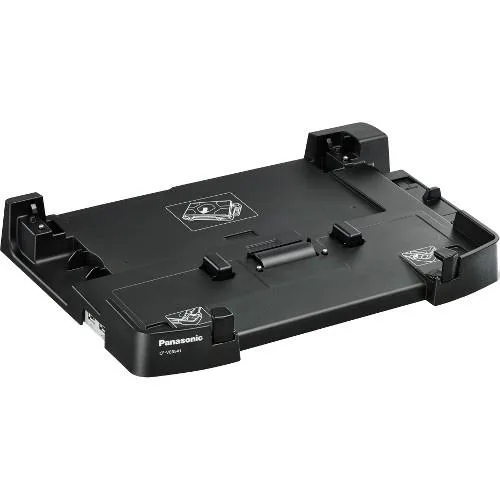
Panasonic CF-VEB541AU Desktop Dock for Toughbook CF-54
A desktop dock providing a proprietary connection for the Toughbook CF-54 notebook
- CompatibilityPanasonic Toughbook CF-54 Notebook
- FeaturesHost Interface:Proprietary Interface Connectivity Technology
- Single-cable desk setup via proprietary docking interface
- Purpose-built for Toughbook CF-54 notebook compatibility
- New Panasonic desktop dock model CF-VEB541AU
- Reliable connectivity through dedicated docking technology
- First listed by manufacturer in 2018
Dedicated Dock for CF-54
The Panasonic CF-VEB541AU is a desktop docking station built specifically for the Toughbook CF-54 notebook. It uses a proprietary host interface to connect the laptop, providing a fixed desk-side connection point for the rugged device. This unit is intended for users who keep a CF-54 at a permanent workstation.
CF-54 Owners Only
This dock suits owners of the Panasonic Toughbook CF-54 who want a simple desk docking solution. It will not fit any other laptop model, so buyers with different hardware should look elsewhere. The proprietary interface also means it cannot serve as a universal hub for mixed device fleets.
Proprietary Host Interface
The single specification that decides fit is the proprietary host interface, which only matches the CF-54 chassis. If your notebook is not a CF-54, this dock will not connect. No other interface or adapter is supported by this unit.
Highlights
- Single-cable desk setup via proprietary docking interface
- Purpose-built for Toughbook CF-54 notebook compatibility
- New Panasonic desktop dock model CF-VEB541AU
- Reliable connectivity through dedicated docking technology
- First listed by manufacturer in 2018
Specifications
| Brand | Panasonic |
|---|---|
| Model | CF-VEB541AU |
| Compatibility | Panasonic Toughbook CF-54 Notebook |
| Features | Host Interface:Proprietary Interface Connectivity Technology:Docking Device Supported:Notebook |
Questions about this item
How can I confirm the CF-VEB541AU dock is working correctly after connecting my Toughbook CF-54?
Insert the CF-54 into the proprietary docking connector; the notebook should immediately recognise the dock and any attached peripherals without additional driver installation.
What comes with the CF-VEB541AU desktop dock and what must I purchase separately?
The package includes the dock unit and its power adapter; cables for external monitors, USB devices or network connections are not included and must be sourced separately.
Which version of the Panasonic desktop dock matches my CF-54 model?
The CF-VEB541AU is built exclusively for the Panasonic Toughbook CF-54 notebook; no other capacity or variant is offered for this docking station.
Also in this aisle
People compared these
Same shelf, same checkout — eight coins and a 30-minute rate lock.


Kensington
Kensington Desk Mount Cable Anchor K64613WW accessory
- Black
- Provides a secure a…
$19.99
0.00023811BTC
In stock
Panasonic
Panasonic CF-VDR291U laptop cooling pad
- Optical Drive
- Buffer Size: 2 MB B…
$213.99
0.00254896BTC
In stock
eReplacements
eReplacements PB992A-ER laptop battery 14.4V
- Battery
- Lithium-Ion
$65.99
0.00078604BTC
In stock